
What’s New in ActivePresenter 10.6: Branching Scenario, Smart Studio, Local AI, and More Powerful eLearning
Creating effective eLearning content is about more than adding slides, recording a screen, or building a quiz. As learning experiences become more interactive, personalized, and media-rich, content creators need tools that make complex authoring workflows easier without limiting creative control.
That’s where ActivePresenter 10.6 eLearning authoring software does.
This update introduces several major improvements designed to help you build more engaging learning experiences, create polished screen recordings, work with AI directly on your computer, and develop more sophisticated interactions and assessments.
From the new Scenario Editor for visually designing branching learning paths to Smart Studio for automatically enhancing screen recordings, ActivePresenter 10.6 focuses on making content creation more powerful while keeping the authoring process efficient.
Here’s a closer look at what’s new.
1. Branching Scenario: Design Interactive Learning Paths Visually
Modern eLearning isn’t always linear.
Instead of presenting the same sequence of slides to every learner, you may want learners to make decisions, respond to situations, and follow different paths based on their choices. This is especially useful for compliance training, customer service training, leadership development, software training, and other scenario-based learning.
ActivePresenter 10.6 makes these experiences easier to design with the new Scenario Editor.
Build branching scenarios with a visual graph
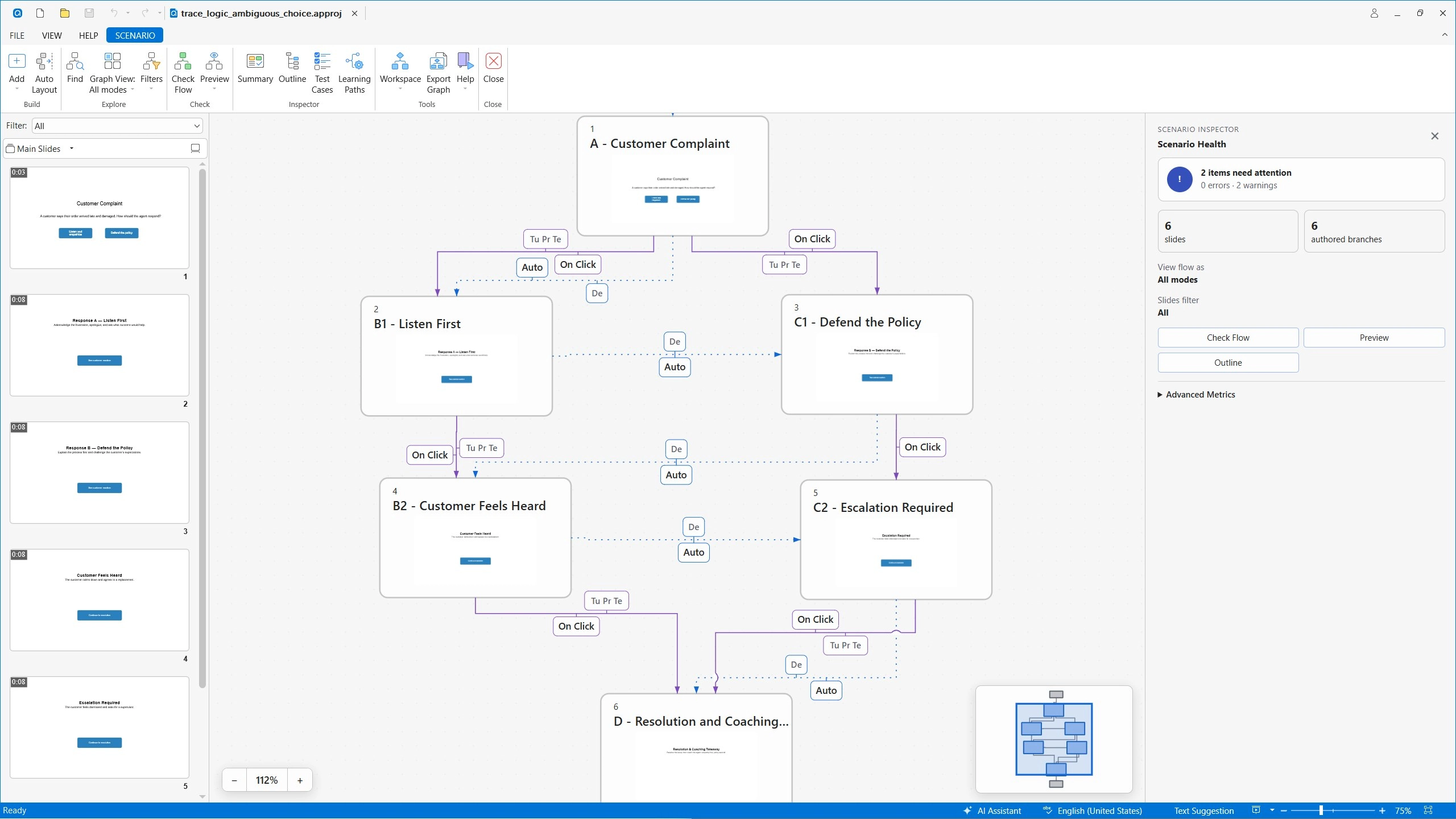
The Scenario Editor provides a visual graph that lets you create, review, validate, simulate, and export branching scenarios and learning paths.
Rather than managing complex branching logic entirely through individual slides and actions, you can view the overall structure of your scenario in one place.
For example, you could create a customer service simulation where a learner starts with a customer complaint and chooses how to respond.
One decision might lead to:
Customer complaint → Response A → Positive outcome
while another might lead to:
Customer complaint → Response B → Escalation → Resolution
This visual approach makes it easier to understand how different choices connect and where each learning path leads.
Review and validate your learning paths
As branching scenarios become more complex, it can be difficult to keep track of every possible route.
The Scenario Editor helps authors review the structure of their scenarios and identify potential issues before publishing. You can also simulate scenarios to understand how learners will move through different paths.
This is particularly useful when creating decision-based training where learner choices need to lead to specific outcomes.
Create more realistic decision-based learning
Branching scenarios can turn passive content into active learning.
Instead of simply asking learners to remember information, you can place them in realistic situations and ask them to decide what to do next.
With ActivePresenter 10.6, you have a more visual way to design those experiences and organize complex learning paths.
2. Smart Studio: Create Better Screen Recordings Automatically
Screen recording is one of ActivePresenter’s core capabilities, and version 10.6 introduces Smart Studio, designed to make full-motion recordings more polished with less manual editing.
Instead of spending tons of time manually adding zoom effects, adjusting cursor movement, or creating presentation layouts, Smart Studio can automatically enhance your recordings with professional visual elements.
Automatic zoom for better focus
Long screen recordings can be difficult to follow when everything on the screen remains at the same scale.
Smart Studio adds automatic zoom to help emphasize important areas of the screen. This can make software demonstrations, tutorials, and product walkthroughs easier to follow.
For example, when demonstrating a specific button or menu, the recording can automatically focus attention on the relevant area rather than leaving viewers to search the entire screen.
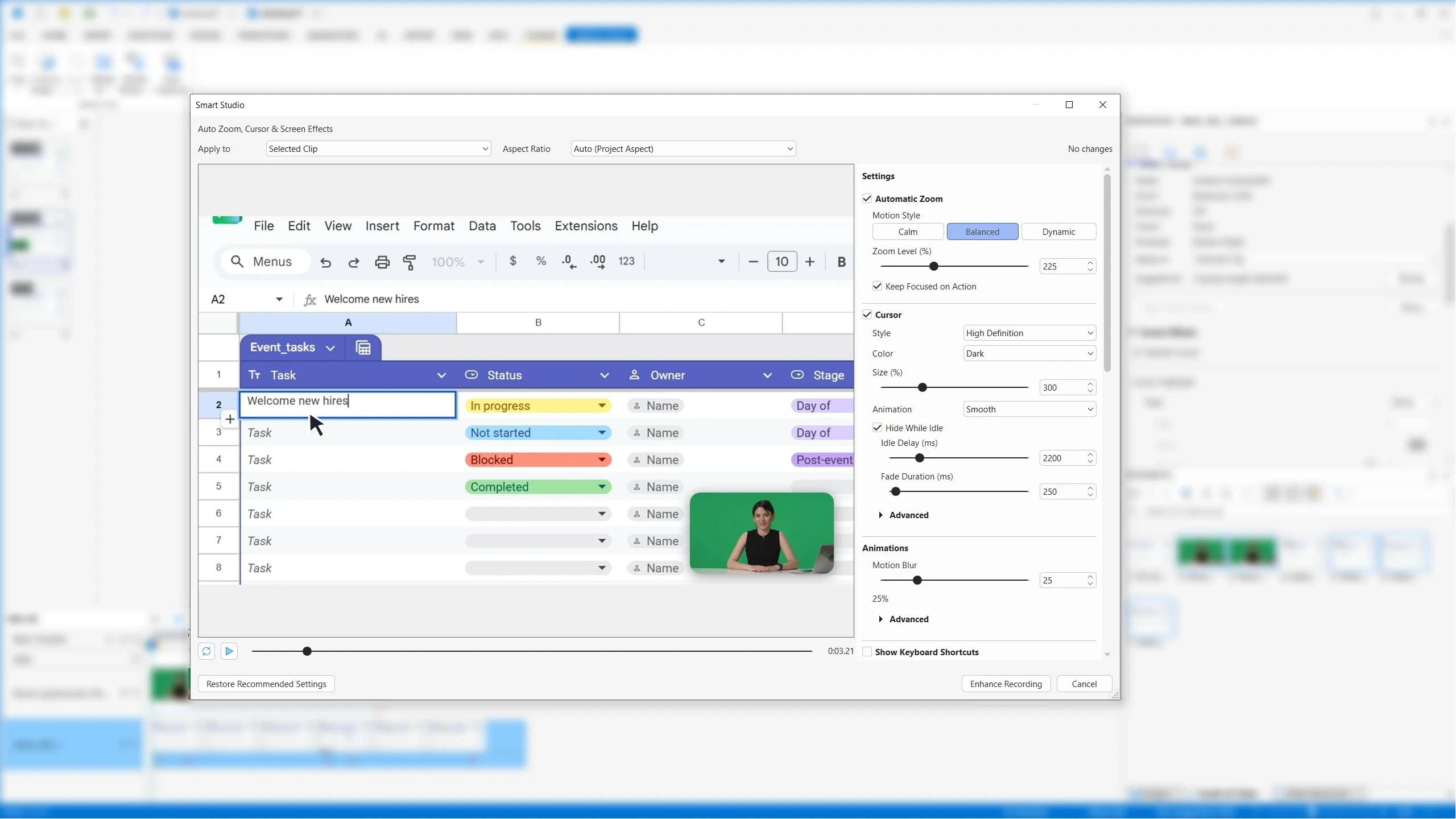
Smooth cursor movement
Cursor movement is another small detail that can have a major impact on the viewing experience.
Smart Studio enhances cursor movement to make screen recordings feel smoother and more intentional. This is particularly useful for software tutorials where viewers need to follow exactly where the presenter is clicking.
High-definition cursors with background
Smart Studio also improves cursor presentation with high-definition cursors, helping the pointer remain clear and visible throughout the recording. You can also adjust background for more dynamic and visual attraction to your recordings. This is especially valuable when recording at high resolutions or demonstrating detailed software interfaces.
Keyboard shortcut overlays
When creating software tutorials, simply showing what happens on screen isn’t always enough.
Keyboard shortcuts can help learners understand how an action was performed. Smart Studio can display keyboard shortcut overlays so viewers can see the keys being pressed during the recording.
This makes software training and productivity tutorials more informative without requiring the author to manually add every shortcut afterward.
3. Local AI & More Processing on Your Video Recordings
AI is becoming an increasingly important part of content creation, but not every AI-powered workflow needs to rely on cloud services.
ActivePresenter 10.6 introduces local processing capabilities that can help authors analyze and work with media directly on their computers.
This includes Local Speech-to-Text (Auto Captions) & Local Media Analysis, and Text-to-speech generation.
Local Speech-to-Text (Auto Captions)
With Local Speech-to-Text, ActivePresenter can transcribe media directly on your computer without sending the audio to a cloud service.
The key difference is where the AI processing happens.
With a cloud-based AI workflow, audio is typically uploaded to a remote service, processed by an AI model on the server, and then returned as text.
So conceptually:
Cloud AI:
Audio → Internet → AI server → Transcript → Computer
Local AI:
Audio → AI model on your computer → Transcript
Since the model runs on the user’s computer, there will be no cloud AI request and no AI credits consumed.
In other words, the transcription process doesn’t depend on sending the audio to an online AI service for inference.
This can be particularly useful when working with recordings that contain sensitive training content, internal company information, or other material that users may prefer not to send to a third-party cloud service.
Batch Options to Generate Text-to-Speech Audio
ActivePresenter 10.6 also makes text-to-speech (TTS) generation more flexible. You can generate TTS audio for multiple text objects across a project in a single click.
This can be useful when creating narration for slides, instructional content, software tutorials, or localized versions of a course.
Instead of recording narration separately for every text element, authors can generate all audio directly from the text objects within the selected slides from the project.
Green Screen Effect
Create a more immersive webcam, spokesperson video with the improved Green Screen (Chroma Key) effect. You can remove a solid-color video background with greater accuracy while keeping edges smooth and natural.
You simply pick a background color directly from your video, then adjust Strength to control how much of the selected color is removed and Edge Softness to refine the transition around your subject. This makes it easy to place presenters or webcam footage into a cleaner, more polished visual environment.
4. Smarter Interactions & Assessments
Assessment is an essential part of eLearning, but effective assessment often requires more than traditional multiple-choice questions.
ActivePresenter 10.6 expands the possibilities for creating flexible questions, validating learner responses, and building more sophisticated interaction logic.
Flexible Fill-in-the-Blank Questions
Fill-in-the-Blank questions now support several types of inline blanks:
- Text Entry
- Dropdown
- Drag-and-Drop
- Numeric answers
- Multiple accepted answers
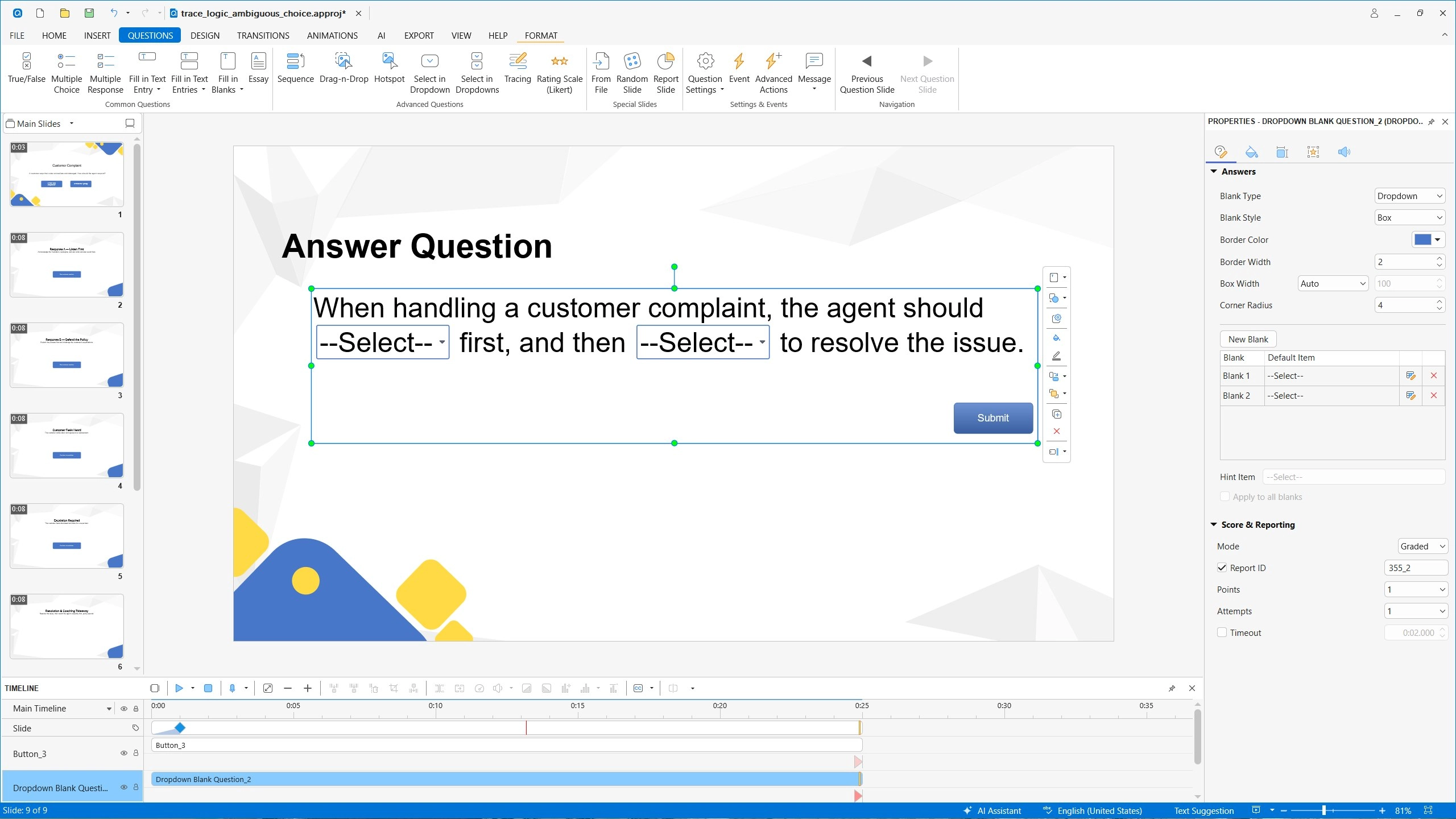
This gives authors more control over how learners provide their answers.
For example, instead of requiring learners to type every answer manually, you could combine a text entry field with a dropdown or drag-and-drop blank within the same question. Multiple accepted answers are particularly useful when a question has more than one valid way to express the same concept.
More Option for Text Entry Questions
Text Entry objects now support both Text and Numeric answer types.
Numeric input validation and comparison rules provide greater control over how learner responses are evaluated.
This is useful for subjects involving calculations, measurements, percentages, scores, dates, or other numerical responses.
Conditional Actions
ActivePresenter 10.6 also expands interaction logic with more powerful conditional actions.
Authors can now create:
- IF/THEN/ELSE logic
- Ordered actions
- Nested All/Any condition groups
This makes it possible to create more sophisticated interactions without having to rely on simple one-condition actions.
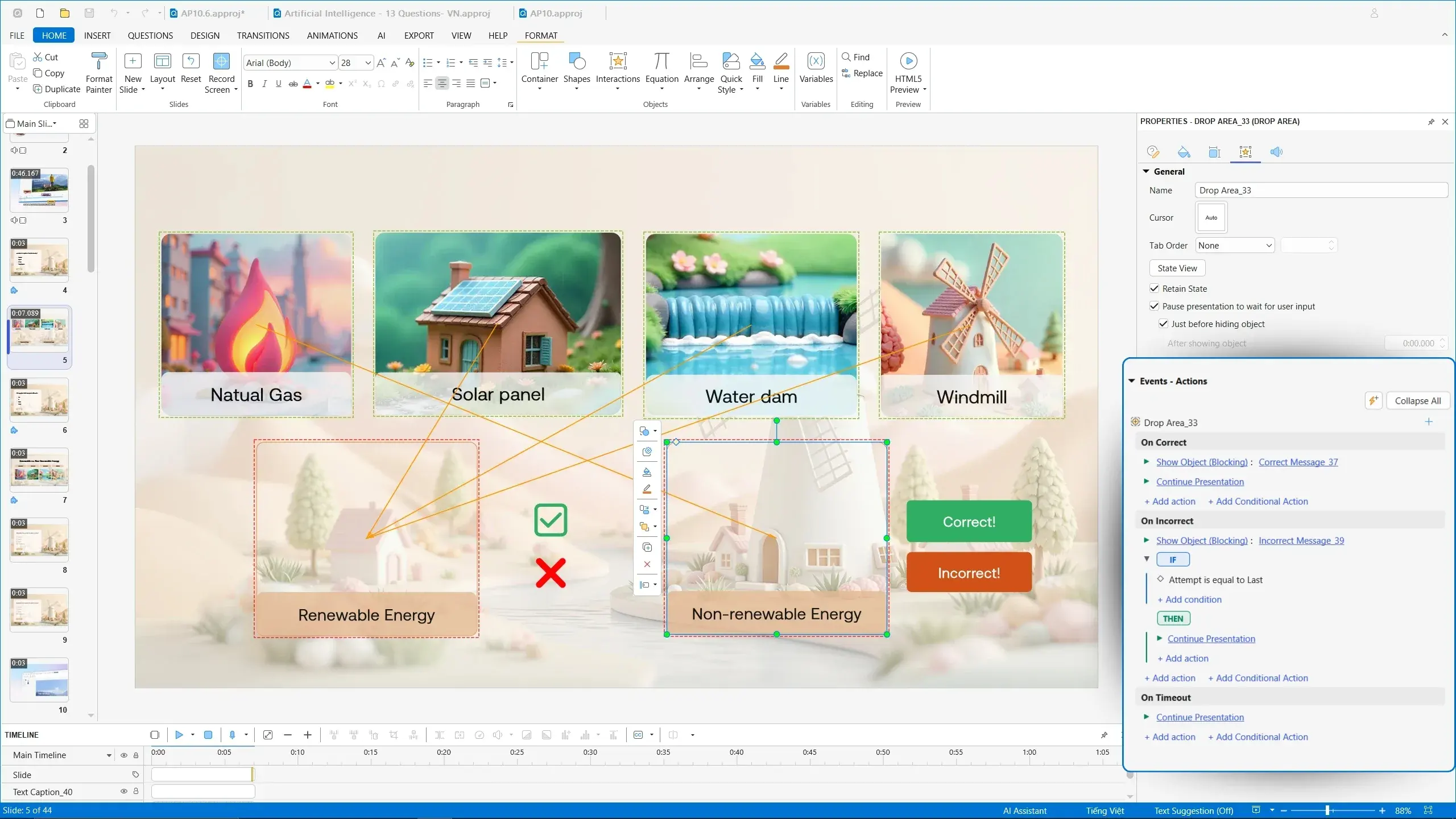
For example:
IF the learner selects the correct answer
AND completes a required interaction
THEN show feedback and continue to the next section.
More complex conditions can also be nested to support interactive learning logic.
Better Quiz Results
Quiz results can now support grading scales with custom grades and feedback.
This allows authors to move beyond a simple percentage score and provide learners with more meaningful outcomes.
For example:
90–100% → Excellent
80–89% → Good
70–79% → Needs Improvement
Below 70% → Review Required
Authors can also provide feedback associated with different grades, helping learners understand what their results mean and what they should do next.
Report slides can additionally show unanswered questions as Not Answered in the details table, giving learners and instructors a clearer picture of assessment performance.
5. More Powerful Shapes & Visual Design
ActivePresenter 10.6 also brings a collection of improvements for authors who want more control over visual design and interactive objects.
Merge Shapes
The new Merge Shapes capabilities allow authors to create more complex visual objects using:
- Union
- Combine
- Fragment
- Intersect
- Subtract
These operations make it easier to build custom graphics for templates directly inside ActivePresenter instead of relying on external design software.
The update also supports editable multi-subpath shapes and multiple Spotlight areas, giving authors greater flexibility when creating visual explanations and interactive demonstrations.
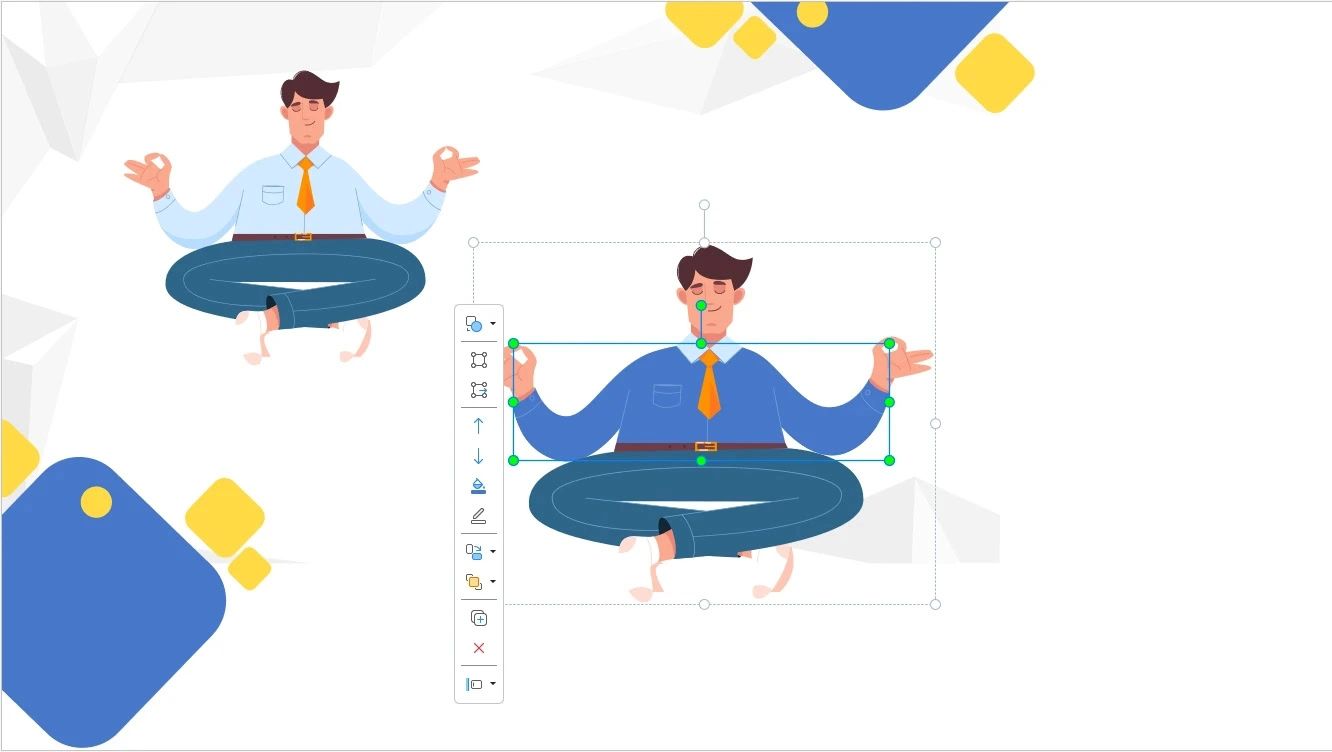
Convert SVG Images to Editable Shapes
SVG images can now be converted into editable shapes.
This provides more control over vector graphics after importing them into a project. Instead of treating an SVG as a single image, authors can work with its editable shape components. This means, you can change color, shadow to play around with the visual objects.
This can be useful for customizing icons, diagrams, illustrations, and other vector-based assets.
New Slide Transitions
ActivePresenter 10.6 adds two new slide transitions:
- Peel Off
- Page Curl
These provide additional options for creating visual movement between slides bringing the feeling of reading an online book and can help vary the presentation style of different projects.
Progress Timer Shapes
New customizable Progress Timer shapes provide another way to visually communicate timing and progress within interactive content.
These can be useful for timed activities, quizzes, simulations, or instructional sequences where learners need to understand how much time remains.
Dark Blue Application Theme
A new Dark Blue application theme is also available, giving users another interface appearance option while working in ActivePresenter.
Save Shapes as Pictures
Eligible shapes and objects can now be saved as pictures, making it easier to reuse visual assets across projects or outside ActivePresenter.
More Improvements in ActivePresenter 10.6
Beyond the major features above, ActivePresenter 10.6 includes a wide range of workflow, export, accessibility, and platform improvements.
Better video proxy workflow: Video proxy creation now supports reusable profiles, along with a combined import confirmation and profile-selection dialog.
More efficient question editing: Question editing has been improved with question-type conversion and Enter-key insertion for new answer options.
Better image handling: Oversized imported PNG and JPEG images can now be automatically resized while preserving the original source files.
More flexible publishing: ActivePresenter 10.6 also adds options to customize filenames for exported SCORM and xAPI ZIP packages.
Improved HTML5 and LMS output: HTML5 Preview now honors font-embedding settings and includes fonts used across multiple-slide layers.
Create More Powerful eLearning Experiences with ActivePresenter 10.6
ActivePresenter 10.6 is more than a collection of small fixes and refinements. The update brings together several improvements that address different stages of the content creation process.
With the Scenario Editor, you can visually design branching scenarios and interactive learning paths.
With Smart Studio, you can turn full-motion screen recordings into more polished instructional videos with automatic zoom, smooth cursor movement, keyboard shortcut overlays, and presenter layouts.
With Local AI capabilities, you can transcribe and analyze media directly on your computer while working with text-to-speech generation inside your projects.
And with more flexible assessments, conditional actions, shapes, transitions, and publishing workflows, you have greater control over how your courses look, behave, and are delivered.
Whether you’re creating software simulations, employee training, interactive courses, assessments, or video-based lessons, ActivePresenter 10.6 gives you more tools to build engaging learning experiences from a single authoring environment.
Ready to explore what’s new? Download ActivePresenter 10.6 and start creating more interactive, engaging, and professional eLearning content today.
