
HIPAA compliance training is often treated as a yearly checkbox: employees watch a presentation, click through several slides, complete a quiz, and receive a completion status. The problem is that this approach rarely prepares people for the decisions they must make when handling protected health information (PHI) in real situations.
A more effective program requires an authoring tool for HIPAA training that can turn policies into realistic practice, track learning outcomes in an LMS, and make annual content updates manageable. ActivePresenter is built for this type of work, combining screen recording, interactive software simulations, video editing, eLearning authoring, and SCORM/xAPI publishing in one desktop application.
In this guide, we’ll cover why HIPAA training teams need more than basic slide conversion, how ActivePresenter supports real-world healthcare learning, and practical ways to use it for compliance programs.
What Makes HIPAA Compliance Training Difficult to Build?
HIPAA training is not just about explaining regulations. Employees need to understand how those regulations affect their behavior when they open patient files, send emails, use mobile devices, speak with visitors, or respond to potential incidents.
Policies must be understood—not simply acknowledged
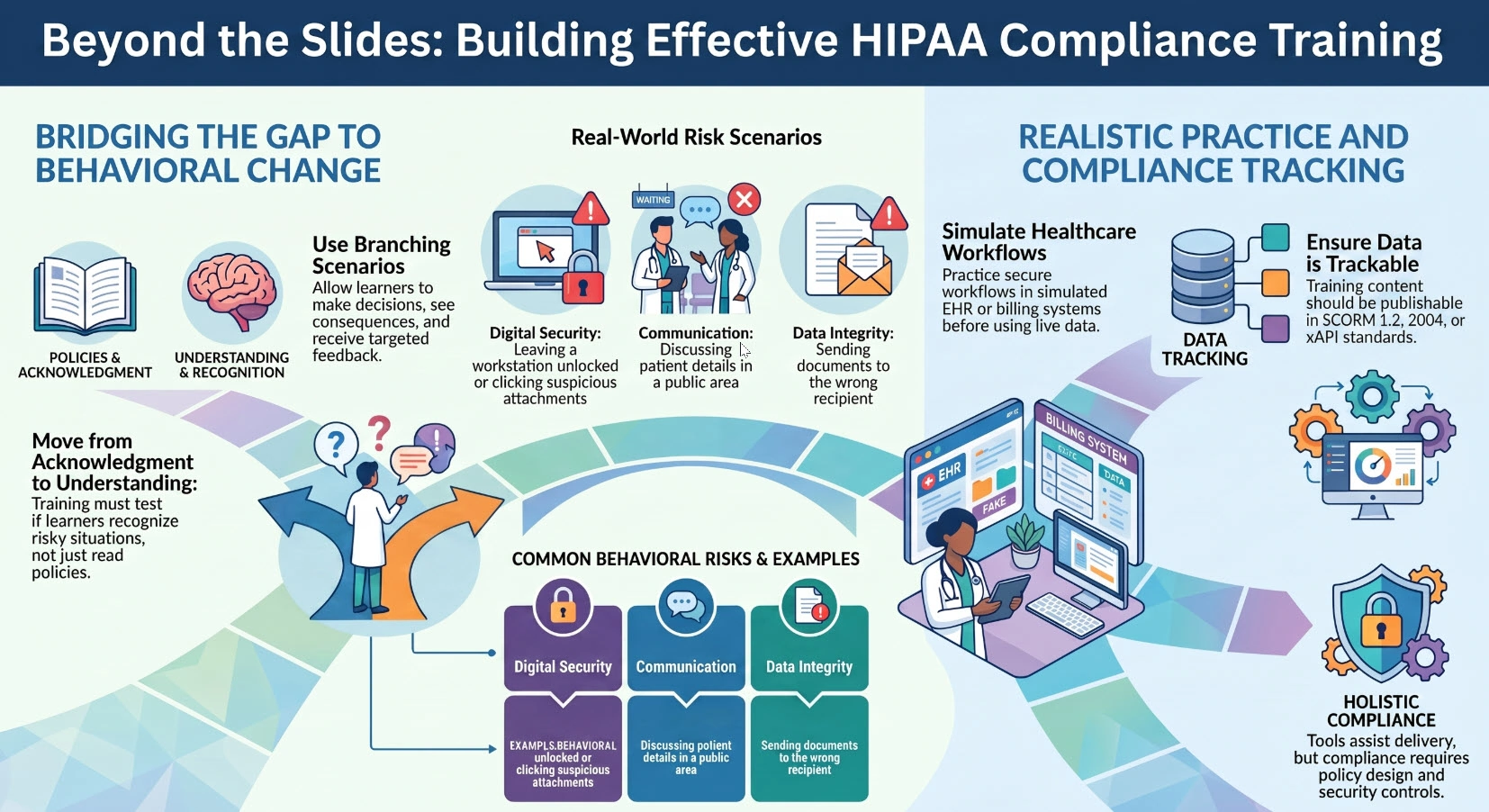
A standard presentation can explain that employees should not disclose PHI to unauthorized individuals. But a slide alone cannot test whether a learner recognizes a risky situation, such as:
- Opening a patient record out of curiosity.
- Sending documents to the wrong recipient.
- Discussing patient details in a public area.
- Leaving a workstation unlocked.
- Clicking a suspicious email attachment.
For compliance training to be meaningful, learners should make decisions, see the consequences, and receive targeted feedback. This is where branching scenarios and interactive questions become far more valuable than a final multiple-choice quiz.
Healthcare workflows need realistic practice
Many HIPAA risks happen inside healthcare applications: EHR systems, scheduling platforms, patient portals, billing software, secure messaging tools, and cloud storage systems.
Employees should not have to learn secure workflows for the first time while using a live production system. An interactive simulation gives them a safer place to practice what to click, what to avoid, and what to do when something goes wrong.
Completion and assessment data must be trackable
Compliance teams need reliable evidence that training was assigned, completed, and assessed. Depending on the organization’s LMS and reporting needs, content should be publishable in recognized standards such as SCORM 1.2, SCORM 2004, or xAPI.
However, it is worth making an important distinction: an authoring tool does not make an organization HIPAA-compliant by itself. HIPAA compliance also depends on policy design, security controls, data handling procedures, access management, legal guidance, and ongoing employee education. The right tool helps you deliver, assess, and document training more effectively.
Why ActivePresenter Fits HIPAA Training Teams
ActivePresenter is a strong option for healthcare organizations, instructional designers, IT trainers, and compliance teams that need to create training with practical depth—without piecing together separate applications for recording, editing, interactivity, and LMS publishing.
Suggested image placement: Insert a feature overview graphic with icons for software simulation, video editing, quizzes, SCORM/xAPI, and AI Agent integration.
Record Software Simulation for realistic EHR and system practice
One of ActivePresenter’s most relevant capabilities for HIPAA training is Record Software Simulation.
Instead of recording a passive walkthrough and manually placing annotations afterward, you can capture real actions—including mouse clicks, keystrokes, and navigation—while using a mock healthcare application or training environment. ActivePresenter can then convert those actions into an interactive simulation.
For example, a learner can practice how to:
- Log in securely to an EHR system.
- Locate the correct patient record.
- Avoid opening unauthorized information.
- Log out properly after a session.
- Recognize when a sharing action requires additional approval.
You can create demonstration, practice, and test-style experiences, allowing employees to observe a workflow first and then perform it themselves.

High-quality screen recording and non-destructive video editing
Some HIPAA topics are best delivered through clear video explanations. A compliance manager may need to explain a revised policy, while an IT specialist may need to demonstrate secure remote access procedures.
ActivePresenter supports high-quality screen recording and webcam recording, making it useful for software walkthroughs, narrated policy updates, and internal training videos.
It also includes non-destructive video editing. This means you can trim, split, crop, adjust, annotate, and refine recordings without permanently changing the original media. For teams that revisit compliance content every year, this is a practical advantage. You can update a policy reference, replace a voiceover, or revise a section without rebuilding the entire project from scratch.
Advanced eLearning authoring tools for decision-based learning
HIPAA training should help people think through consequences—not just memorize terminology.
With ActivePresenter’s advanced eLearning tools, you can create:
- Multiple-choice, true/false, and fill-in-the-blank questions.
- Branching scenarios.
- Variables and conditional logic.
- Interactive objects and hotspots.
- Custom feedback layers.
- Remediation paths for incorrect answers.
For instance, if a learner chooses to email patient information using an unapproved personal account, you can send them to a remediation slide that explains the risk and demonstrates the correct secure process. This creates a learning experience that is more useful than simply showing a red “incorrect” message.
Responsive courses for modern learners
Healthcare staff often complete mandatory training across different devices and working environments. A responsive course helps ensure that the learning experience remains clear and professional when accessed on various screen sizes.
ActivePresenter helps teams create responsive eLearning content without requiring code-heavy development. This is especially helpful when your audience includes clinical staff, administrative teams, remote workers, and IT personnel using different devices.
SCORM and xAPI publishing for LMS reporting
ActivePresenter can publish training content to SCORM 1.2, SCORM 2004, and xAPI formats. This allows teams to upload content to a compatible LMS and track important information such as completion status, assessment scores, and learner progress.
For HIPAA training, these reporting capabilities can support internal training documentation and help compliance teams monitor whether employees have completed required modules.
Before deployment, always test the published package in your LMS. Tracking behavior can vary based on LMS settings, completion criteria, and the standard selected.
Faster content updates with AI Agent integration via MCP Connect
HIPAA policies, internal procedures, and software interfaces change. Updating a course manually across dozens of slides can quickly become tedious.
ActivePresenter’s AI Agent integration via MCP Connect can help teams speed up repetitive authoring work. Depending on your workflow, AI agents can assist with tasks such as:
- Drafting quiz variations from approved policy content.
- Creating slide summaries.
- Revising repeated text after a policy update.
- Generating first-draft narration scripts.
- Suggesting knowledge-check questions based on recorded workflows.
AI should support—not replace—human review. In healthcare compliance training, all AI-generated content should be reviewed by qualified compliance, legal, privacy, or subject-matter experts before publication.
Predictable cost with perpetual licensing and a capable free edition
Subscription costs can be a challenge for organizations maintaining a large library of annual compliance courses. ActivePresenter offers a perpetual license option, allowing teams to make a one-time purchase rather than relying exclusively on recurring subscriptions.
There is also a capable free edition for users who want to explore the application or begin with smaller projects. This makes ActivePresenter accessible to teams that need to validate their workflow before expanding production.
Three Practical HIPAA Training Scenarios to Build with ActivePresenter
Scenario 1: Protecting patient information in an EHR system
A hospital needs to train new employees on secure patient-record access.
Using Record Software Simulation, the training team captures a mock EHR workflow. Learners are asked to locate a patient record, verify appropriate access, avoid unrelated records, and log out after completing a task.
If they click an unauthorized record, the course can show a feedback layer explaining the minimum necessary principle and why inappropriate access creates compliance risk.
Suggested image placement: A simulation slide with a fictional EHR interface, clickable hotspots, and a feedback panel.
Image requirement: Use anonymized dummy fields and fictional patient names only.
Scenario 2: Reporting a lost device or suspicious email
A healthcare organization wants to teach employees what to do when a work phone is lost or a phishing email appears to contain patient information.
Create a branching scenario where learners choose their next action. They might report the incident to IT, notify a supervisor, use an approved reporting channel, or make an unsafe decision such as deleting evidence without reporting it.
Each decision can lead to a different outcome, helping employees understand that response speed and procedure matter during a potential privacy incident.
Scenario 3: Training IT and administrative staff on secure workflows
HIPAA training is not limited to clinical staff. IT teams may need guidance on account provisioning, access controls, system updates, and secure remote support. Administrative employees may need to learn safe document-sharing and printing procedures.
With ActivePresenter, an IT trainer can record a secure VPN login process, edit the video professionally, add callouts and captions, then insert interactive checks throughout the lesson. The same project can be published as a video for quick reference or as SCORM/xAPI content for formal LMS tracking.
ActivePresenter vs. Typical HIPAA Authoring Tool Options
Many tools can convert PowerPoint slides into SCORM packages. That may be enough for a basic policy acknowledgment course, but it often falls short when employees need to practice a workflow or make judgment calls.
| Evaluation Area | Basic Slide-to-SCORM Tool | ActivePresenter |
| Interactive software simulation | Often limited or requires add-ons | Built-in Record Software Simulation |
| Screen recording | May require a separate tool | Built-in high-quality recording |
| Video editing | Basic or external workflow needed | Professional, non-destructive editing |
| Branching and interactive quizzes | Varies by plan | Available within the authoring environment |
| LMS publishing | Usually SCORM | SCORM 1.2, SCORM 2004, and xAPI |
| Content updates | Can be time-consuming | Timeline editing plus AI Agent support via MCP Connect |
| Licensing approach | Frequently subscription-only | Perpetual license option and free edition |
The key advantage is workflow consolidation. Instead of recording in one application, editing in another, building interactions in a third, and then exporting elsewhere, teams can develop a complete HIPAA learning module within ActivePresenter.
Pro Tips for Building More Effective HIPAA eLearning
Start with Record Software Simulation—not a passive recording
In more than a decade of creating digital learning content, one recurring lesson stands out: it is much easier to begin with the right recording mode than to add interactivity later.
If learners need to practice a system workflow, use Record Software Simulation from the start. Recording in plain video mode and then manually adding click-here annotations, hotspots, and feedback can take significantly longer.
Design remediation paths for high-risk mistakes
Not all incorrect answers have the same consequence. A learner who misses a definition may only need a quick explanation. A learner who chooses to share PHI through an unapproved channel should receive more detailed remediation.
Use branching and feedback to prioritize high-risk topics, such as unauthorized access, insecure communication, device loss, and disclosure procedures.
Plan AI-assisted work around shared credits
For teams using AI features across multiple activated devices under the same ActivePresenter license key, AI credits are shared across those devices rather than resetting for each machine.
This is worth planning for. Reserve AI-assisted work for high-volume tasks—such as generating quiz variations, drafting summaries, or preparing initial translations—and make sure your team follows a coordinated workflow.
Keep source files ready for annual policy revisions
Never treat a published SCORM package as your only source of truth. Store the editable ActivePresenter project files, approved scripts, visual assets, and policy references in an organized location.
When procedures change, you will be able to revise specific scenes, replace a recording segment, update a quiz, and republish the course with far less effort.
A Practical Checklist Before Publishing HIPAA Training
Before uploading your course to an LMS, review the following:
- Confirm that all policy statements have been reviewed by the appropriate compliance or legal stakeholders.
- Use fictional data, de-identified information, or a secure training environment in all recordings.
- Test interactions, branching paths, and feedback messages.
- Verify that captions, readable fonts, and color contrast support accessibility.
- Set appropriate completion and passing-score criteria.
- Test SCORM or xAPI reporting in your actual LMS.
- Confirm that course updates are version-controlled and documented.
- Review any AI-assisted content before release.
Final Thoughts: Choose an Authoring Tool That Supports Real Compliance Learning
The best authoring tool for HIPAA training should do more than place policy text on slides and export a SCORM file. It should help you show realistic workflows, allow learners to practice critical decisions, track completion through your LMS, and update training efficiently as policies evolve.
ActivePresenter brings together interactive software simulation, high-quality screen recording, non-destructive video editing, responsive eLearning design, SCORM/xAPI publishing, and AI Agent integration through MCP Connect. For teams that want to create practical, trackable, and maintainable HIPAA training without relying on multiple disconnected tools, it is a compelling choice.
Ready to build a more engaging HIPAA training experience? Download ActivePresenter and create your first interactive compliance module today. If you need ideas, templates, or workflow guidance, join the Atomi Systems community and connect with other eLearning designers and training professionals.
