
Choosing an eLearning authoring tool means looking beyond attractive templates. You need software that supports your course logic, accessibility goals, review process, and budget—and remains practical when the next revision arrives.
This Lectora review examines its strengths, limitations, and pricing to help you plan for 2027. We also explore when ActivePresenter, our winning star budget friendly elearning software, deserves a place on your shortlist, particularly for training built around screen recordings and software demonstrations.
Research note: Product information was checked on October 7, 2026. This is a review for 2027 planning based on currently documented capabilities, rather than a review of an announced “Lectora 2027” release. Features and prices may change. The assessment draws on official documentation; it does not claim hands-on benchmark testing.
What Is Lectora?
Lectora is an eLearning authoring tool from ELB Learning, available through desktop and online applications. It helps instructional designers build interactive training, assessments, and courses for delivery through learning platforms.
ELB Learning positions the product around flexible course development, with templates and PowerPoint import available as starting points. This makes it relevant to teams adapting existing training as well as those developing original learning experiences.
The practical question is how much control your courses require. A short information module and a branching assessment place different demands on an authoring tool. Your evaluation should reflect the harder project you expect to maintain, rather than only the easiest course you can build.
Lectora Review at a Glance
Our assessment is that Lectora merits consideration when detailed course behavior and a structured development process matter to your team.
| Area | Potential advantage | Tradeoff to evaluate |
| Course customization | Room to develop tailored learning experiences | More logic requires more testing |
| Accessibility | Tools for addressing accessible course design | Finished courses still need validation |
| Responsive design | Control over device-specific presentation | Mobile layouts require review |
| Team workflow | Online authoring and stakeholder review options | Agree on ownership and revision rules |
| Budget | A subscription bundle with several tools | Value depends on which tools you use |
These tradeoffs are evaluation judgments, not measured performance results. A representative pilot will tell you more than a feature checklist alone.
Lectora Pros: Where It Offers Value
1. Support for Custom Learning Paths
Lectora supports variables and conditions for adapting learning paths to learner behavior. Its documented extensibility also includes custom HTML, CSS, and JavaScript.
That flexibility matters when a course needs to respond to a learner’s decisions. For example, an incorrect choice could lead to additional explanation before the learner continues.
The benefit is instructional freedom. You can start with the behavior you want learners to practice, then assess whether the authoring workflow supports it. This is similar to the scenario editor in ActivePresenter 10.6.
2. Tools for Accessibility Work
Lectora’s feature page lists focus behavior, tabbing order, and an accessibility guide. ELB Learning also publishes an accessibility conformance report dated October 12, 2023, based on a VPAT framework including WCAG 2.2.
These resources make accessibility a concrete part of the evaluation. Ask your team to examine the relevant report and build a sample interaction that reflects your intended content.
A product’s accessibility capabilities do not automatically validate every course created with it. Your choices about navigation, text, media, and interaction design still shape the learner’s experience.
3. Responsive Layout Control
Lectora’s Responsive Course Design workflow uses desktop layouts as the starting point, with inheritance helping populate mobile views. ELB’s guidance recommends designing for desktop first, then adjusting other views.
This approach can be useful when you need to make deliberate decisions about small-screen presentation. You might simplify a diagram, reposition controls, or remove decorative elements from a mobile view.
The value comes from using that control thoughtfully. Responsive output should preserve the learning task as well as the visual layout.
4. Online Collaboration and Review
Lectora Online supports shared authoring, roles, revision history, and check-in/check-out controls. ReviewLink provides contextual comments and screen markups for stakeholder feedback. ELB specifies that the co-authoring features apply to Lectora Online.
For distributed teams, a defined review process can help keep feedback tied to the correct course location. Establish who edits, who approves, and who closes comments before the first review round.
5. Multiple Publishing Options
ELB documents HTML, SCORM, AICC, xAPI, and cmi5 publishing options. These give teams several routes for delivering and tracking content.
Support for a format is a starting point. Confirm how your chosen output behaves in your actual learning platform, including scoring, completion, and resuming a session.
Lectora Cons: What to Consider Before Buying
1. Advanced Control Requires Learning Time
Lectora’s training resources cover inheritance, actions, variables, tests, and publishing. That range suggests authors should allow time to understand the development model before tackling complex projects.
Our inference is that teams seeking only basic page assembly may find some of this flexibility unnecessary. Teams building custom logic may find the learning investment worthwhile.
During a trial, ask a new author to make a meaningful revision without help. That exercise reveals how easily knowledge can spread across your team.
2. Responsive Courses Need Additional QA
Inherited layouts can provide a useful starting point, but ELB’s own guidance describes repositioning and removing content in mobile views.
Plan time to check long labels, portrait orientation, crowded interactions, and readable text. A course that looks tidy on desktop may still need adjustments elsewhere.
3. Subscription Costs Can Accumulate
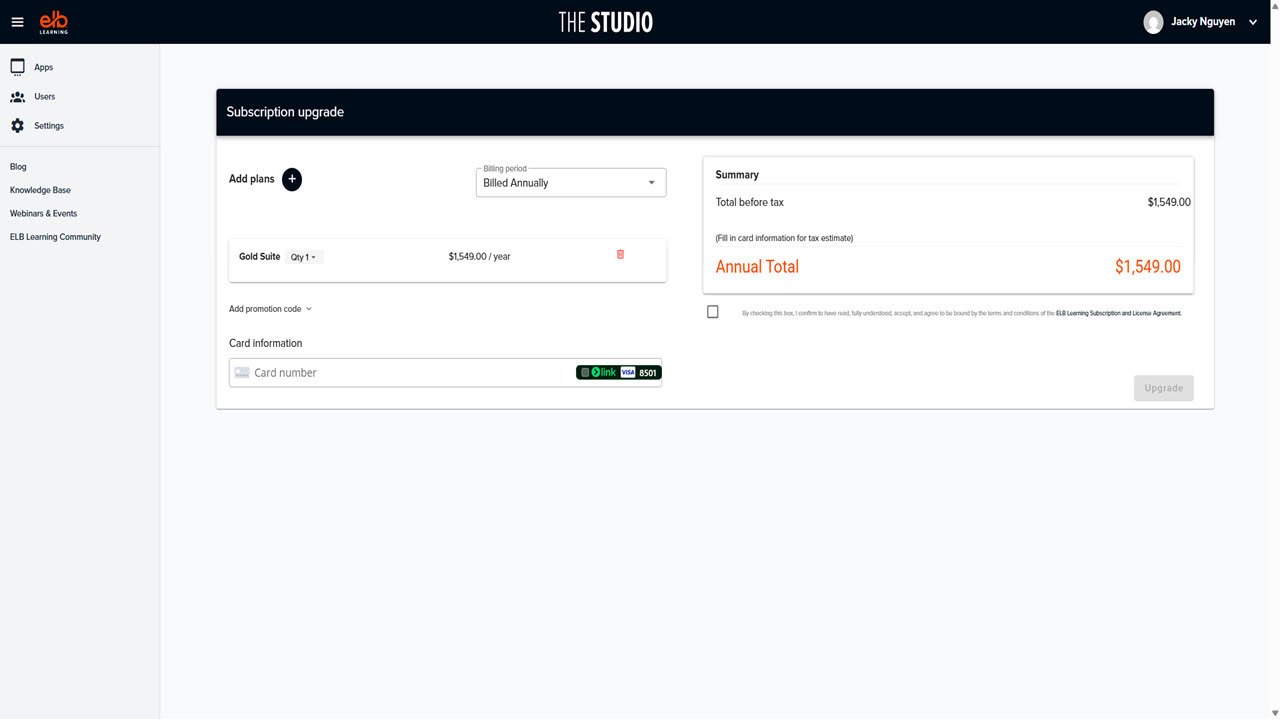
Lectora’s current pricing is subscription-based through the Studio Gold Suite. For occasional authors, recurring spending may be harder to justify than for teams producing courses throughout the year.
Evaluate cost against actual usage. Include onboarding, maintenance, and any additional production tools your workflow requires.
4. Desktop and Online Workflows Need Separate Evaluation
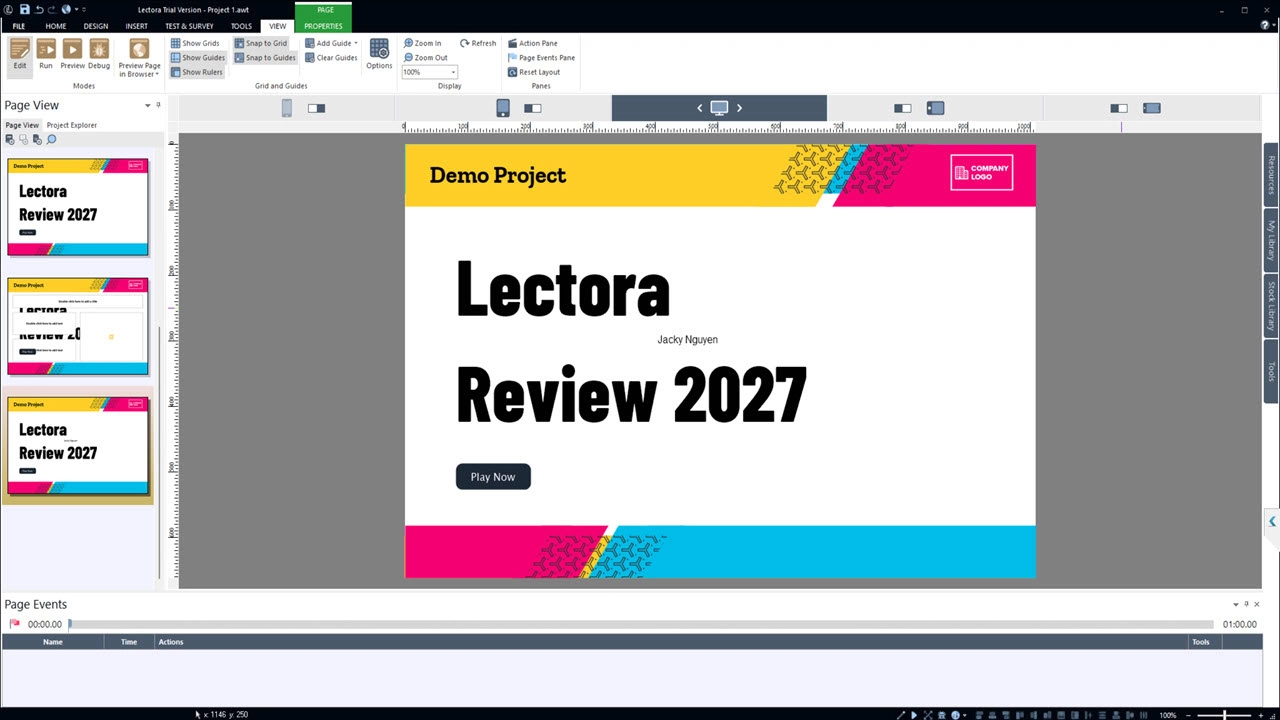
ELB’s published requirements identify Lectora Desktop as a Windows application, while Lectora Online uses a browser. The requirements article notes that it was last reviewed in March 2022, so confirm current compatibility before purchasing.
Mac-based authors should test the online workflow against their project needs. Access to both applications does not mean every workflow will feel identical.
5. Custom Logic Increases Maintenance Work
A tailored interaction has more behavior to verify than a simple information page. This is a consequence of project complexity, rather than evidence of a Lectora defect.
Before committing to an elaborate design, ask who will maintain it next year. Clear variable names, documented decisions, and reusable patterns can make later revisions easier.
Lectora Pricing for 2027 Planning
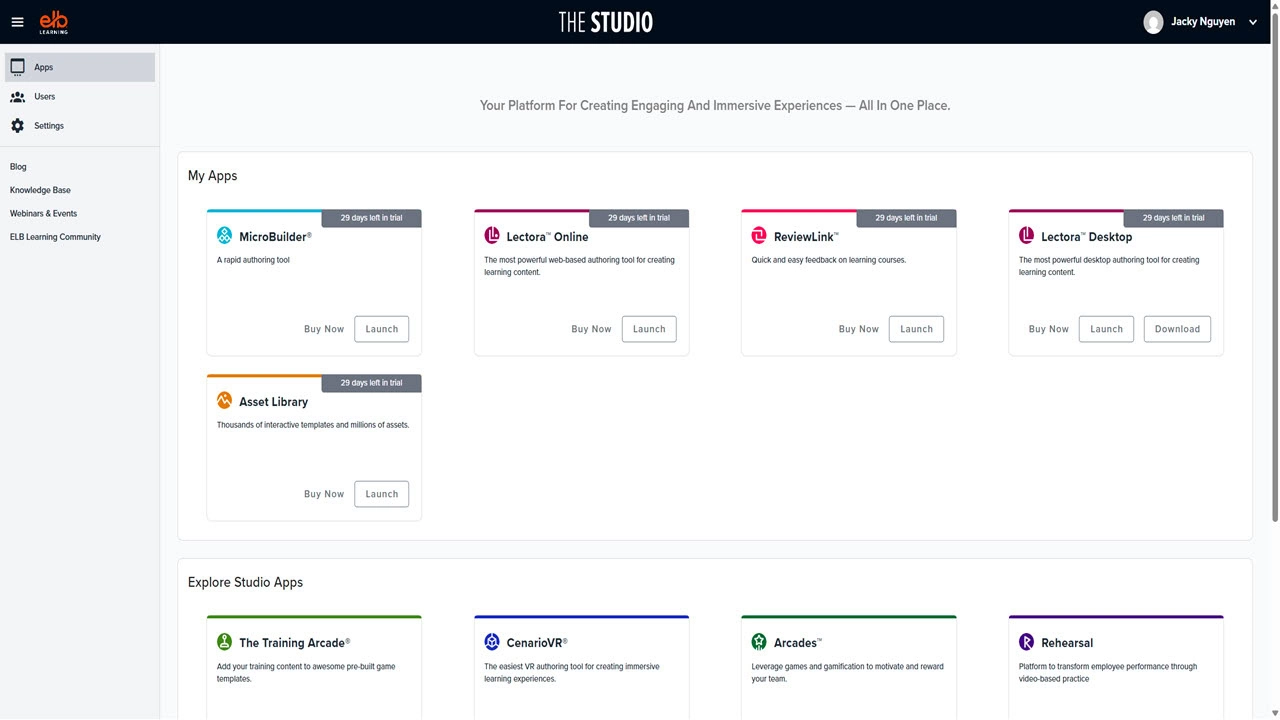
As checked on October 7, 2026, ELB Learning lists the Studio Gold Suite starting at $1,549 per year. The bundle includes Lectora Online and Desktop, MicroBuilder, Asset Library, and ReviewLink. The page states that listed prices apply to the United States; international pricing may vary.
Treat this as a planning reference, not a confirmed 2027 price.
Before purchasing, request confirmation of author seats, renewal terms, regional pricing, and included services. Also establish what happens to editable projects and hosted resources if the subscription ends.
A bundle offers the most value when its tools support work you already need to do. Map each included product to a real task before assigning it value in your budget.
How to Evaluate Lectora Before Purchasing
Step 1: Choose a Representative Lesson
Select a small module containing your hardest requirements. Include an assessment, a decision path, stakeholder feedback, and a mobile layout if those matter to your work.
Avoid evaluating only a polished template with replacement text.
Step 2: Record the Work Required
Track time spent building, correcting, reviewing, and publishing. Ask another author to update the project.
Include the effort needed to understand the course structure. That is part of the ownership cost.
Step 3: Test the Published Course
Upload the output to your intended LMS or delivery environment. Check completion, scoring, retries, navigation, and resume behavior.
For accessibility, test the actual lesson and its interactions. Request a current conformance report where your procurement process requires one.
Step 4: Compare the Same Task in ActivePresenter
ActivePresenter combines screen recording, video editing, and interactive eLearning authoring. Its Free Edition can support evaluation, with restrictions: it is intended for trial and non-commercial use, and outputs using non-free features carry a watermark until a license is activated.
ActivePresenter Pro supports HTML5, SCORM, and xAPI output.
For application training, explore its software simulation capabilities. Compare the time needed to create and update the same lesson in each tool. For commercial deployment, review the applicable edition and current licensing information.
Final Verdict: Is Lectora Worth Considering?
Lectora deserves a place on your shortlist when your courses require custom behavior, accessibility work, responsive layouts, and coordinated review. Its flexibility can justify the investment when your team has the time and skills to use it effectively.
For simpler projects or occasional production, assess whether the learning effort and subscription bundle match your needs. For training centered on screen capture and application practice, compare ActivePresenter through a realistic pilot.
Honestly speaking, I was impressed by how ELB Learning add their products in their ecosystem. It seems to be a good platform for eLearning designers. However, when I test the products more deeply, I realize that the overall workflow isn’t as smooth as expected and can be quite confusing for beginners. Additionally, individual features don’t seem as well-optimized as those in ActivePresenter, which left me a bit disappointed with the experience.
That being said, ELB Learning still has its strong points as I mentioned earlier, and you can give it a try to see if it fits your needs. But if you’re looking for a cost-effective, powerful eLearning authoring tool with a one-time purchase for perpetual use, I’d highly recommend checking out ActivePresenter via the link below:
