
Interactive content is the foundation of effective digital learning. That’s why choosing the right authoring tools for interactive content is one of the most important decisions for educators, trainers, and eLearning developers in 2026.
A course can look beautiful, but real learning only happens when users can interact with it, answer questions, practice skills, explore scenarios, and receive immediate feedback. The best eLearning authoring tools allow creators to build these engaging experiences without technical complexity.
In this guide, we review and compare the best authoring tools for interactive content in 2026, analyzing interactive features, SCORM compatibility, AI capabilities, pricing, and ease of use to help you choose the right solution.
Table of contents
- Comparison table of top eLearning authoring tools
- Why authoring tools for interactive content matter more than ever
- The 4 levels of interactivity in eLearning
- What makes an eLearning authoring tool great in 2026
- Top 5 eLearning authoring tools for interactive content
Before diving into the strengths and limitations of each tool, let’s first take a quick look at this comparison table featuring the five best eLearning authoring tools for creating interactive content in 2026.
Comparison of Top Authoring Tools for Interactive Content (2026)
| Criteria | ActivePresenter | Storyline 360 | Captivate | iSpring Suite | Elucidat |
| Ease of Use | ⭐⭐⭐⭐⭐ | ⭐⭐⭐⭐ | ⭐⭐ | ⭐⭐⭐⭐⭐ | ⭐⭐⭐ |
| Interactive Content Capability | ⭐⭐⭐ Good for technical use, but complex | ⭐⭐⭐⭐ Requires heavy manual setup | ⭐⭐⭐ Good for technical use but complex | ⭐⭐ Mostly basic interactivity | ⭐⭐⭐ Template-driven interactions |
| Software Simulations | ⭐⭐⭐⭐⭐ | ⭐⭐ | ⭐⭐⭐⭐ | ⭐⭐⭐ | ⭐⭐ |
| Built-in Video Editing | ⭐⭐⭐⭐⭐ | ⭐⭐ | ⭐⭐ | ⭐⭐ | ⭐⭐ |
| AI Features | ⭐⭐⭐⭐ | ⭐⭐⭐⭐ | ⭐⭐⭐⭐ | ⭐⭐⭐⭐ | ⭐⭐⭐⭐ |
| Customization Flexibility | ⭐⭐⭐⭐⭐ | ⭐⭐⭐⭐ | ⭐⭐⭐ | ⭐⭐ | ⭐⭐ |
| SCORM/xAPI/HTML5 Support | ⭐⭐⭐⭐⭐ | ⭐⭐⭐⭐⭐ | ⭐⭐⭐⭐⭐ | ⭐⭐⭐⭐⭐ | ⭐⭐⭐⭐⭐ |
| Course Development Speed | ⭐⭐⭐⭐⭐ | ⭐⭐⭐⭐ | ⭐⭐ | ⭐⭐⭐⭐ | ⭐⭐⭐ |
| Beginner-Friendly | ⭐⭐⭐⭐⭐ | ⭐⭐ | ⭐ | ⭐⭐⭐⭐⭐ | ⭐⭐⭐ |
| Pricing Model | Affordable one-time license | Subscription only | Subscription | Subscription | Enterprise-level pricing |
Why Authoring Tools for Interactive Content Matter More Than Ever
The way people learn online has changed dramatically. Modern learners are used to interactive apps, immersive games, and personalized digital experiences. Passive learning formats no longer deliver strong results.
The right interactive eLearning software helps organizations:
- Increase learner engagement
- Improve knowledge retention
- Create realistic practice environments
- Track performance effectively
- Reduce training time and costs
This is why interactivity has become the most critical feature of any professional eLearning authoring tool.
The Four Levels of Interactivity in eLearning
Not all interactivity is the same. When evaluating authoring tools for interactive content, it’s important to understand the different levels of learner engagement.
Level 1 – Passive Interactivity
This is the most basic form of online learning.
Examples include:
- Clicking the “Next” and “Back” buttons
- Watching instructional videos
- Viewing presentations and animations
Many simple tools can create Level 1 content, but real engagement is limited.
Level 2 – Basic Interaction
Learners begin to respond actively to content.
Common examples:
- Multiple-choice quizzes
- Click-to-reveal activities
- Simple drag-and-drop exercises
Most modern SCORM authoring tools support this level.
Level 3 – Moderate Interaction
At this level, learners must think and make decisions.
Examples:
- Scenario-based quizzes
- Interactive processes
- Branching lessons
- Problem-solving activities
Creating Level 3 content requires advanced features like triggers, variables, and conditional logic.
Level 4 – Advanced / Immersive Interaction
This is the highest level of engagement.
Examples:
- Full software simulations
- Gamified learning paths
- Complex branching scenarios
- Interactive role-play environments
Very few tools can produce Level 4 content efficiently. ActivePresenter is one of the rare platforms that makes this possible without technical complexity.
What Makes an eLearning Authoring Tool Great in 2026?
Modern eLearning tools have evolved far beyond static slides and simple quizzes. In 2026, a strong authoring tool should offer:
- Powerful interactivity features such as drag-and-drop, branching, and interactive video
- Built-in software simulation tools
- AI-powered eLearning tools for narration, captions, and automation
- Support for SCORM, xAPI, and HTML5
- Integrated screen recording and video editing
- Flexible pricing and licensing options
- Ease of use for both beginners and professionals
Tools that combine all these elements into one platform deliver the most value.
Top 5 eLearning Authoring Tools for Interactive Content (2026)
ActivePresenter 10 – Best All-in-One Interactive eLearning Tool
ActivePresenter 10 is one of the most versatile and cost-effective authoring tools for interactive content in 2026. It combines course authoring, screen recording, video editing, software simulations, quizzes, and AI-powered features in a single platform, so creators can build complete eLearning courses without switching between multiple tools.

Its biggest advantage is the true all-in-one workflow. Users can record on-screen actions, automatically convert them into interactive simulations, and refine them using a powerful built-in editor. This makes ActivePresenter especially strong for software training and technical tutorials.
The advanced event–action system enables designers to create complex interactions, branching scenarios, and conditional logic without programming. This level of customization is rarely found in tools at a similar price point.
ActivePresenter also includes professional multimedia editing tools, such as timeline-based video editing, annotations, animations, and interactive elements, allowing for the production of high-quality interactive lessons entirely within one application.
With AI-powered features, SCORM/xAPI/HTML5 support, cross-platform availability, and affordable perpetual licensing, ActivePresenter delivers enterprise-level capabilities at a fraction of the cost of many competitors.
Strengths
- Automatic interactive software simulations
- Powerful event–action system for advanced interactivity
- Built-in screen recording and full video editing
- AI tools: text-to-speech, captions, and image generation
- Supports SCORM, xAPI, and HTML5 output
- Available for both Windows and macOS
- Free version and affordable one-time licensing
- Export directly to uPresenter LMS for tracking results
ActivePresenter is especially powerful for software training. Its interactive simulation recording mode automatically converts on-screen actions into step-by-step interactive slides, dramatically reducing development time.
Weaknesses
- No cloud-based collaboration or online co-authoring
- Interface can feel feature-heavy for first-time users
- Creating very complex interactions may require a learning period
Best For
Educators, instructional designers, and corporate trainers who want a professional, all-in-one solution for building interactive courses, simulations, assessments, and training videos, without expensive subscriptions.
👉 Download ActivePresenter for free today and start creating interactive content immediately.

Articulate Storyline 360 – Powerful but Costly and Complex
Articulate Storyline 360 is a well-known professional eLearning authoring tool widely used by experienced instructional designers. Its trigger-and-variable system allows developers to create highly customized courses with complex logic, branching scenarios, and sophisticated interactions.
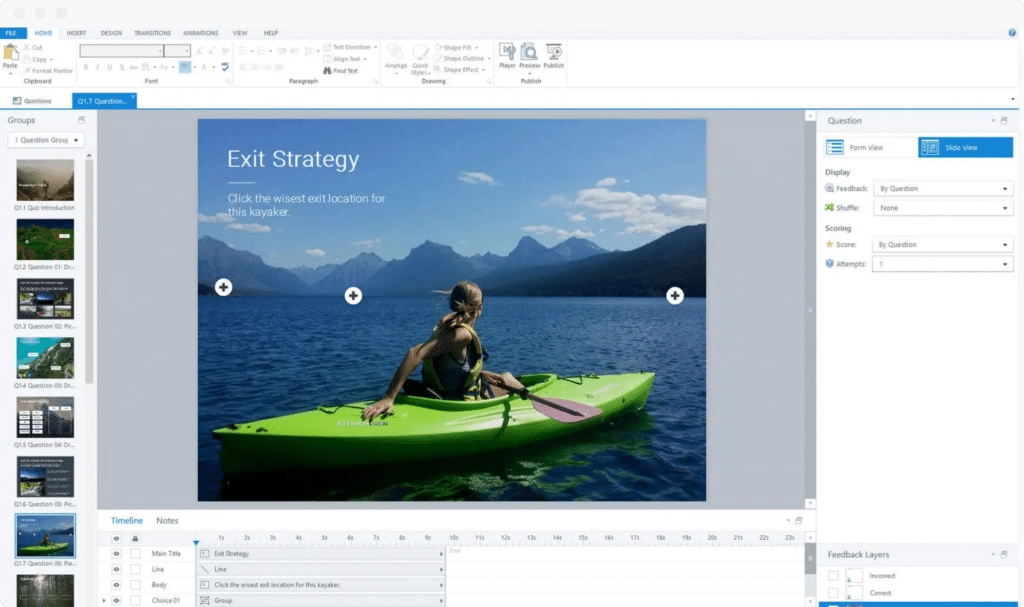
However, this power comes with notable drawbacks. Articulate Storyline 360 requires heavy manual setup steps, depending on whether you are using the desktop apps or web-based tools. It requires installing a desktop application, managing software updates, and, in some environments, configuring IT security policies.
Besides, Storyline 360 has a relatively high subscription cost, which can be a barrier for individuals, small teams, or organizations with limited budgets. The Articulate ecosystem is also quite complex, requiring users to work across multiple tools such as Storyline, Rise, Review, and Reach, which increases the learning curve and setup effort. In addition, there are hidden or indirect costs, including long onboarding time, ongoing subscription fees, and extra expenses for collaboration, hosting, or scaling content across teams.
Strengths
- Customizable course design and branching logic
- Supports SCORM, xAPI, and HTML5 output
- Large library of templates and community resources
- Ideal for creating detailed simulations and scenario-based learning
Weaknesses
- Heavy manual setup
- Very steep learning curve for new users
- The development process can be slow and time-consuming
- Subscription-only pricing model
- Relatively expensive compared to alternatives
- Limited built-in video and media editing tools
- Often requires additional external software
Best Fit
Articulate Storyline 360 is best suited for large corporate L&D teams with dedicated eLearning specialists and substantial budgets. For smaller organizations, educators, or teams looking for faster and more cost-effective solutions, it can be overly complex and impractical.
Adobe Captivate – Rich But Complex To Use
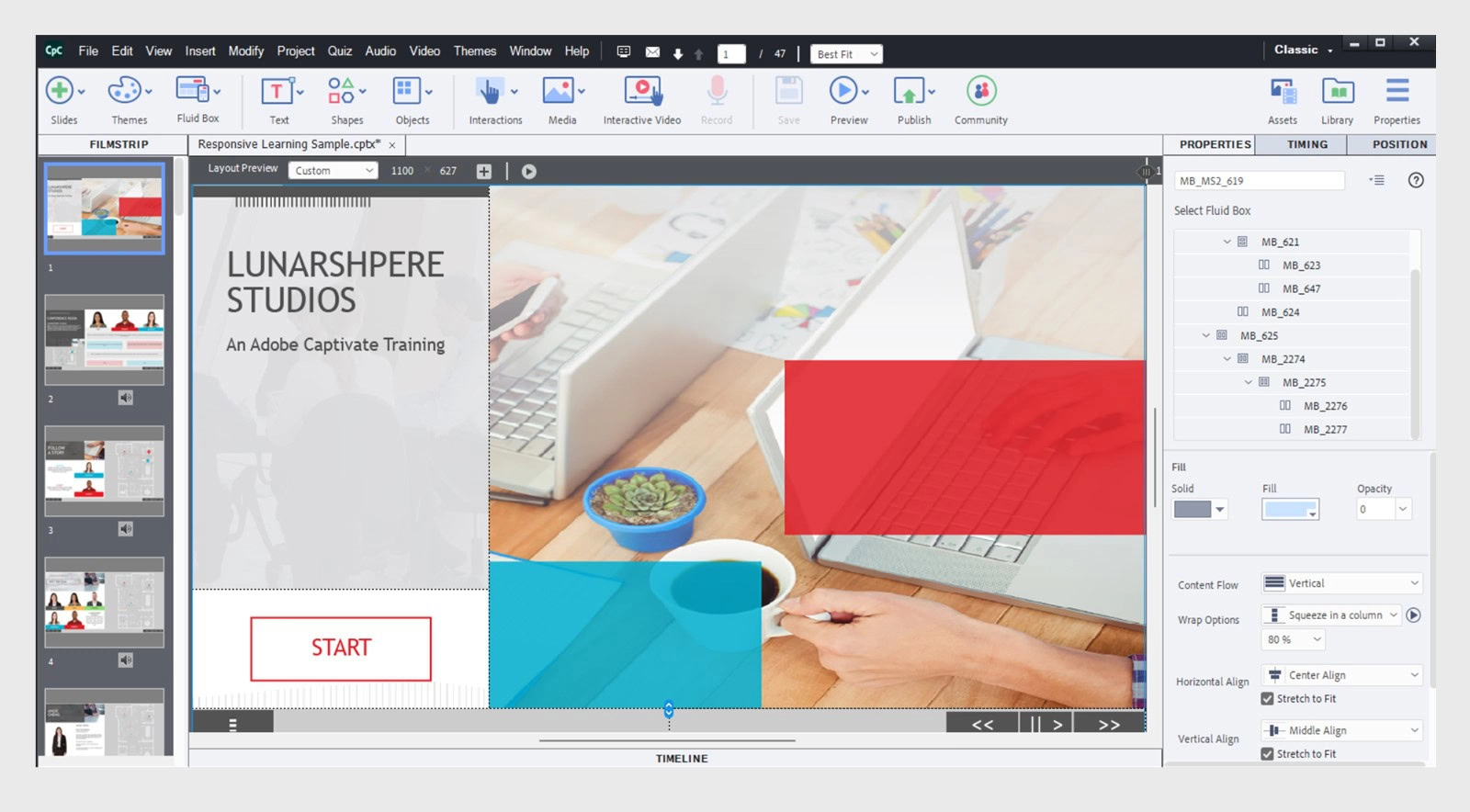
Adobe Captivate is a long-established eLearning authoring tool, especially recognized for its strengths in software simulations and responsive learning content.
Despite its rich feature set, Captivate is often criticized for being a heavy application that requires high system resources, which can lead to slow performance and stability issues on mid-range computers. The interface and workflow are complex and less intuitive, making the tool difficult for beginners and even time-consuming for experienced users to master. In addition, Adobe Captivate comes with a high licensing cost, particularly under Adobe’s subscription model, which can be a significant burden for freelancers, educators, and small training teams.
Strengths
- Strong capabilities for software simulations and screen-based training
- Supports responsive design for multi-device courses
- Advanced quiz and assessment options
- SCORM, xAPI, and HTML5 compatibility
- Good for technical and compliance-focused training projects
- Includes features for VR and interactive video
Weaknesses
- Complicated and outdated user interface
- Steep learning curve for beginners
- Slow and inefficient workflows
- Performance and stability issues on large projects
- Frequent product changes and updates
- Subscription-only model with relatively high cost
Best Fit
Adobe Captivate is most suitable for organizations that need detailed technical simulations and have experienced instructional designers. However, for everyday course creation, many users find it overly complex and less user-friendly.
iSpring Suite – Fast and Simple, but Limited in Depth
iSpring Suite is designed to quickly transform PowerPoint presentations into eLearning courses. Built as a PowerPoint add-in, it emphasizes speed, simplicity, and rapid course development, making it appealing for users who are already comfortable working in PowerPoint.
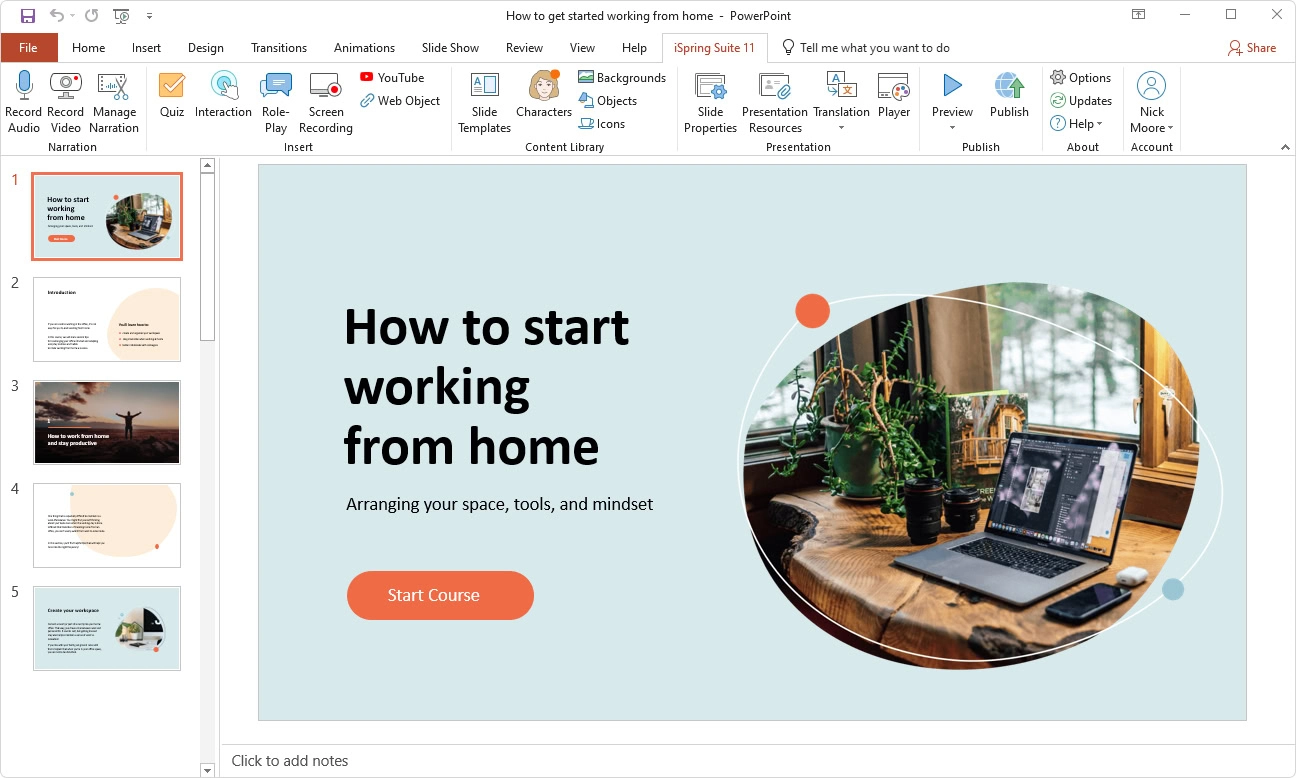
However, iSpring Suite is heavily dependent on Microsoft PowerPoint, which significantly limits its flexibility and depth compared to standalone authoring tools. Advanced interactions, complex logic, and highly customized learning experiences are difficult to achieve within the PowerPoint-based workflow.
From a cost perspective, iSpring Suite is relatively expensive because it requires a desktop-installed version of Microsoft PowerPoint to function. As a PowerPoint add-in, iSpring Suite cannot be used with the web-based version of PowerPoint, meaning users must purchase and maintain both an iSpring license and a separate PowerPoint desktop license.
Strengths
- Easy to learn and use
- Ideal for converting existing slides into online courses
- Supports quizzes, dialogue simulations, and basic interactions
- Fast development time for non-technical users
- SCORM and LMS-friendly output
Weaknesses
- Need PowerPoint installed
- Limited advanced interactivity and branching logic
- Basic simulation capabilities
- Heavily template-driven design
- Lacks built-in video editing and screen recording depth
- Not suitable for complex or highly customized projects
Best Fit
iSpring Suite is an excellent choice for educators and trainers who rely on PowerPoint and need to produce courses quickly.
Elucidat – Cloud-Based for Enterprises
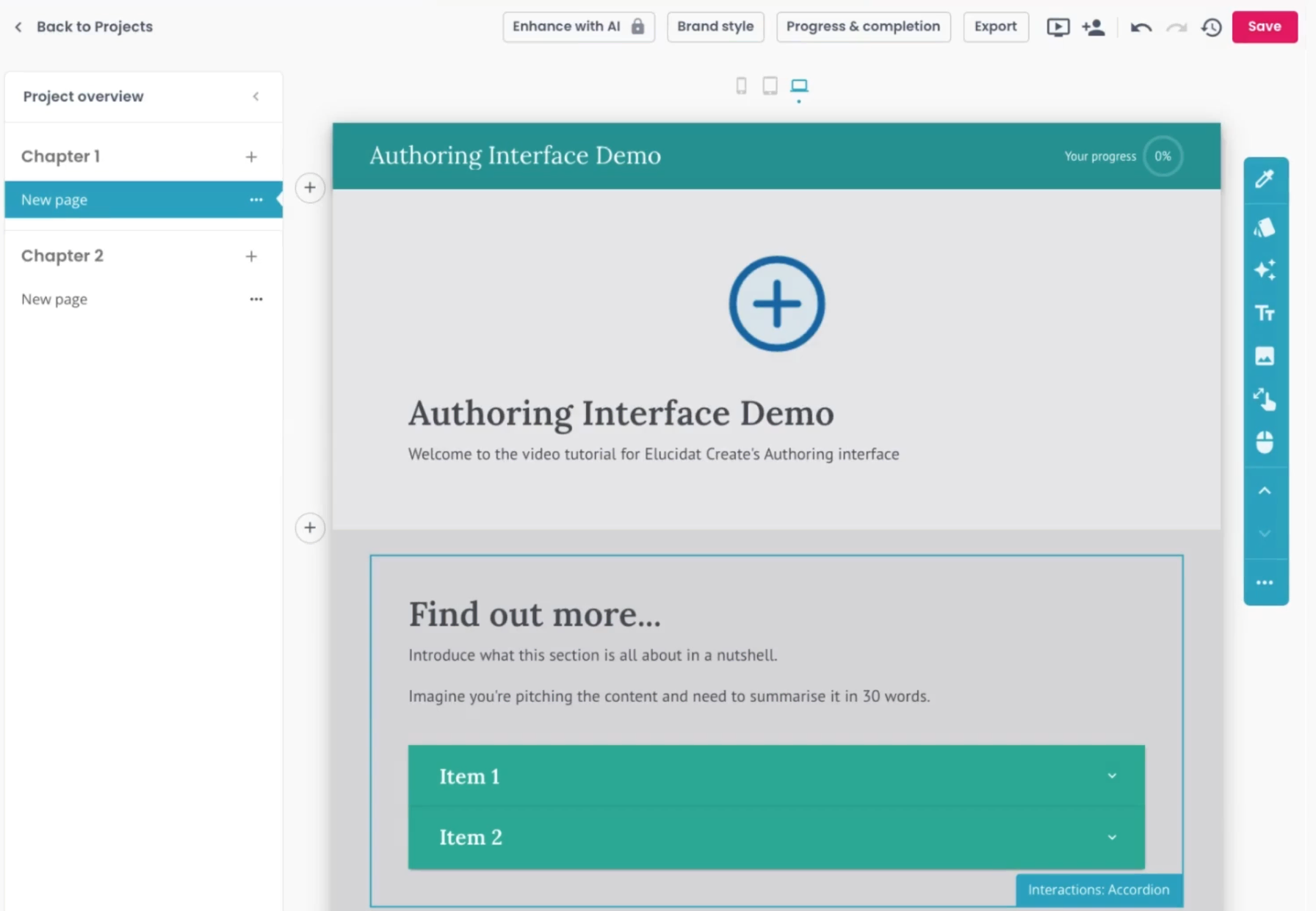
Elucidat is a fully cloud-based eLearning authoring platform designed mainly for large enterprises that require team collaboration and centralized course management.
However, Elucidat comes with a high pricing model that is often unsuitable for small teams, educators, or individual creators. Because it is entirely cloud-based, the platform requires a stable and fast internet connection; any network issues can directly impact authoring speed and overall productivity. Users may also experience performance limitations when working with complex projects, along with restrictions on file upload size and media handling, which can be challenging for content that relies heavily on large videos, simulations, or rich assets.
Strengths
- Web-based platform with no installation required
- Supports real-time collaboration among multiple authors
- Built-in templates for fast course creation
- Scalable for large corporate training teams
Weaknesses
- Very high subscription cost
- Heavily template-driven approach
- Limited flexibility for advanced custom interactions
- Requires a constant internet connection
- Less suitable for detailed software simulations
- Can feel restrictive for creative course designers
Best Fit
Elucidat works well for large enterprises that need standardized, team-based content production at scale.
Final Verdict: The Best Choice for 2026
After comparing all major options, one platform clearly delivers the best balance of power, usability, and price:
👉 ActivePresenter 10
It offers:
- Advanced interactivity
- True software simulations
- Built-in multimedia editing
- AI-powered tools
- SCORM and HTML5 support
- Direct export to uPresenter LMS
- Affordable pricing
For most creators, it is the smartest and most practical choice among all authoring tools for interactive content in 2026.
Ready to Create Engaging eLearning?
If you want to build professional, interactive courses quickly and efficiently, ActivePresenter is the perfect solution.
👉 Download ActivePresenter now and start creating powerful interactive content today.