
Choosing the right screen recording and video editing tool can make or break your teaching workflow.
Whether you’re a classroom teacher moving to online instruction, a corporate trainer building onboarding videos, or a complete beginner just starting out, the software you pick will determine how much time you spend editing versus actually teaching.
Two names come up again and again in this space: Camtasia and ActivePresenter. Both are capable, well-established tools, but they serve different needs, different budgets, and different skill levels.
In this honest, side-by-side comparison, I’ll compare Camtasia vs ActivePreseter & break down exactly what each tool does well, where each one falls short, and which one is the smarter choice depending on your specific situation.
What Are Camtasia and ActivePresenter?
Before diving into the comparison, let’s quickly establish what each tool actually is, because they’re not identical products chasing the same goal.
Camtasia, developed by TechSmith, is a well-known screen recorder and video editor that has been popular with content creators, marketers, and educators for over two decades. Its strength lies in its polished, beginner-friendly video editing experience and its brand recognition.
ActivePresenter, developed by Atomi Systems, is a more comprehensive eLearning authoring platform that combines screen recording, seamless video editing, and advanced interactive course creation (SCORM/xAPI).
It’s designed specifically for educators, instructional designers, and corporate trainers who need more than just a video – they need a complete learning experience.
💡 Insight: In several years of working with eLearning teams, I’ve seen many educators start with Camtasia, then gradually migrate to ActivePresenter once they realize they need interactive quizzes, branching scenarios, or LMS integration. Understanding why that switch happens is the key to making the right choice from day one.
Quick Comparison: Camtasia vs ActivePresenter at a Glance
| Feature | Camtasia | ActivePresenter |
| Screen Recording | ✅ Excellent | ✅ Excellent |
| Video Editing | ✅ Strong, beginner-friendly | ✅ Strong, non-linear timeline |
| eLearning Interactivity | ⚠️ Basic (quizzes only) | ✅ Advanced (drag-drop, simulations) |
| SCORM / xAPI Export | ⚠️Partial support | ✅ Full support |
| Software Simulation | ❌ Limited | ✅ Built-in, automatic event capture |
| Responsive Design | ❌ Limited | ✅ Multi-device adaptive layout |
| Free Version | ❌ Limited time trial only (watermark) | ✅ No limited time for trial |
| Pricing | from $179.88 yearly subscription$599 yearly with AI features & Assets | Free / Pro from ~$249 (one-time payment) |
| Platform | Windows, macOS | Windows, macOS |
| Best For | Video creators, marketers | Teachers, educators, eLearning designers |
Camtasia vs ActivePresenter Head-to-Head Comparison : 6 Key Criteria
1. Screen Recording Quality
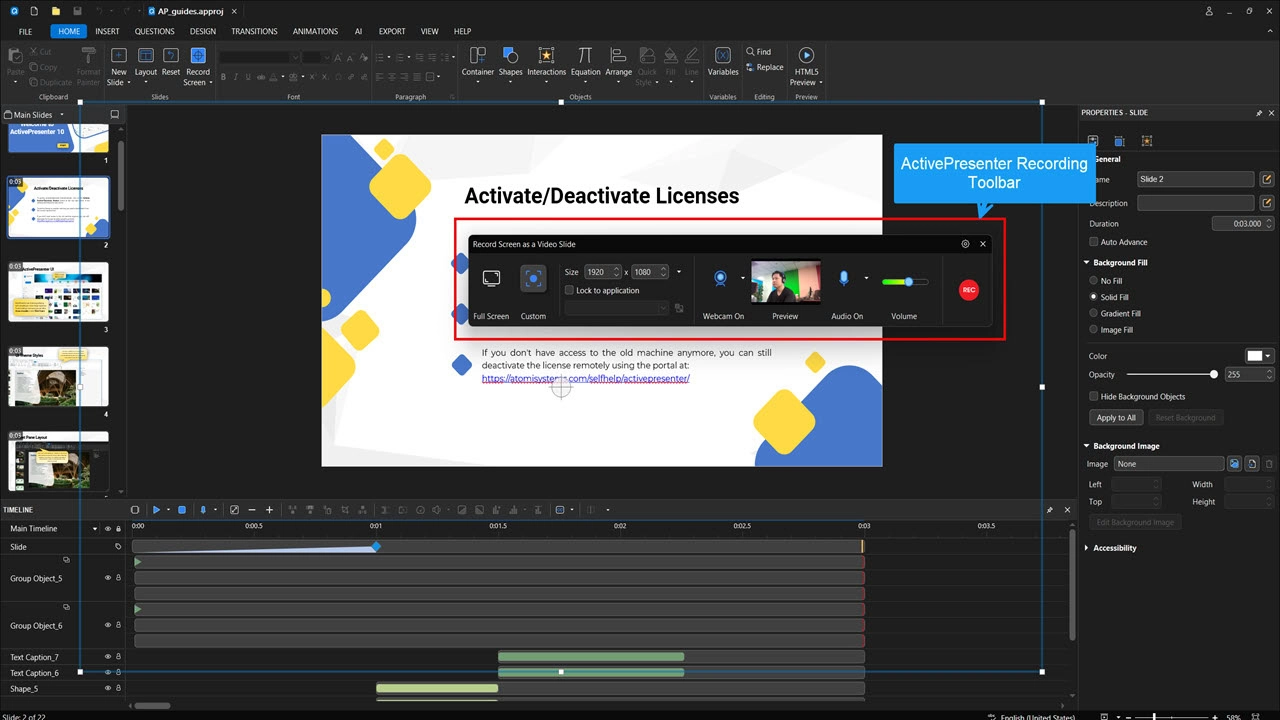
Both tools offer solid screen recording capabilities. You can capture your full screen, a specific window, or a custom region. Both support webcam overlay and system/microphone audio capture.
Camtasia offers a clean, streamlined recording experience. The interface is minimal and approachable, which is great for beginners who want to hit record and go.

ActivePresenter matches this with high-quality recording, and adds one important advantage: automatic event capture.
When you record software interactions (clicking buttons, navigating menus), ActivePresenter logs those events automatically. This is a game-changer for creating software simulations and step-by-step tutorials.
2. Video Editing Capabilities
This is where both tools genuinely shine, but with different strengths.
Camtasia is widely praised for its intuitive drag-and-drop timeline. Trimming clips, adding transitions, inserting text callouts, and applying zoom-and-pan effects are all accessible within a few clicks.
ActivePresenter offers a multi-track timeline editor that gives you granular control over every element: audio, video, annotations, interactive objects, and animations, all on separate, manageable tracks. Features include:
- Advanced audio editing: noise reduction, auto captions, etc.
- Visual effects and professional transitions
- Rich annotation tools: text, shapes, spotlights, blur effects
- Non-linear editing: rearrange, cut, and modify without permanently altering source file.
For beginners: Camtasia (easier to start)
For educators who need quick recordings & tutorials: ActivePresenter (more precise control)
3. eLearning & Interactivity Features
This is where the Camtasia vs ActivePresenter diverges most significantly, and where your decision likely hinges.
Camtasia has added some interactive elements over the years (basic interactive video quizzes), but its core identity is a video tool.
If you need a polished video with some light interactivity, it works. But it was not built for complex instructional design.
ActivePresenter was built from the ground up as an eLearning authoring tool. Its interactive capabilities include:
- Quizzes & Surveys: Multiple choice, fill-in-the-blank, matching, drag-and-drop, hotspot questions
- Branching Scenarios: Create adaptive learning paths based on learner responses
- Software Simulations: Build realistic, clickable software demos with automatic feedback
- Responsive Design: Content automatically adapts to desktops, tablets, and smartphones
- SCORM 1.2, SCORM 2004, xAPI Export: Full LMS compatibility for tracking learner progress

💡 Insight: If you’re a teacher who wants to track whether students actually completed your video or passed a quiz, you need SCORM/xAPI. Camtasia simply cannot provide this. ActivePresenter can publish a complete, trackable course package that integrates with Moodle, Canvas, Blackboard, and almost any LMS.
4. Export Options
Camtasia exports to standard video formats (MP4, GIF, M4A), SCORM, and allows direct publishing to YouTube, Vimeo, and TechSmith’s own platform (Screencast). Great for simple video distribution.
ActivePresenter offers a far broader range of export options:
- Video formats: MP4, AVI, WMV, WebM, MKV
- HTML5: Embed interactive content directly on websites, or uPresenter eLearning platform
- SCORM 1.2 /SCORM 2004/ xAPI: Full eLearning package export for LMS
- Images & Documents: Export slides as PNG, PDF, Word
- Interactive HTML: Publish quizzes and simulations as standalone web content

If your goal is simply to upload a video to YouTube, both tools work equally well. But if you need to deliver a course through an LMS, only ActivePresenter can do the job.
5. Learning Curve & User Interface
Camtasia wins on approachability. Its clean, modern interface gets new users recording and editing within minutes. For someone who has never used video editing software before, this matters.
ActivePresenter’s interface is more feature-rich, which means there’s more to explore, but it’s logically organized and well-documented.
Most educators find they can handle basic recording and editing quickly, and then gradually unlock the more advanced eLearning features as their confidence grows.
Both Camtasia vs ActivePresenter have active documentation, tutorial libraries, and community support.
6. Pricing & Accessibility
Let’s talk about the elephant in the room: cost.
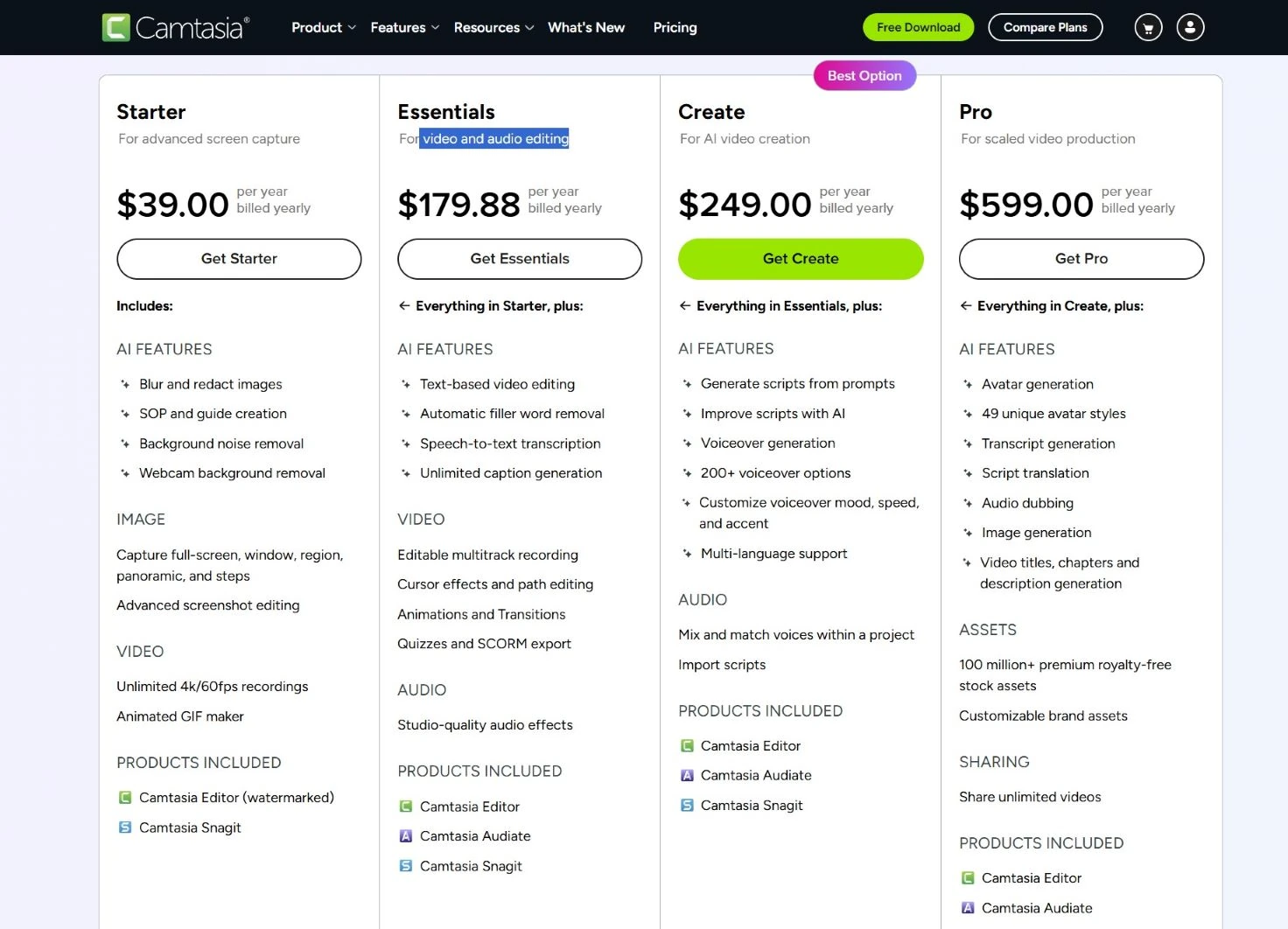
Camtasia pricing (as of 2026):
- For video and audio editing (Essentials plan): starts at $179.88/year (billed annually). The Pro plan, which includes AI features (Avatar generation,text-to-speech etc.) jumps to $599 per user/year.
- A free trial is available, but exports include a watermark.
ActivePresenter pricing:
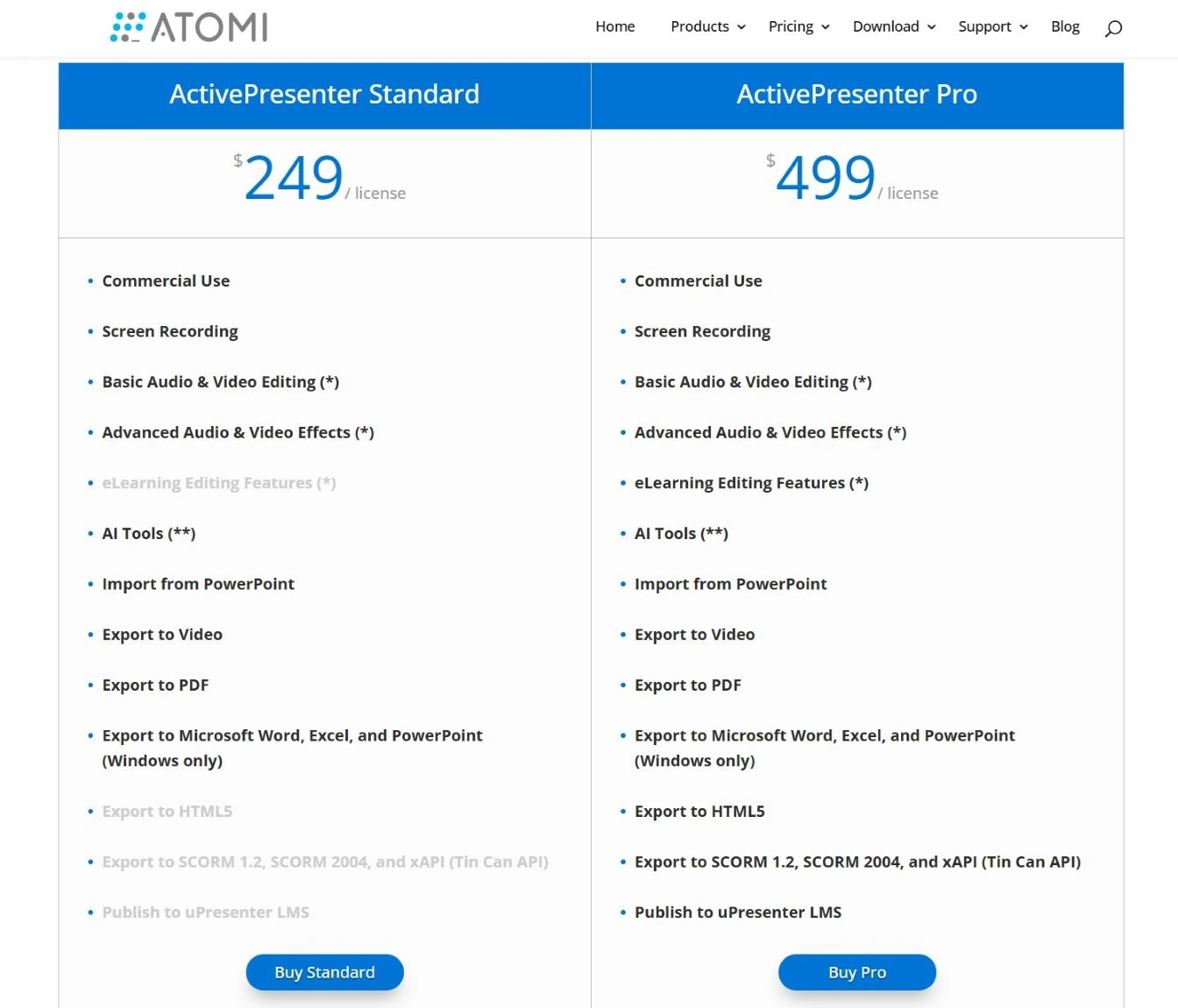
- Free version: No time limits, includes screen recording, video editing, and core eLearning features. Exported videos are watermark-free
- Paid version: Starting from ~$249 (one-time, perpetual license) with no subscription required
Real-World Use Cases
Use Case 1: A High School Teacher Creating Flipped Classroom Videos
Best Tool: ActivePresenter
A teacher wants to record short 5-10 minute lesson videos, add text annotations, and share them with students. ActivePresenter handles this perfectly with no watermark, clean MP4 export, and built-in annotation tools.
Use Case 2: A Corporate Trainer Building a Software Onboarding Course
Best Tool: ActivePresenter
An HR trainer needs to teach new employees how to use an internal CRM system. They need clickable software simulations, branching feedback (“If you click the wrong button, here’s what to do”), and SCORM export to track completion in their LMS. This is ActivePresenter’s specialty, Camtasia simply cannot deliver this workflow.
Use Case 3: A YouTuber or Online Course Creator Focused on Video Quality
Best Tool: Camtasia
A content creator who primarily publishes on YouTube or Udemy and wants polished, visually appealing videos with smooth zoom effects, animated callouts, and easy direct publishing. Camtasia’s video-first approach and streamlined workflow make it the better fit here.
Pros & Cons: An Honest Assessment
Camtasia Pros and Cons
| ✅ Pros | ❌ Cons |
| Extremely beginner-friendly interface | High price point with subscription |
| Polished video effects and transitions | Limited eLearning interactivity |
| Direct publish to YouTube/Vimeo | Watermark on free trial |
| Good for marketing and promotional videos |
ActivePresenter Pros and Cons
| ✅ Pros | ❌ Cons |
| No time limit for free version | A bit learning curve |
| Full SCORM/xAPI support for LMS. | Limited library assets |
| Advanced eLearning interactivity (drag-n-drop, timer, etc.) | |
| Software simulation with automatic event capture | |
| One-time Pro license (no subscription trap) |
Camtasia vs ActivePresenter: Evaluation Criteria Summary
When choosing between these tools, ask yourself these 5 questions:
- Do I need LMS integration or SCORM export? → If yes, ActivePresenter is your only real choice here.
- What is my budget? → If cost is a constraint, ActivePresenter’s free version is a serious option.
- How complex is my content? → Simple tutorial videos: either tool works. Interactive software simulations: ActivePresenter.
- Who is my audience? → Learners in an LMS: ActivePresenter. YouTube/social media: either tool.
Final Words: Which Tool Should You Choose?
Choose Camtasia if:
- You’re a content creator or marketer focused on polished, shareable videos
- You publish primarily to YouTube, Vimeo, or social media
- You want the most beginner-friendly experience and budget is not a concern
Choose ActivePresenter if:
- You’re a teacher, educator, or corporate trainer
- You need SCORM/xAPI export for LMS integration
- You want to create interactive quizzes, branching scenarios, or software simulations
- You want a powerful, professional tool without paying a premium — the free version alone outperforms many paid alternatives
Generally, ActivePresenter consistently delivers more value per dollar (or zero dollars) for educators. Camtasia is excellent at what it does, but it was designed for video creators, not instructional designers. If teaching and learning is your goal, ActivePresenter is the smarter, more scalable choice.
Ready to Get Started?
ActivePresenter is free to download – no time limit, no credit card required. Whether you’re a first-time screen recorder or an experienced educator looking to level up your courses, it’s worth trying today.

See also:
Camtasia 2026 Alternatives: 5 Powerful Tools That Cost Less and Do More