
Many people start with a very simple idea: to package their years of expertise into an effective online learning course.
However, after only a few attempts at learning about it, they were quickly overwhelmed by a bunch of highly technical terms, tools, and methods, such as eLearning, LMS, SCORM, xAPI, and eLearning authoring software looks “somewhat similar” to PowerPoint.
This makes getting started become the biggest struggle.
#1 Difficulty: eLearning authoring software = PowerPoint?
At first glance, it’s easy to think so.PowerPoint is a presentation tool. It combines text, images, audio, and video to make content more engaging.
But eLearning authoring software goes far beyond presentation.
Instead of simply showing information, it helps you design a complete learning experience – one where learners must interact, answer questions, receive feedback, and move through a structured learning path. Learning is no longer passive, it becomes guided and measurable.
#2 Difficulty: Choosing the Right eLearning Authoring Software
Selecting the right tool from the beginning is not easy.
Beginners are often faced with too many options. Every eLearning tool promotes a long list of advanced features, making it difficult to tell what is actually necessary at the starting stage.
On top of that, many tools come with high license costs. Investing too early can feel risky, but not investing leaves you stuck and unsure where to begin.
See how interactivity works in real eLearning project!
#3 Difficulty: Learning Effort & Time Investment
Beginners not only need to learn how to use the software, but also need to understand a range of concepts, terminology, and design logic.
It is worth noting that the technical support systems of some big companies are…unfriendly for beginners: slow response times, unclear instructions, and confusing documentation. This can easily discourage users right at the start.
#4 Difficulty: Combining Too Many Tools
Another common but less talked about challenge, is the need to use multiple tools to create a complete lesson.
Many beginners use:
- one tool for screen recording
- another for video editing
- separate software for images or illustrations
- and AI tools to generate learning content
Constantly switching between tools is time-consuming and mentally exhausting. For beginners, this complexity can drain motivation before they even finish their first lesson.
So, Is There a Solution?
For people who have never formally studied eLearning, the answer is not about the most powerful or feature-heavy eLearning authoring software
What beginners really need is:
- An easy-peasy starting tool
- easy to learn
- flexible enough to grow with demand
The right tool should lower learning barriers with a familiar interface, intuitive workflows, and clear documentation. It should also reduce the need to juggle multiple software by covering essential tasks: creating lessons, editing videos, adding interactivity, and publishing in one seamless process.
Among eLearning authoring software, ActivePresenter is the easiest to get started with. If you are already familiar with PowerPoint, then getting started with it will be no problem at all.
With ActivePresenter you can:
- Screen recording with webcam
- Video editing
- Add interactive activities and questions with feedback.
- Publish lectures and track results.
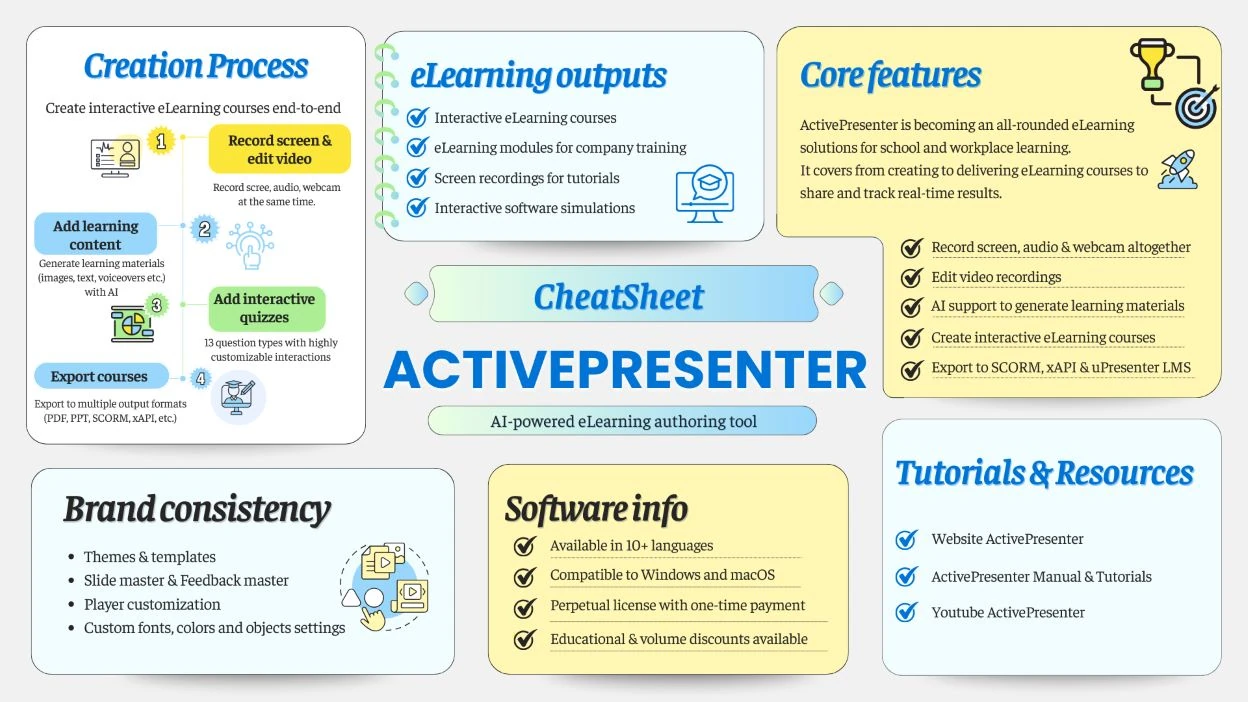
The shift from PowerPoint to eLearning isn’t just about changing tools, it’s a change in mindset. You move from presenting information to designing structured, interactive, and feedback-driven learning experiences.
Download ActivePresenter and experience a tool that feels familiar, built for eLearning purposes!

Why ActivePresenter eLearning Authoring Software Works For Beginners?
1. If You Can Use PowerPoint, You Can Use ActivePresenter
Slide-based design thinking
Just like PowerPoint, ActivePresenter is slide-based. Each slide holds content such as text, images, audio, or video, and you control how learners move through that content using animations and transitions.
If you’re already comfortable arranging content on slides and applying simple effects in PowerPoint, you’ll feel at home almost immediately in ActivePresenter. The learning curve is far gentler than most people expect.

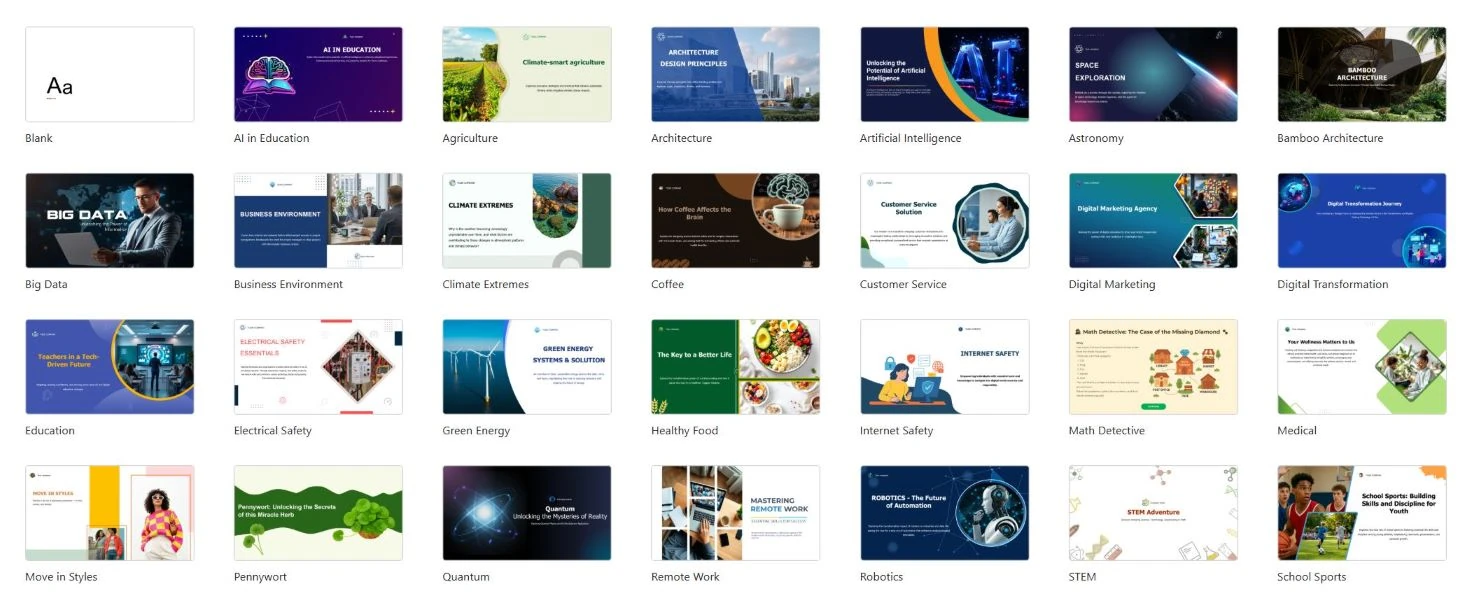
Templates & Samples
PowerPoint offers plenty of templates, but most of them focus on layout and visual presentation. They’re designed for presenting, not teaching, which often leads to repetitive and monotonous slides.
ActivePresenter, on the other hand, provides ready-made eLearning samples built on real instructional design principles. These samples already include:
- Interactive elements
- Quiz questions
- Corresponding feedbacks
- A complete learning flow
Beginners can open these projects, explore how they’re structured, modify them, and learn by doing without having to design everything from zero.
Screen Recording Without Switching Tools
PowerPoint can record your screen, but its video editing capabilities are very limited.
With ActivePresenter, screen recording, webcam recording, and voice recording are just the starting point. Every recording appears directly on a professional editing timeline, where you can:
- Visual: Cut and trim clips, merge segments
- Audio: AI noise removal, audio ducking
- Align audio and visuals
- Fine-tune timing
This means you don’t need to jump between separate recording and editing software. Everything happens in one place, which saves time and reduces frustration, especially for beginners.
Timeline
Another major difference is the timeline.
PowerPoint doesn’t provide a true timeline, making it hard to control animations and object timing as projects become more complex.
ActivePresenter solves this with a clear, visual timeline that lets you see and adjust every object on the slide.
You can easily synchronize animations, audio, and interactions while the interface remains understandable even for first-time users.
Set up the action (Triggers)
At a basic level, PowerPoint allows simple interactions, such as “On Click” actions or basic triggers.
This eLearning authoring software, ActivePresenter keeps this familiar approach but expands it into a more powerful event–action system. Each object can respond to specific events with clearly defined actions. For example: Change object states when mouse hovers over, toggle objects, etc.
Beginners can start with very simple interactions and only explore advanced logic when they’re ready. You’re never forced to understand everything upfront.
2. Establish a Well-structured Lesson Right From The Start
One key reason why ActivePresenter is considered easy to use for beginners lies in the way the eLearning authoring features are organized.
Instead of leaving users to figure out lesson structure on their own, ActivePresenter provides a pre-defined framework. This removes much of the guesswork and reduces the fear of “doing it wrong” early on, which is a common reason many people give up when first trying eLearning tools.
Right from the start, ActivePresenter clearly separates core eLearning components, most notably the Slide Master and Feedback Master.
- Slide Master helps you set up a consistent visual layout across your course.
- Feedback Master controls how feedback appears when learners answer questions: correct, incorrect, time’s up, incomplete, etc.
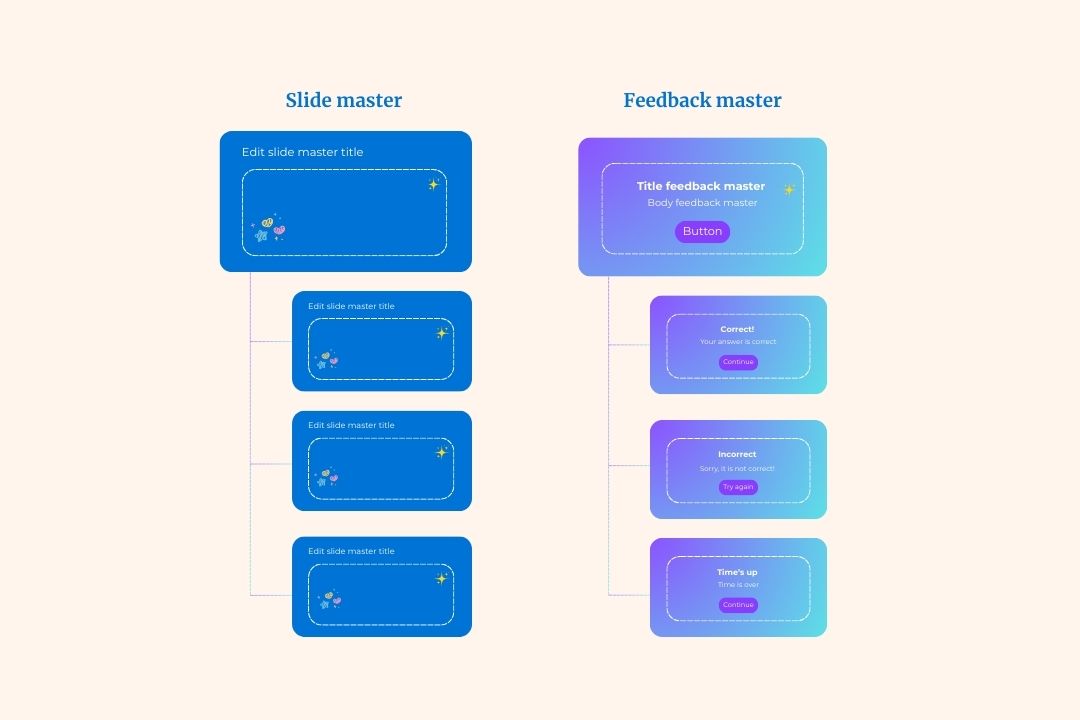
This separation keeps feedback organized and consistent, instead of scattered and hard to manage. As a result, your lessons feel more structured and professional without extra effort.
ActivePresenter also encourages good design habits by letting you define fonts and color schemes at the project level. This ensures visual consistency throughout the entire course and eliminates the need for time-consuming re-editing later. For beginners, this is especially helpful, you can focus on content, not design details.
Overall, this built-in structure helps new users get comfortable faster and significantly lowers the risk of early mistakes that often discourage beginners.
3. Learn as You Go, Use as You Learn
With ActivePresenter, you don’t need to fully understand eLearning authoring software or theory, SCORM standards, or interactive logic before you begin.
Instead, you can start with the most familiar tasks.
Many beginners begin by creating simple videos: recording their screen, adding voiceovers, and editing recordings much like using basic video editing software. All of this happens inside one tool.
Once you feel comfortable with the interface and workflow, you can gradually add interactive elements, quiz questions, and feedback to transform a simple video into a complete eLearning lecture. Each step stands on its own and can be learned at your own pace.
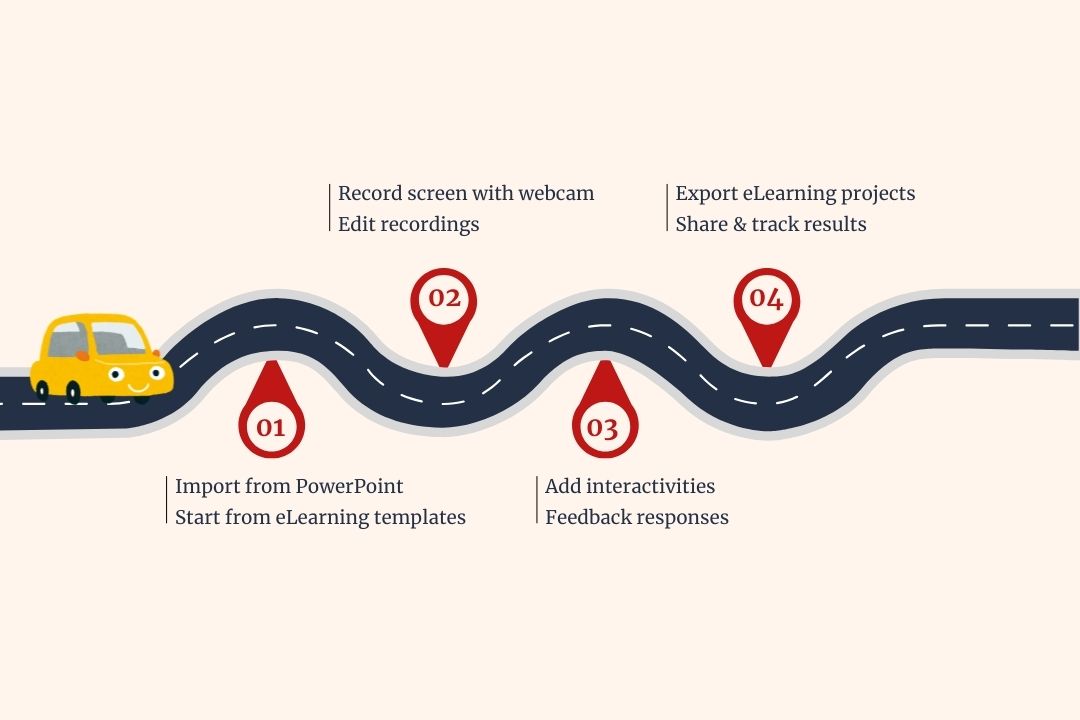
This gradual approach prevents the common beginner problem: information overload when too many concepts and technical requirements appear at once.
Compared to more complex tools like Articulate or iSpring, ActivePresenter takes a noticeably more accessible approach. It doesn’t force users to understand lesson states, triggers, or advanced logic upfront.
Instead, it lets beginners focus on building content first, then expand their skills naturally over time.
In short: do first, understand later, and grow when you’re ready.
This mindset is crucial in helping beginners stay motivated and actually finish their first eLearning project.
4. One tool, Multiple Outputs Options
Another reason why ActivePresenter is easy to use and suitable for beginners is that the software itself is a tool that can generate many different outputs, preventing users from being “stuck” with only one way of doing things from the start.
When you’re ready to create a full eLearning course, ActivePresenter allows you to export to SCORM, xAPI, or HTML5 for LMS deployment. But beginners are never forced to go down that path immediately.
In many cases, users can:
- Export back to PowerPoint to continue editing or presenting in a familiar format
- Export videos for teaching, sharing, or uploading to popular platforms

This creates a “safe fallback” option. You can experiment freely without worrying about choosing the wrong format or committing too early to a complex eLearning workflow.
You can start with videos, move to slide-based lessons, and later build full eLearning courses, all within the same tool. This flexibility allows you to grow gradually without being limited from day one.
5. A Truly Beginner-Friendly Free Trial
ActivePresenter’s free trial policy is another reason it’s so approachable for beginners.
The trial version:
- No time limit
- No login required
You can download the software, open it, and start creating immediately with no barriers, no setup friction.
More importantly, the trial allows you to build real interactive eLearning lectures, not just test isolated features or watch demos. This hands-on experience helps you quickly understand the actual workflow and decide whether ActivePresenter fits your needs before making any long-term commitment.
To support this learning journey, ActivePresenter also provides a rich library of step-by-step video tutorials on YouTube, ranging from beginner to advanced levels. This learning support perfectly matches the “learn as you go, use as you learn” principle, allowing you to progress at your own pace without pressure.
2 Ways to Get Started with ActivePresenter eLearning Authoring Software
Import from PowerPoint
One of the simplest and most familiar ways to start ActivePresenter is to import existing PowerPoint. The entire slide content remains intact, you can start adding audio, video, questions, and interactive elements directly onto the existing presentation.
This approach allows you to avoid building content from scratch, instead focusing on upgrading your PowerPoint presentations into eLearning courses.
From templates library
In addition, ActivePresenter allows you to create new lessons using a library of pre-built templates and sample projects. These examples come with ready-made learning structures, interactions, and questions already in place.
For beginners, this is incredibly valuable. You can open a sample lesson, see how everything is put together, make small changes, and learn by doing, without the pressure of designing an entire course from scratch.
It’s a fast, practical way to understand how effective eLearning lessons are structured.
Summary
For those new to eLearning, the most important factor isn’t choosing the most powerful or most feature-packed tool. What truly matters is finding a solution that’s easy to start with and flexible enough to grow with you.
ActivePresenter strikes this balance exceptionally well. It feels familiar to PowerPoint users, supports hands-on learning, removes the need for deep technical knowledge at the beginning, and still offers plenty of room to expand as your skills and needs evolve.
This balance between accessibility and scalability is what makes ActivePresenter stand out, and why it’s one of the most suitable eLearning authoring tools for beginners who want to start confidently. With ActivePresenter, you will not feel overwhelmed or giving up halfway when learning to use.