
If you’ve ever finished a 20-minute screen recording in OBS Studio, felt great about it, and then realized you now need to open an entirely different application just to trim out a cough or add a text callout. You know the frustration I’m talking about.
Here’s the honest truth: OBS was built for capturing and streaming, not for editing or learning video. There’s no timeline editor. No annotations. No way to add quizzes, captions, or zoom effects inside the app.
For content creators, educators, and L&D professionals who need to go from “raw recording” to “polished, publish-ready video” that gap is a real productivity killer.
So I tested and compared four tools that can genuinely replace OBS Studio for screen recording workflows, tools that let you record and edit in one place, without sacrificing capture quality. Let’s break them down.
What to Look for in an OBS Studio Alternative: Evaluation Criteria
Before jumping into the list, here’s the framework I use when evaluating any screen recording tool. This keeps things objective:
| Criterion | Why It Matters |
| Recording Quality | High quality (1080p or above), frame rate, system audio, webcam & mic capture |
| Built-in Video Editing | Timeline editor, trimming, transitions, effects without exporting to another app |
| Annotations & Interactivity | Callouts, shapes, cursor effects, zoom-n-pan, text overlays |
| eLearning Capabilities | Quizzes, SCORM/xAPI export, software simulations, LMS compatibility |
| Export Flexibility | MP4, HTML5, SCORM, WebM, AVI options |
| Ease of Use | How fast can a new user produce something usable? |
| Pricing & Free Tier | Watermarks? Time limits? Hidden costs? |
| Platform Support | Windows, macOS, browser-based? |
OBS scores a perfect 10 on recording quality and price (it’s free). But it scores a zero on editing, annotations, and eLearning. That’s the gap we’re filling.
Quick Comparison: 4 Best OBS Studio Alternatives at a Glance
| Feature | ActivePresenter | Bandicam | ScreenPal | Screencastify |
| Platform | Windows, macOS | Windows only | Windows, macOS | Browser (Chrome) |
| Built-in Video Editor | ✅ Advanced timeline + AI tools | ❌ None | ✅ Basic–intermediate | ✅ Basic trim/merge |
| Screen Recording | ✅ Full/region/window | ✅ High-FPS capture | ✅ Full/region/webcam | ✅ Browser & desktop |
| Annotations & Callouts | ✅ Extensive | ⚠️ Basic | ✅ Good | ⚠️ Basic |
| eLearning/SCORM | ✅ Full SCORM/xAPI | ❌ | ⚠️ Limited | ❌ |
| Interactive Quizzes | ✅ | ❌ | ⚠️ Limited | ⚠️ Limited |
| Free Version | ✅ Unlimited, no watermark | ⚠️ Watermark on free | ⚠️15 minute/video | ⚠️ 30 min/video limit with watermark |
| Best For | Educators, L&D, trainers | Gamers, high-FPS recording | General screencasting | Quick browser recordings |
Now let’s dig into each one.
1. ActivePresenter — Best OBS Alternative for Recording, Editing, And Teaching
“This is the tool I recommend to every eLearning developer and tutorial creator who tells me they’ve outgrown OBS – or gotten tired of juggling two apps.”
What Is ActivePresenter?
ActivePresenter, developed by Atomi Systems, is a full-featured screen recording & editing tool that doubles as a professional screen recorder and video editor. Unlike OBS which hands you a raw video file and wishes you luck, ActivePresenter gives you a complete post-production and instructional design suite in one application.
No exporting, no re-importing, no format conversion headaches. You just hit Record → Edit → Publish. Done.
Key Features
- Flexible screen capture: Record full screen, a specific region, or a single application window with system audio, microphone, and webcam simultaneously.
- Advanced timeline editor: Multi-track editing with popular editing features.
- Annotations & callouts: Shapes, arrows, spotlights, blur effects, cursor highlighting, and zoom-n-pan, all added in post-production.
- Interactive eLearning elements: Build quizzes (multiple choice, fill-in-the-blank, drag-and-drop), and click-based interactions.
- Export versatility: MP4, AVI, WMV, WebM, MKV for video, plus HTML5, SCORM, and xAPI for LMS deployment.

3 Real-World Scenarios Where ActivePresenter Replaces OBS
- IT Training Team Creating Software Tutorials: Instead of recording in OBS, editing in Premiere, and building quizzes in a separate LMS tool, do everything in ActivePresenter.
Record the software walkthrough, add cursor highlights and callout annotations, insert knowledge-check quizzes at key points, and export as video or SCORM package.
- Freelance Course Creator: Record your screen and webcam simultaneously, trim dead air in the built-in editor, add zoom effects to highlight UI elements, and export polished MP4 videos, all without opening a second app.
- Bank Compliance Training: Build interactive software simulations where employees practice navigating internal systems. ActivePresenter captures each click and lets you create branching “try-it” scenarios with feedback, This is something OBS (or any pure screen recorder) simply cannot do.
ActivePresenter Pricing
- Free Edition: Full recording & editing features, no watermark, no time limit.
- Standard License: $249 One-time purchase (unlocks advanced export options).
- Pro License: $499 One-time purchase (adds SCORM/xAPI, advanced interactivity).
No subscription. No recurring fees. For anyone escaping software subscription fatigue, this matters.
2. Bandicam – Best OBS Alternative for Game & Screen Recording
What Is Bandicam?
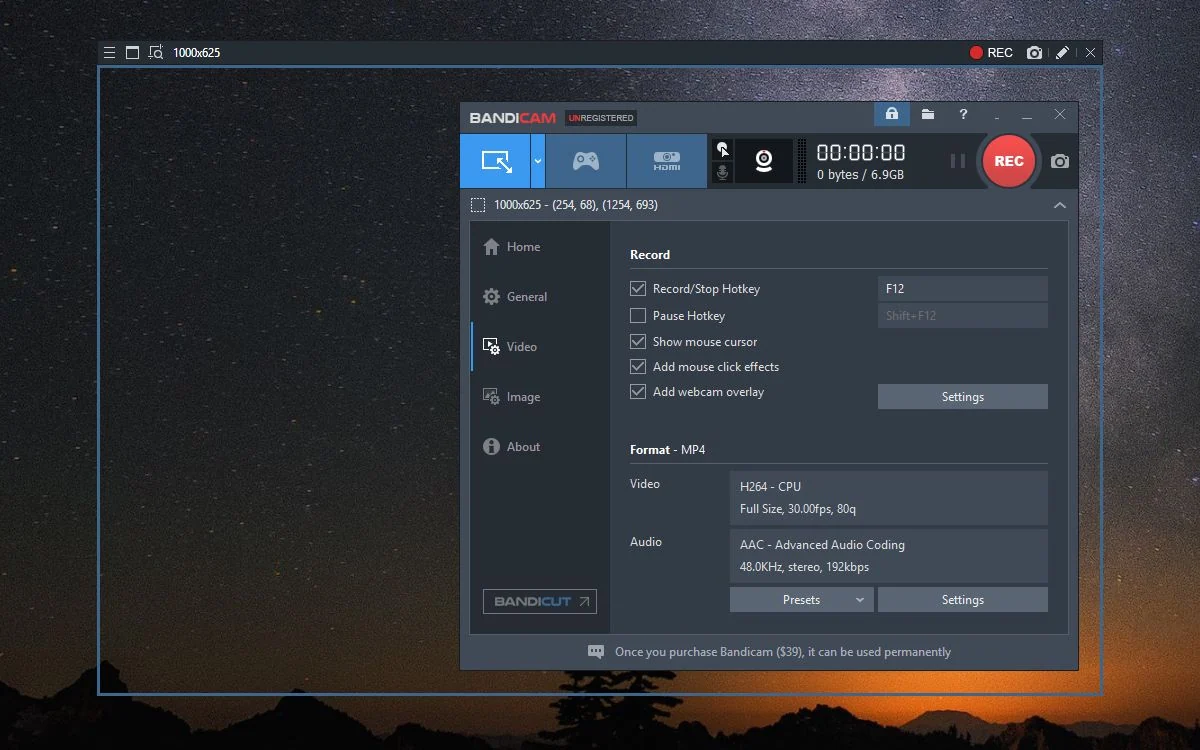
Bandicam is a lightweight, high-performance screen recorder built primarily for game recording and high-FPS capture on Windows. If your main complaint about OBS is its complexity and you just want a simple, reliable recorder with excellent compression, Bandicam delivers.
Key Features
- Game recording mode (DirectX/OpenGL/Vulkan hook) with up to 480 FPS capture
- Screen recording mode with area selection
- Real-time drawing during recording
- Hardware-accelerated encoding (NVIDIA NVENC, Intel Quick Sync, AMD VCE)
Pricing
- Free version (watermark with 15-min recording limit)
- One-time license purchase
3. ScreenPal – Best OBS Alternative for Simple Screencasting
What Is ScreenPal?
ScreenPal is a well-known screencasting tool that balances simplicity with enough editing features to handle most tutorial and presentation workflows. It’s particularly popular among educators and small business teams who need to produce quick explainer videos without a steep learning curve.
Key Features
- Screen + webcam recording with picture-in-picture
- Built-in video editor with trimming, cuts, and transitions
- Annotation tools: text, shapes, arrows, highlights
- Stock music and image library
- Cloud hosting with shareable links
Pricing
- Free version available (with limitations)
- Subscription plans (Deluxe, Max)

4. Screencastify – Best Browser-Based OBS Alternative for Quick Sharing
What Is Screencastify?
Screencastify is a Chrome browser extension that lets you record your screen, webcam, or both, directly from your browser. No software installation required. It’s designed for speed: click, record, share.
Key Features
- Browser-based recording (Chrome extension)
- Record browser tab, full desktop, or webcam only
- Basic editing: trim, merge, crop
- Easy sharing via link
Pricing
- Free version with watermark
- Paid subscription for unlimited recording and advanced features

To Sum Up: Which OBS Studio Alternatives Should You Choose?
After testing all five tools extensively, here’s my honest recommendation based on your specific workflow:
| Your Situation | Best Choice | Why |
| You create eLearning, training, or tutorials | ActivePresenter | Only tool with recording + editing + SCORM/xAPI + quizzes + simulations in one app. |
| You record gameplay or need high-FPS capture | Bandicam | Lightest footprint, best game capture engine, simple interface. |
| You need quick, simple screencasts | ScreenPal | Good balance of recording + basic editing + easy sharing. |
| You need zero-install browser recording | Screencastify | Fastest path from “I need to record something” to “here’s the link.” |
Personal Pick
For the majority of users reading this article, people who record screens and need to edit the result – ActivePresenter is the strongest all-around OBS alternative in 2026. Here’s why:
- It’s the only tool on this list that truly replaces OBS’s recording capabilities and adds a professional editor and offers interactive eLearning features.
- The free version has no watermark and no recording time limit
- It works entirely offline with no account sign up/in required.
- If your needs grow into eLearning territory (SCORM packages, interactive quizzes, software simulations), you don’t need to switch tools.
Ready to Replace Your OBS + Editor Workflow?
Download ActivePresenter Free – no watermark, no time limit, no credit card. Record your screen, edit the video, add annotations, and publish — all in one app.

Frequently Asked Questions
Is there a free alternative to OBS Studio with a built-in video editor?
Yes. ActivePresenter Free Edition offers screen recording and a full timeline-based video editor with no watermark and no recording time limit. It’s the most complete free option available in 2026.
Can I use OBS Studio for video editing?
No. OBS Studio is designed exclusively for screen capture and live streaming. It has no built-in video editing capabilities. You’ll need a separate tool like ActivePresenter, Filmora, or DaVinci Resolve to edit OBS recordings.
What is the best OBS alternative for eLearning?
ActivePresenter is the clear leader. It’s the only screen recording tool that also functions as a full eLearning authoring platform with SCORM/xAPI export, interactive quizzes, software simulations, and branching scenarios.
What OBS alternative works on Mac?
ActivePresenter and ScreenPal all support macOS. Bandicam is Windows-only, and Screencastify runs in any Chrome browser regardless of OS.