
You’ve opened two browser tabs – one for OBS Studio, one for ActivePresenter – and you’re stuck. Both are free to start. Both record your screen. But that’s roughly where the similarities end.
In over a decade of working with content creators, instructional designers, and IT trainers, I’ve seen the same mistake repeated: people pick the wrong tool for the job, spend weeks building a workflow around it, then start over. That’s time, and sometimes money, and you can’t get back.
This guide cuts through the noise. Whether you’re a solo educator building your first online course, a corporate trainer producing onboarding videos, or a freelance instructional designer juggling multiple clients, you’ll walk away knowing exactly which tool fits your workflow, and why.
Let’s get into comparing OBS Studio vs ActivePresenter for your screen recording purposes.
What Is OBS Studio?
OBS Studio (Open Broadcaster Software) is a free, open-source screen recording and live streaming tool trusted by millions of content creators, gamers, and broadcasters worldwide. It’s built for performance: multi-source scene composition, real-time mixing, and direct integration with streaming platforms like YouTube make it the gold standard for live content production.
Best known for: Live streaming, high-performance screen capture, multi-scene broadcasting.
Runs on: Windows, macOS, Linux.
Price: Free (open-source).

What Is ActivePresenter?
ActivePresenter, developed by Atomi Systems, is an all-in-one screen recording, video editing, and eLearning authoring platform. Unlike OBS, it’s designed not just to capture your screen, but to help you build something from that recording, whether that’s a polished tutorial video, an interactive software simulation, or a full SCORM-compliant online course.
Best known for: Screen recording, video editing, interactive eLearning content, SCORM/xAPI publishing.
Runs on: Windows, macOS.
Price: Free version available; paid plans with perpetual licensing options.
OBS Studio vs ActivePresenter: 5 Key Differences
1. Core Purpose: Broadcasting vs. Building
This is the most important distinction, and it shapes everything else.
OBS Studio is fundamentally a capture and broadcast tool. It excels at getting your screen content out to a stream, to a recording file, to a virtual camera.
What happens to that content after the recording stops? That’s your problem.
OBS has no built-in editing timeline, no annotation tools, no quiz builder, and no export-to-LMS capability.
ActivePresenter is a create and deliver platform. Recording is just the starting point. The moment you stop recording, you’re inside a full editing environment where you can trim clips, add callouts, insert interactive questions, build branching scenarios, and export directly to your LMS, all without touching a second application.
2. Video Editing: None vs. Full Suite
OBS Studio excels at capturing high-quality footage and live streaming, but it lacks built-in video editing tools. It does not feature a timeline editor, meaning users cannot cut, trim, or split clips within the application. Essential post-production tasks, such as adding callout annotations, blurring sensitive information, adjusting playback speed, or applying zoom and pan effects are not supported. To refine a recording made in OBS, users must export the file and use a third-party video editing software.
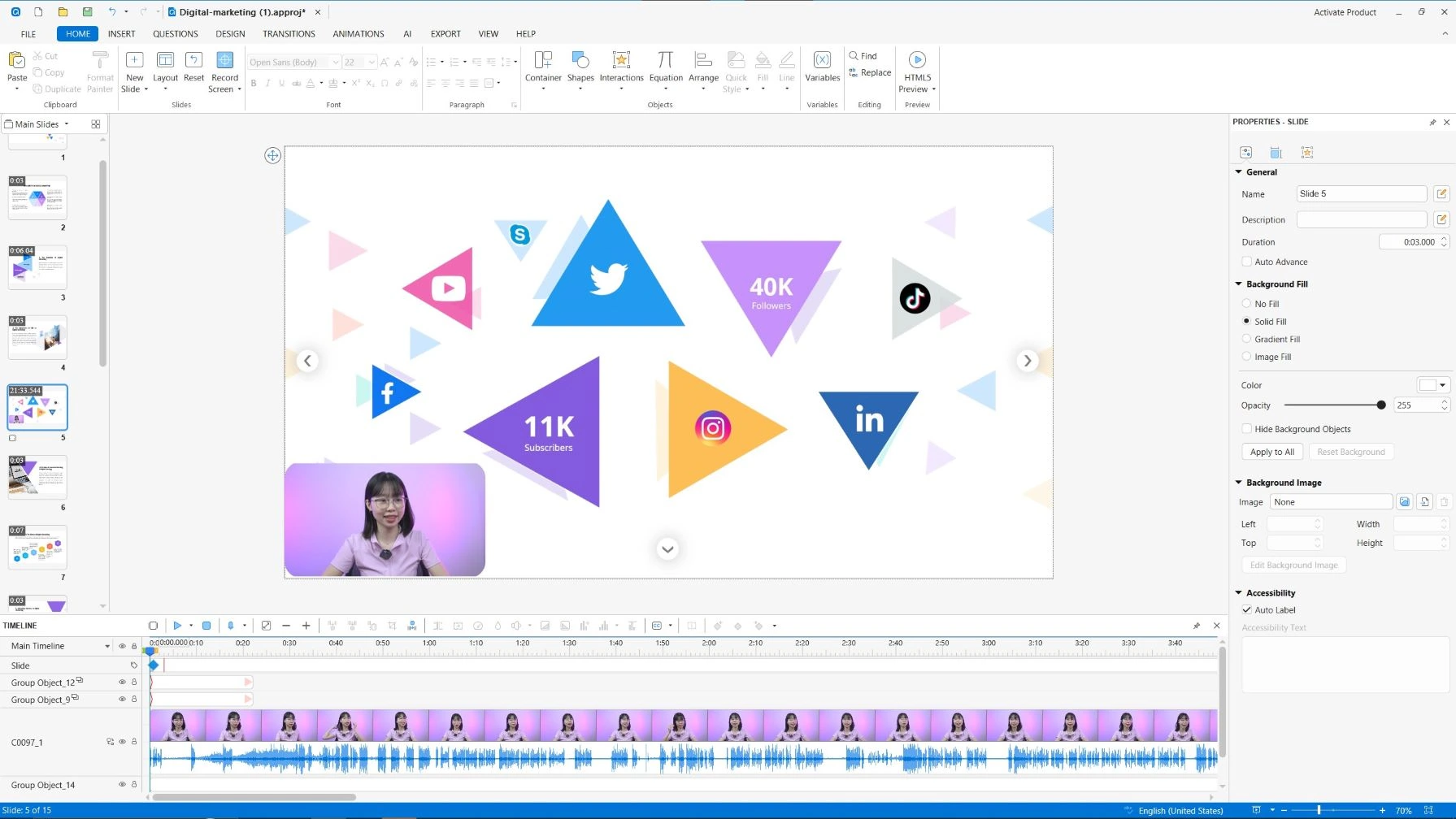
In contrast, ActivePresenter features a robust, built-in video editor that supports non-destructive editing. This allows you to make extensive changes on a multi-track timeline while keeping your original recording intact. Its professional toolset includes:
- Precision Editing: Easily cut, trim, split, and join clips.
- Visual Enhancements: Add zoom-and-pan effects to highlight key actions, insert professional callout bubbles
- Dynamic Controls: remove audio noise, adjust playback speed and audio levels directly within the interface.
When comparing video editing capabilities, the distinction between OBS Studio vs ActivePresenter is clear: OBS is designed primarily for recording and broadcasting, while ActivePresenter is a comprehensive all-in-one solution for both recording and post-production.
3. eLearning & Interactivity: Zero vs. Full Authoring
If you’re creating content for training or education, this category alone will make your decision.
OBS Studio: Zero native eLearning features. No quizzes, no branching, no SCORM, no xAPI. It simply wasn’t built for that.
ActivePresenter: A fully featured eLearning authoring tool. You can:
- Insert multiple question types (multiple choice, fill-in-the-blank, drag-and-drop, hotspot) with immediate feedback & slide randomization
- Use variables and the Event-Action panel to create dynamic, adaptive learning paths
- Export to SCORM 1.2, SCORM 2004, xAPI (Tin Can), or HTML5
- Publish directly to your LMS without leaving the application
This is the feature set that separates a “screen recorder” from a “course authoring platform.”
4. Export Options: Stream-First vs. Multi-Format
OBS Studio outputs primarily to MKV or MP4 video files, or streams directly to platforms. That’s intentional, it’s built for broadcast, not multi-format publishing.
ActivePresenter supports a wide range of export formats designed for different delivery contexts:
- MP4/MOV/MKV/WebM for video
- HTML5 – for interactive web-based delivery & lightweight uPresenter LMS
- SCORM 1.2 / SCORM 2004 / xAPI – for LMS integration with full tracking
- Document formats: Word, Excel, PDF
- PowerPoint – for presentation-based delivery
- PNG / JPG image sequences – for frame-by-frame use cases
5. Pricing & Licensing: Free vs. Freemium/Perpetual
OBS Studio: Completely free and open-source. No paid tiers, no feature locks. The tradeoff is that you get exactly what the community has built — no dedicated support, no integrated editing, no eLearning features.
ActivePresenter: Offers a free version with core recording and editing features. Paid plans unlock advanced eLearning features, SCORM/xAPI export, and direct LMS publishing. Critically, ActivePresenter offers perpetual licensing starting from $249 – you pay once and own the software, rather than paying an annual subscription that disappears the moment you stop paying.
For freelance instructional designers or small teams, this is a significant financial advantage. Competing tools in the eLearning authoring space can cost $4,500+ per year in subscription fees. A perpetual license from ActivePresenter represents a fundamentally different cost model.
OBS Studio vs ActivePresenter Pros & Cons: Honest Assessment
OBS Studio
| ✅ Pros | ❌ Cons |
| Completely free | No built-in video editor |
| Excellent for live streaming | Steep learning curve for beginners |
| Multi-source scene composition | No eLearning or interactivity features |
| Cross-platform (Win/Mac/Linux) | No SCORM/xAPI export |
| Large community & plugin ecosystem | Requires separate tools for editing |
| High-performance capture | Not designed for course creation |
ActivePresenter
| ✅ Pros | ❌ Cons |
| All-in-one: record + edit + publish | Not designed for live streaming |
| Full eLearning authoring suite | |
| SCORM/xAPI/HTML5 export | |
| Perpetual licensing available | |
| Direct LMS publishing |
Real-World Use Cases: Which Tool Fits Your Scenario?
Use Case 1: Live Streamer/Content Creator on Twitch or YouTube
Best choice: OBS Studio
If your primary output is a live stream, gameplay or a raw recording that you’ll edit in DaVinci Resolve or Premiere Pro, OBS is purpose-built for you. It’s free, powerful, and the streaming community has built an enormous ecosystem of plugins, themes, and tutorials around it. ActivePresenter simply doesn’t compete in this space – it’s not designed for live broadcast.
Use Case 2: Educator Building an Online Course for an LMS
Best choice: ActivePresenter
A university lecturer or corporate L&D professional needs to build a structured online course with video lessons, knowledge checks, and completion tracking. ActivePresenter lets them record lectures, add interactive quiz slides, build branching scenarios for different learner paths, and export the entire package as a SCORM file that drops directly into Moodle, Canvas, Cornerstone, or any other LMS. OBS cannot do any of this natively.
Use Case 3: Freelance Instructional Designer Working with Multiple Clients
Best choice: ActivePresenter
A freelancer working with three SME clients simultaneously can’t justify $4,500+ in annual software subscriptions. With ActivePresenter’s perpetual license, they invest once and build unlimited courses for unlimited clients – packaging each as SCORM for delivery to the client’s LMS of choice.
ActivePresenter’s direct LMS publishing feature lets the freelancer push completed courses straight to the client’s LMS without ever leaving the authoring environment, saving hours of manual upload and configuration per project.
Evaluation Criteria: How to Choose Your Screen Recording Tool
Before committing to either tool, run your workflow through these five questions:
| Criterion | OBS Studio | ActivePresenter |
| Do you need live streaming? | ✅ Native | ❌ Not supported |
| Do you need built-in video editing? | ❌ No | ✅ Full suite |
| Do you need eLearning/SCORM output? | ❌ No | ✅ Full support |
| Do you need software simulation? | ❌ No | ✅ Native feature |
| Is budget a primary constraint? | ✅ Free forever | ✅ Free tier + perpetual paid |
| Do you need a single-tool workflow? | ❌ Requires add-ons | ✅ All-in-one |
The simple rule: If your end goal is a stream or raw video file, choose OBS. If your end goal is a finished, interactive learning experience, choose ActivePresenter.
Last Words
OBS Studio is the best free screen recorder for live streaming and raw capture. It’s a remarkable piece of open-source software that does exactly what it promises with zero cost. If you’re a streamer, podcaster, or content creator who edits in a separate application, OBS is hard to beat.
On the other hand, ActivePresenter is the best all-in-one solution for anyone creating training, tutorials, or eLearning content. The combination of high-quality screen recording video editor, software simulation, and a complete eLearning authoring suite all in one application, is genuinely unique in the market. For educators, instructional designers, and corporate trainers, it eliminates the multi-tool workflow that costs hours per project.
They’re not really competing for the same user. They just happen to both record screens.
Ready to Try ActivePresenter?
If you’re building training content, tutorials, or online courses, there’s no better way to evaluate a tool than to use it on a real project.

Join thousands of instructional designers, educators, and corporate trainers who’ve made ActivePresenter the center of their content workflow. Have questions? Our Support community is active, responsive, and genuinely helpful.