
Have you ever sat through a corporate training session that felt like a never-ending PowerPoint presentation, leaving you more confused than when you started? That is what happens when content lacks proper instructional design.
Most learning fails because it’s not designed properly. Just because someone is a Subject Matter Expert doesn’t mean they know how to teach.
When organizations simply hand over a 50-page PDF or a text-heavy slide deck to learners, learners skim, they forget, and the training fails to produce any real behavioral change.
By leveraging a structured approach alongside powerful authoring tools like ActivePresenter, you can transform dry information into highly interactive, SCORM-compliant eLearning courses that actually drive results.
But before that, we are going to dive deep into what instructional design really is, how it works, and how you can apply it practically to create engaging learning experiences.
1. What is Instructional Design?
Learning doesn’t happen by chance. It requires a strategic blueprint. You need to capture attention, build relevance, provide practice, and assess understanding.
At its core, Instructional Design (ID) is the systematic practice of creating instructional experiences that make the acquisition of knowledge and skill more efficient, effective, and appealing.
Think of an instructional designer as an architect. An architect doesn’t just start laying bricks; they study the terrain, understand the people who will live in the house, draw blueprints, and plan the plumbing before any construction begins.
Similarly, instructional design is a structured approach to creating learning experiences. It shifts the focus away from what the instructor wants to say toward what the learner needs to achieve.
A robust instructional design strategy focuses heavily on three outcomes:
Understand: Breaking down complex concepts into digestible, logical chunks.
Apply: Providing safe environments (like interactive simulations) where learners can practice without real-world consequences.
Retain: Using techniques like spaced repetition and multimedia engagement to ensure knowledge sticks long after the course ends.
2. How Instructional Design Works (Process + Principles)
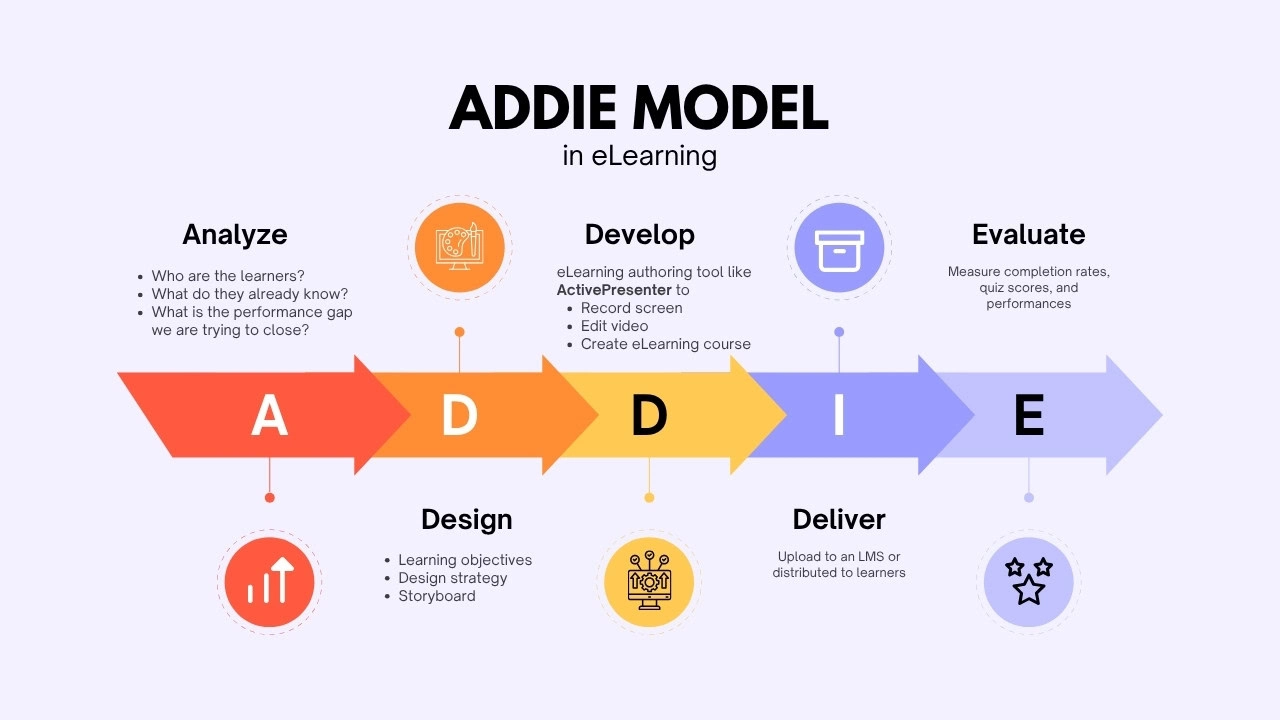
To truly answer “what is instructional design,” we must look at how it is applied. The most universally recognized framework is the ADDIE model.
The Core Steps in Instructional Design: The ADDIE Model
Analyze: Who are the learners? What do they already know? What is the performance gap we are trying to close?
Design: This is the blueprint phase. We define learning objectives (using Bloom’s Taxonomy), decide on the instructional strategy, and storyboard the course.
Develop: This is where the magic happens. You bring the storyboard to life using an eLearning authoring tool. This involves high-quality screen recording, non-destructive video editing, and setting up complex Event-Action logic for interactions.
Deliver: The course is uploaded to an LMS or distributed to learners.
Evaluate: Did the course work? We use surveys and LMS analytics to measure completion rates, quiz scores, and real-world performance improvements.
Key Principles of Effective Instructional Design
Learner-Centered Approach: Always design for the user’s context. Are they learning on mobile? Are they pressed for time?
Clear Objectives: Every module must start with a clear “What’s in it for me?” (WIIFM).
Structured Content: Moving logically from simple concepts to complex applications.
Engagement (Multimedia & Interaction): Mixing text, audio, and video.
Feedback & Assessment: Using Slide Pools and randomized Quizzes to test knowledge, providing immediate, constructive feedback for both correct and incorrect answers.
3. Instructional Design in Practice & What’s Next
Theory is great, but how does this look in the real world? Let’s look at some practical applications and the tools you need to execute them.
Practical Examples (3 Real-World Use Cases)
01. Software Simulation for Bank Tellers
The Problem: A bank is rolling out new software. Training on the live system is too risky.
The ID Solution: Using ActivePresenter, I record the software process. The tool automatically captures mouse clicks and generates a “Software Simulation” with Practice and Test modes. Tellers can safely click through the simulated software, learning by doing without touching real customer data.
02. IT Onboarding Tutorials
The Problem: New hires struggle to set up their VPNs, and the IT department is overwhelmed with repetitive questions.
The ID Solution: I create a crisp, lossless screen recording of the setup process. Using non-destructive video editing, I cut out mistakes, add highlight boxes, zoom-n-pans, and closed captions. The video is exported as an interactive HTML5 package where the video pauses until the learner clicks the correct button.
03. Workplace Safety & Compliance Training
The Problem: Factory workers find mandatory safety training incredibly boring.
The ID Solution: I design a gamified learning experience. Using advanced Variables and Event-Action logic, I build a branching scenario where learners must choose the correct safety gear. If they choose wrong, they are shown the consequences. The final assessment is packaged as xAPI to track detailed learner behaviors on the company’s LMS.
Tools Commonly Used: Evaluation Criteria
When moving from the “Design” to the “Develop” phase, your choice of tool is critical. While PowerPoint is fine for basic presentations, true instructional design requires robust Authoring Tools. Here is my evaluation criteria for choosing a tool:
Interactivity capabilities: Can it handle complex logic (Variables, Triggers) without coding?
Recording quality: Does it support lossless, high quality screen recording?
Editing power: Does it offer timeline-based, non-destructive audio/video editing?
Export formats: Can it export to HTML5, SCORM (1.2, 2004), and xAPI?
With criteria above, ActivePresenter checks all these boxes, making it an incredibly powerful, all-in-one eLearning software for instructional designers.
1. Record Your Screen with Ease
Every great tutorial or course often starts with a simple recording. ActivePresenter makes this step effortless by allowing you to capture your entire screen, a specific application, or a custom region.
Whether you’re creating software walkthroughs, product demos, or instructional videos, you can record system audio, microphone input, and even webcam footage at the same time.
This flexibility is especially useful for educators and trainers who want to demonstrate real-time processes while maintaining a personal connection with learners through voice or face cam.
Highlight Features
- Record screen with webcam and audio
- Smart capture for software simulations with automatic step detection
- Change mouse cursor & sound effects
2. Edit Videos Like a Pro
Recording is just the beginning. What truly elevates your content is how you refine it, and that’s where ActivePresenter’s built-in video editor shines.
With a timeline-based interface, you can trim unwanted parts, split clips, adjust playback speed, and enhance audio quality. On top of that, you can add annotations, captions, zoom effects, and visual highlights to guide learners’ attention.
The best part? You don’t need a separate video editing tool. Everything happens in one place, saving both time and effort.
Highlight Features:
- Split video for chunking smaller videos
- Add annotations, shapes, text captions, and callouts
- Blur effects for objects
- AI noise reduction
- Auto captions & voice-over
3. Create Interactive eLearning Courses
Unlike traditional video tools, ActivePresenter goes far beyond passive content. It allows you to transform your materials into fully interactive eLearning courses, with AI support
You can easily insert quizzes, drag-and-drop activities, clickable buttons, and branching scenarios to actively engage learners. Whether you’re building training modules, assessments, or educational lessons, these interactive elements help reinforce knowledge and improve retention.
This is what makes ActivePresenter not just a video tool but a complete eLearning authoring platform.
Highlight Features
- 13 types of questions
- Question banks & randomization
- Drag-and-drop interactions and clickable elements
- Immediate feedback responses
- AI features to create learning material: translation, writing, text to speech etc.

4. Export and Deliver Anywhere
Once your course is ready, ActivePresenter ensures it reaches your audience in the right format. You can export your content as HTML5 for web delivery or package it into SCORM and xAPI standards for LMS integration.
This means you can upload your courses to learning management systems and track important data such as learner progress, quiz results, and completion rates. If you simply need a video, you can also export to popular formats like MP4 for easy sharing.
Highlight features
- Export videos to MP4 for easy sharing
- Direct upload to uPresenter lightweight LMS for sharing & report
- Export to HTML5 for interactive web content
- Export to LMS (SCORM, xAPI) for tracking learners’ performance
For other authoring tools comparison, visit Best Authoring Tools for Instructional Design for more details
ActivePresenter Pros and Cons
| Pros | Cons |
| Eliminates the need for multiple software (combines screen recorder, video editor, and eLearning author in one). | There is a learning curve, but once you are familiar with this tool, you would feel this tool matches your growing demand |
| Highly customizable interactions that go far beyond standard multiple-choice questions. | |
| No recurring monthly subscription (ActivePresenter offers one-time payment). | |
| Available for MacOS and Windows | |
| No limited trial time |
4. Future Trends: What’s Next for Instructional Design?
Instructional Design with AI
Instructional Design (ID) is entering a new phase where AI is no longer just a supporting tool, it’s becoming a co-creator. Designers can now leverage AI to draft storyboards, generate scripts, and even produce realistic voiceovers in minutes instead of hours. This shift significantly reduces production time while allowing instructional designers to focus more on strategy and learner experience.
Microlearning & Personalization: The New Standard for Learner Engagement
Today’s learners expect fast, relevant, and personalized experiences, and that’s exactly where Instructional Design is heading.
Microlearning, with its 3–5 minute bite-sized lessons, is quickly becoming the default approach, especially for mobile learning. It allows learners to consume content on the go, retain information better, and stay engaged without feeling overwhelmed.
At the same time, Personalized Learning is becoming easier to implement than ever. With the help of variables and adaptive logic in modern authoring tools, courses can now adjust based on individual performance, such as pre-test results or user interactions. This means each learner follows a unique path tailored to their skill level, making learning more efficient and impactful.
Final Thoughts
Understanding what instructional design is and applying it faithfully is the difference between a training program that is merely “completed” and one that actually transforms behavior. By focusing on the learner, structuring your content logically, and utilizing the right technology, you can create eLearning experiences that are both engaging and highly effective.
Ready to put these instructional design principles into practice? You don’t need a massive budget to start creating professional, interactive eLearning content.
👉 Download the free trial of ActivePresenter today to experience the power of all-in-one screen recording and SCORM-compliant course authoring. If you need help along the way, join the vibrant Atomi Systems User Community to share ideas and get support from fellow instructional designers!
