
The Problem Every Creator Faces
You’ve been there. You need to edit a video, you open your preferred tool, and then — watermark. Export limit. “Upgrade to Pro.” Another paywall standing between you and a finished project.
The promise of truly free, professional-grade video editing has been broken so many times that most creators have stopped believing in it. So when Kdenlive keeps appearing on “best free editor” lists year after year, it’s natural to be skeptical.
Having spent over a decade working in e-learning content production and video software evaluation, I’ve tested Kdenlive extensively — not just for five minutes in a sandbox, but across real production workflows: lecture recordings, tutorial videos, documentary-style content, and software demo editing. This review gives you the unfiltered verdict.
If you are looking for a comprehensive solution tailored specifically for e-learning and professional screen recording, try our winning star, ActivePresenter, an all-in-one eLearning authoring tool to elevate your production workflow. ActivePresenter includes free video editing tools for personal use and trial with no watermark on the output.

Table of contents
- The Problem Every Creator Faces
- What Is Kdenlive? A Quick Overview
- Evaluation Criteria: How I Tested Kdenlive
- Key Features of Kdenlive in 2026
- Real-World Use Cases: Who Actually Uses Kdenlive?
- Kdenlive vs. The Competition: How Does It Stack Up?
- Pros & Cons: The Unfiltered Assessment
- Who Should Use Kdenlive in 2026?
- Final Verdict: Kdenlive Score 2026
- 🚀 Ready to Take Your Video Production Further?
What Is Kdenlive? A Quick Overview
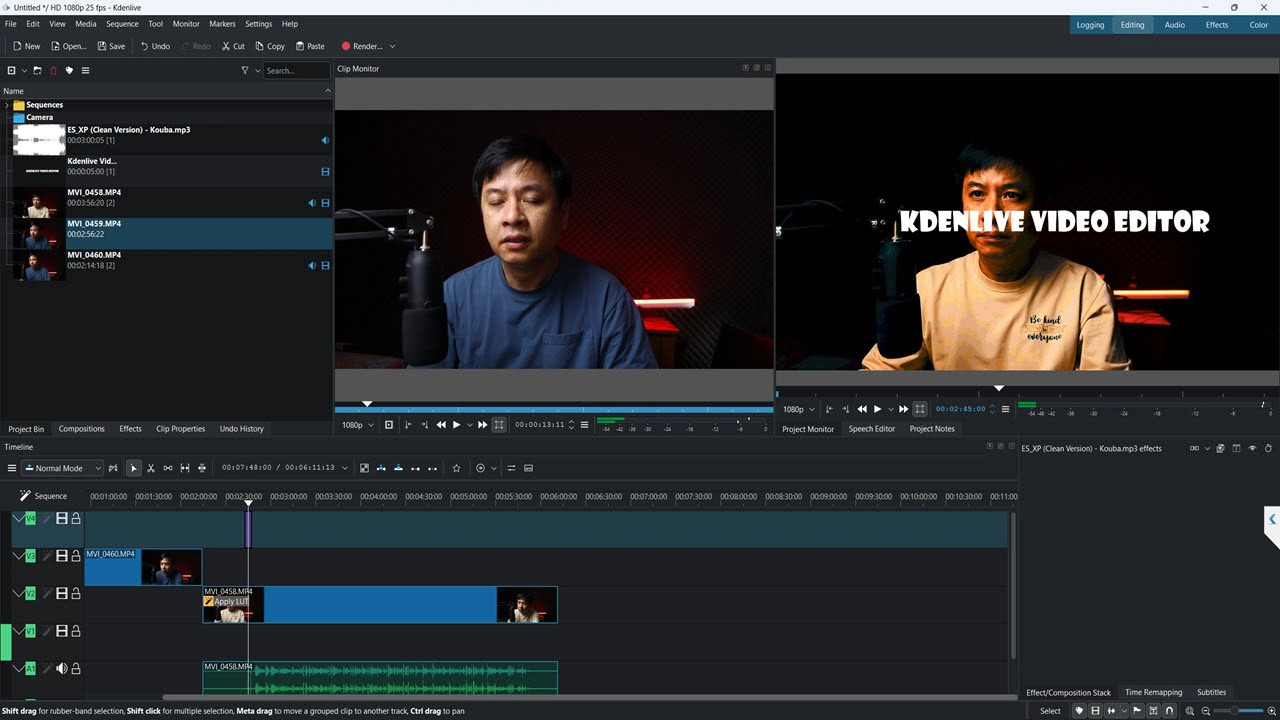
Kdenlive (KDE Non-Linear Video Editor) is a completely free, open-source video editor built on the MLT multimedia framework and maintained by the KDE community. It runs on Linux, Windows, and macOS, and has been in active development since 2002 — making it one of the most battle-tested free editors in existence.
Unlike many “free” tools that are free in name only, Kdenlive has zero watermarks, no export limits, and no subscription tiers. What you download is the complete product.
As of 2026, the latest stable release brings meaningful improvements to stability, the user interface, and performance on modern hardware — which makes this the right time to take a serious look.
Evaluation Criteria: How I Tested Kdenlive
Before diving into features, here’s the framework I used to evaluate Kdenlive fairly:
| Criteria | Weight | What I Tested |
| Core Editing Features | 25% | Timeline, trimming, transitions, multi-track |
| Performance & Stability | 20% | Long-form projects, 4K footage, crash frequency |
| Format Compatibility | 15% | Import/export codec support |
| Learning Curve | 15% | Time to first usable output for new users |
| Output Quality | 15% | Final render quality, compression artifacts |
| Community & Support | 10% | Documentation, forums, update frequency |
Key Features of Kdenlive in 2026
Multi-Track Timeline Editing
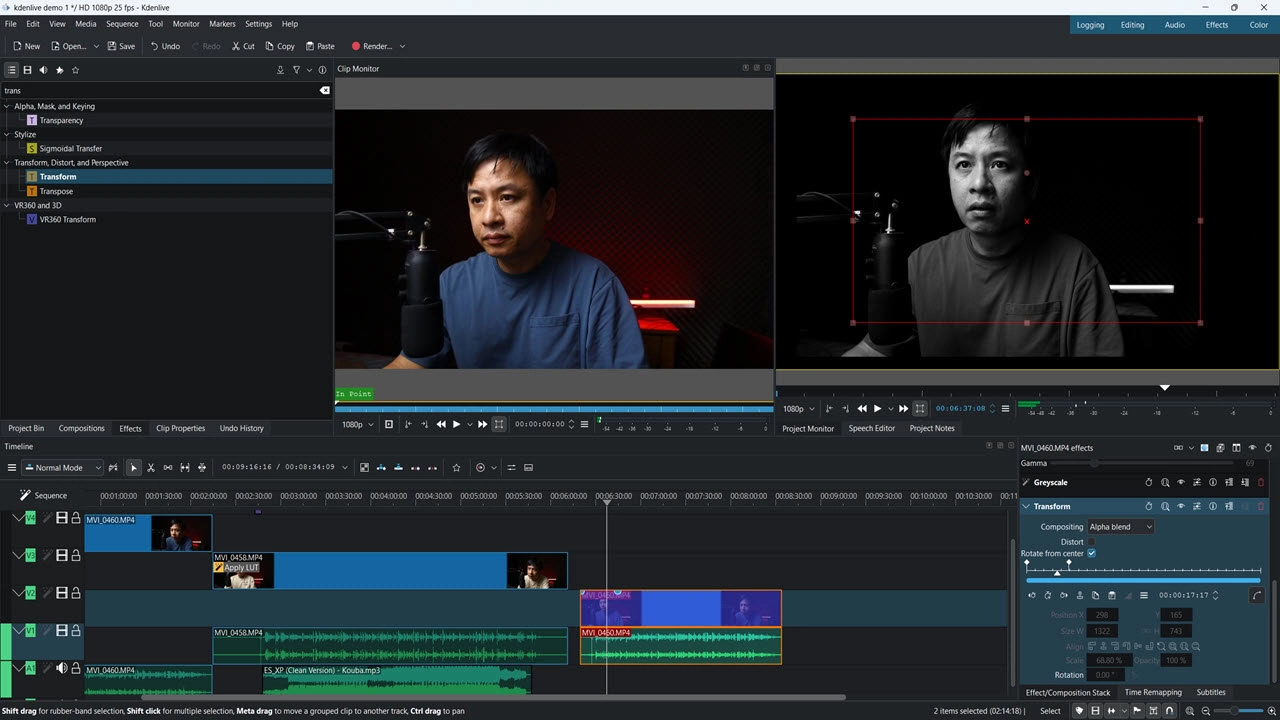
Kdenlive’s timeline is its strongest asset. You get unlimited video and audio tracks, clip grouping, nested sequences, and smooth magnetic snapping. For anyone who has used Premiere Pro or Final Cut, the paradigm will feel immediately familiar — though the polish level is a step below.
The three-point editing workflow works cleanly, and keyboard shortcuts are fully customizable, which matters enormously in a professional production environment.
Extensive Format Support via FFmpeg
This is where Kdenlive genuinely outperforms many commercial tools. Thanks to deep FFmpeg integration, it handles virtually any codec or container you throw at it — MKV, MOV, AVI, MP4, WebM, ProRes, and formats that even some paid editors struggle with.
💡 Pro Tip: If you’re working with mixed-format footage (common in e-learning production where you might have screen recordings alongside camera footage), Kdenlive’s native format handling means you can drop everything onto the timeline without pre-conversion. This alone saves significant time in multi-source projects.
Hardware-Accelerated Rendering
GPU-accelerated rendering is now properly supported on compatible systems (NVIDIA, AMD, and Intel GPUs). In practice, this means export times on a mid-range workstation are competitive with entry-level paid editors. On a test project involving 20 minutes of 1080p footage with color correction and transitions, render time clocked in at approximately 4 minutes — respectable for a free tool.
Proxy Clip Workflow
One of the most underrated features in Kdenlive’s arsenal. Enable Proxy Clips in your project settings and Kdenlive automatically generates lightweight preview versions of your footage, keeping the timeline responsive even when working with 4K or high-bitrate files on modest hardware.
💡 Pro Tip (Expert-Level): Before importing any footage into a new Kdenlive project, go to Project Settings → Proxy Clips and set the proxy resolution to 540p. This keeps your editing experience smooth on machines with 8GB RAM or less — a setup many educators and independent creators are working with. Your final export still renders from the original high-quality files.
Keyframe Animation
Animate effects, position, scale, opacity, and audio volume over time using Kdenlive’s keyframe editor. The interface is functional and precise, though it lacks the visual elegance of After Effects-style animation tools. For most tutorial and explainer video workflows, it covers everything you need.
Chroma Key (Green Screen)
The built-in chroma key filter handles standard green screen removal adequately. It’s not Primatte-level, but for educational content, product demos, and YouTube-style videos, it produces clean results with a few minutes of parameter adjustment.
Plugin Architecture & MLT Effects
The MLT framework opens the door to a wide ecosystem of filters and effects. Audio normalization, color grading via curves and LUTs, stabilization, blur, sharpen — the library is substantial. It won’t replace a dedicated color grading suite, but for the majority of video production tasks, it’s more than adequate.
Real-World Use Cases: Who Actually Uses Kdenlive?
Use Case 1: University Educator on Linux
A professor teaching data science at a European university uses Kdenlive to edit all lecture recordings and supplementary tutorial videos. The zero-cost licensing fits the department’s budget constraints perfectly, and the Linux-native performance means no compatibility headaches on the university’s Ubuntu-based systems.
Outcome: Consistent weekly video output, zero licensing costs, full ownership of all exported files.
Use Case 2: Indie Game Developer Creating Devlog Content
A solo game developer uses Kdenlive’s chroma key and motion tracking features to produce polished gameplay trailers and behind-the-scenes development videos. The format flexibility means raw footage from OBS screen recordings, phone cameras, and a mirrorless camera all coexist on the same timeline without issues.
Outcome: Professional-looking devlog series built entirely on a free toolchain, enabling the developer to reinvest budget into the game itself.
Use Case 3: Non-Profit Documentary Production
A non-profit organization producing advocacy documentaries uses Kdenlive to manage multi-camera interview footage, B-roll, and archival material. The proxy workflow makes editing feasible on older hardware, and the open-source nature ensures no vendor lock-in for a team that operates on grant funding.
Outcome: Finished documentary screened at regional film festivals — produced at zero software cost.
Kdenlive vs. The Competition: How Does It Stack Up?
| Feature | Kdenlive | DaVinci Resolve (Free) | Shotcut | CapCut Desktop |
| Price | Free | Free (paid Studio) | Free | Free (watermark on some exports) |
| Watermark | ❌ None | ❌ None | ❌ None | ⚠️ Conditional |
| Linux Support | ✅ Native | ✅ Available | ✅ Available | ❌ No |
| Format Support | ⭐⭐⭐⭐⭐ | ⭐⭐⭐⭐ | ⭐⭐⭐⭐ | ⭐⭐⭐ |
| Learning Curve | Moderate | Steep | Moderate | Low |
| Color Grading | Good | Excellent | Basic | Basic |
| Stability (2026) | Good | Excellent | Good | Good |
| Best For | Power users, Linux | Professional colorists | Beginners | Casual creators |
Honest take: DaVinci Resolve’s free tier is the stronger professional tool overall — but Kdenlive wins decisively on Linux compatibility, format flexibility, and open-source freedom. For educators and indie creators who need a reliable, no-cost workhorse, Kdenlive holds its ground.
Pros & Cons: The Unfiltered Assessment
✅ Pros
- Completely free and open-source — no hidden tiers, no watermarks, no expiring trials
- Exceptional format compatibility via FFmpeg — handles virtually any file you throw at it
- Proxy clip workflow makes 4K editing accessible on modest hardware
- Active development community — bugs get fixed, features get added
- Hardware acceleration support for faster exports
- Linux-native — the best professional-grade free editor for Linux users
- No vendor lock-in — your projects, your files, forever
❌ Cons
- Interface polish lags behind commercial tools — functional, but not beautiful
- Occasional stability issues on Windows — less consistent than on Linux
- Steeper initial setup compared to beginner-friendly tools like CapCut
- Limited built-in asset library — no stock music, no built-in template packs
- Less intuitive for absolute beginners — the learning curve is real
- Motion tracking is available but not as refined as in paid alternatives
Who Should Use Kdenlive in 2026?
Kdenlive is the right choice if you:
- Work on Linux and need a capable, stable editor
- Create educational content, tutorials, or documentary-style videos
- Are a developer, researcher, or educator with zero software budget
- Need maximum format compatibility without codec headaches
- Value open-source principles and data ownership
Consider alternatives if you:
- Are an absolute beginner who needs guided, template-driven editing (→ try Shotcut or CapCut)
- Need professional color grading as a core workflow (→ DaVinci Resolve Free)
- Require seamless Windows/macOS stability above all else
- Need built-in stock assets and template libraries
Final Verdict: Kdenlive Score 2026
| Category | Score |
| Features | 8.5 / 10 |
| Performance | 7.5 / 10 |
| Ease of Use | 6.5 / 10 |
| Format Support | 9.5 / 10 |
| Value for Money | 10 / 10 |
| Overall | 8.4 / 10 |
“In over a decade of evaluating video editing software, I’ve watched Kdenlive evolve from a promising but unstable project into a genuinely capable production tool. It’s not perfect — but for the price of zero, it delivers more than most creators expect. If you’re serious about video production and serious about keeping costs down, Kdenlive deserves a permanent place in your toolkit.”
🚀 Ready to Take Your Video Production Further?
Kdenlive is a powerful free tool — but if your workflow involves screen recording, eLearning content creation, or interactive video, you may find that a purpose-built tool removes friction that a general video editor can’t.
ActivePresenter by Atomi Systems combines professional screen recording, non-destructive video editing, and full eLearning authoring (SCORM/xAPI export) in a single platform — with a free version that includes no watermarks.
👉Download ActivePresenter Free
👉Read more on this blog: Top 5 Best Authoring Tools for eLearning