ActivePresenter has a built-in facility to take screenshots. It is not a key feature of this ultimate tool, but it still surprises you, for sure. Taking Screenshots Taking screenshots with ActivePresenter is a lot easy. Just click the Annotations tab > Screenshot...
ActivePresenter allows you to add YouTube videos to your project by embedding them in a slide. This tutorial shows you how. Inserting YouTube Videos YouTube videos can be used as an effective eLearning tool to make your course more interactive and informative. Do the...
When building an eLearning course, it’s likely that sometimes you want to use check boxes and radio buttons. It can be a field in the signup form where a radio button is meant for data collection. Or, it can be a “I agree” check box to confirm learners agree to the...
In ActivePresenter 7, you can create and manage multiple timelines simultaneously with the Multiple Timelines feature. It allows you to create many timelines, each of them contains a specific task that you want to display. So, creating and managing complex...
What is Audio Noise Reduction?Regardless the microphone quality, there is a high chance that your recordings will have some background noise. So, ActivePresenter 7 provides a new feature called Audio Noise Reduction. Generally speaking, it’s a process of removing...
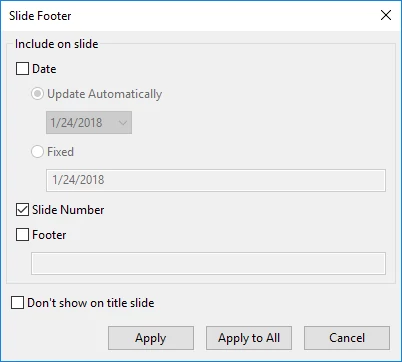
ActivePresenter 7 lets you insert slide numbers with some simple steps. Besides, you can freely add slide numbers to every slide or to a specific slide. Let’s learn how to do these tasks in this tutorial. In ActivePresenter, you can use Footer to insert slide numbers....