
If you’ve ever opened Articulate Storyline’s pricing page and felt your stomach drop, you’re not alone. At roughly $1,299 per year (or bundled into the $1,599/year Articulate 360 subscription), Storyline is genuinely excellent, but it’s a significant financial commitment, especially for freelance instructional designers, small L&D teams, or educators in budget-constrained institutions.
Over the past decade working in eLearning content production, I’ve seen talented designers abandon projects simply because they couldn’t justify the licensing cost. But here’s the honest truth most vendor blogs won’t tell you: you don’t need to spend a thousand dollars a year to build professional, SCORM-compliant, interactive eLearning.

Expert Note for 2026: If your workflow requires high-end software simulations or native macOS support (which Storyline lacks), ActivePresenter 10 is the industry-leading alternative. It integrates AI-powered Text-to-Speech and advanced video editing into a single, one-time-purchase workspace.

In this guide, I’ll walk you through 5 legitimate, battle-tested free and affordable alternatives to Articulate Storyline, tools I’ve personally evaluated against real instructional design workflows, not just feature checklists.
Why Instructional Designers Are Looking for Storyline Alternatives
Articulate Storyline is the industry benchmark for a reason. Its timeline-based editor, trigger system, and output quality are polished. But the frustration is real and widespread:
- 💸 Cost: $1,299+/year is prohibitive for solo designers, NGOs, and academic institutions
- 🖥️ Windows-only: Storyline 360 still doesn’t run natively on macOS (a dealbreaker for many)
- 🔒 Vendor lock-in: Your project files (.story format) are proprietary — switching tools means starting over
- 📦 Bloated subscription: Articulate 360 bundles tools you may never use, yet you pay for all of them
These aren’t minor inconveniences. They’re structural limitations that push experienced designers to explore alternatives, and in 2026, the alternatives are genuinely competitive.
Criteria for Evaluating Articulate Storyline Alternatives
Before diving into the list, here’s the evaluation framework I used. Any tool worth recommending must deliver on these fronts:
| Criterion | Why It Matters |
| SCORM / xAPI Export | Essential for LMS compatibility |
| Interactive Question Types | Quizzes, branching scenarios, simulations |
| Screen Recording + Video Editing | All-in-one workflow reduces tool-switching |
| HTML5 Output | Mobile-friendly, no Flash dependency |
| Pricing Transparency | Free trial must be genuinely usable, not crippled |
| Learning Curve | Time-to-first-course matters for teams under deadline |
| Cross-Platform Support | Windows and macOS preferred |
Top 5 Free Alternatives to Articulate Storyline in 2026
1. ActivePresenter (Free Version) — The All-in-One Powerhouse
“In 9+ years of evaluating authoring tools, ActivePresenter is the one I recommend first to anyone who asks for a Storyline alternative — not because it’s free, but because it earns its place on the merits.”
Developed by Atomi Systems, ActivePresenter is a desktop-based eLearning authoring tool available for both Windows and macOS. What makes it genuinely stand out in a crowded market is the rare combination of three professional-grade capabilities under one roof: screen recording, non-destructive video editing, and interactive eLearning authoring.
What You Get in the Free Version:
✅ Full access to all authoring features (no time limit)
✅ 13 interactive question types — multiple choice, fill-in-blank, drag-and-drop, hotspot, and more
✅ SCORM 1.2, SCORM 2004, and xAPI (Tin Can) export
✅ HTML5 output optimized for all devices
✅ Screen recording with zoom-and-pan annotations
✅ Non-destructive video editing timeline
✅ Event-Action system for complex branching logic (no coding required)
✅ Variables and conditions for adaptive learning paths
✅ PowerPoint import — even without PowerPoint installed
✅ Export to Word, Excel, PDF for storyboarding
✅ Light and dark interface themes; multiple UI languages including Vietnamese
One honest caveat: The free version adds an Atomi Systems watermark to exported outputs. For professional client delivery, you’ll need the paid license — but even that starts at a fraction of Storyline’s cost.
ActivePresenter vs. Articulate Storyline: Side-by-Side
| Feature | ActivePresenter (Free) | ActivePresenter (Pro) | Articulate Storyline 360 |
| Price | Free | ~$499 one-time | ~$1,299/year |
| Platform | Windows + macOS | Windows + macOS | Windows only |
| SCORM/xAPI Export | ✅ | ✅ | ✅ |
| Screen Recording | ✅ (built-in) | ✅ (built-in) | ❌ (separate tool) |
| Video Editing | ✅ Non-destructive | ✅ | Limited |
| Question Types | 13 types | 13 types | 20+ types |
| Collaborative Editing | ❌ | ❌ | ✅ (cloud-based) |
| Media Library | Basic | Basic | Extensive (360 bundle) |
| Output Watermark | ✅ | ❌ | ❌ |
3 Real-World Use Cases for ActivePresenter
🏦 Use Case 1: Banking Software Simulation for Onboarding
A regional bank’s L&D team used ActivePresenter’s screen recording + software simulation mode to capture their core banking software interface, then layered in interactive click-through exercises. Employees could practice the workflow risk-free before touching live systems. The entire module was exported as SCORM and uploaded to their Moodle LMS — no Storyline license required.
💻 Use Case 2: IT Helpdesk Video Tutorial Series
An IT training manager recorded step-by-step tutorials for a new ticketing system using ActivePresenter’s lossless screen capture. The built-in video editor allowed them to trim dead time, add callout annotations, and apply zoom effects — all without exporting to a separate editor. Output time dropped by 40% compared to their previous Camtasia + Storyline workflow.
🎓 Use Case 3: University Compliance eLearning on a Zero Budget
A university compliance officer with no dedicated authoring budget built a fully interactive GDPR training module using ActivePresenter’s free version. The 13 question types — including scenario-based drag-and-drop — were sufficient for meaningful assessment. After internal review, they upgraded to Pro for the watermark-free output.
Pro Tips: What Long-Term ActivePresenter Users Know
💡 Tip 1 — Use Slide Pools for randomized assessments. If you’re building certification courses, enable Slide Pools to serve randomized question sets. This prevents answer-sharing among learners and increases quiz integrity — a feature often overlooked by new users.
💡 Tip 2 — Optimize HTML5 export file size. Before exporting, go to Export Settings → HTML5 and lower the video quality slider to 70–75% for web delivery. Most learners can’t perceive the difference, but your file size drops by 30–50%, dramatically improving load time on slower connections.
💡 Tip 3 — Master the Event-Action panel early. ActivePresenter’s Event-Action system is where the real power lives. Don’t just use it for quiz feedback — use it to build branching scenarios, track custom variables, and trigger animations based on learner behavior. This is the feature that makes the tool genuinely comparable to Storyline’s trigger/condition system.
💡 Tip 4 — Import PowerPoint without PowerPoint installed. This is a hidden gem. You can import .pptx files directly into ActivePresenter even on machines without Microsoft Office. For teams transitioning existing slide-based training to interactive eLearning, this is a massive time-saver.
Pros & Cons of ActivePresenter
✅ Pros:
- Genuinely free with full features (watermark caveat)
- Windows + macOS support
- All-in-one: screen recording + video editing + eLearning authoring
- Affordable Pro upgrade (~$199 one-time vs. $1,299/year for Storyline)
- SCORM 1.2, SCORM 2004, xAPI, HTML5 output
- Event-Action system handles complex interactivity without code
- Dedicated support team
❌ Cons:
- Watermark on free version outputs
- No real-time collaborative editing (single-user desktop workflow)
- Smaller built-in media library compared to Articulate 360
- Interface may feel less polished than Storyline for first-time users
2. iSpring Suite Free Trial — Best for PowerPoint Users
iSpring Suite converts PowerPoint presentations into interactive eLearning courses with impressive fidelity. The free trial gives you full access for 14 days — enough to evaluate the tool for a real project.
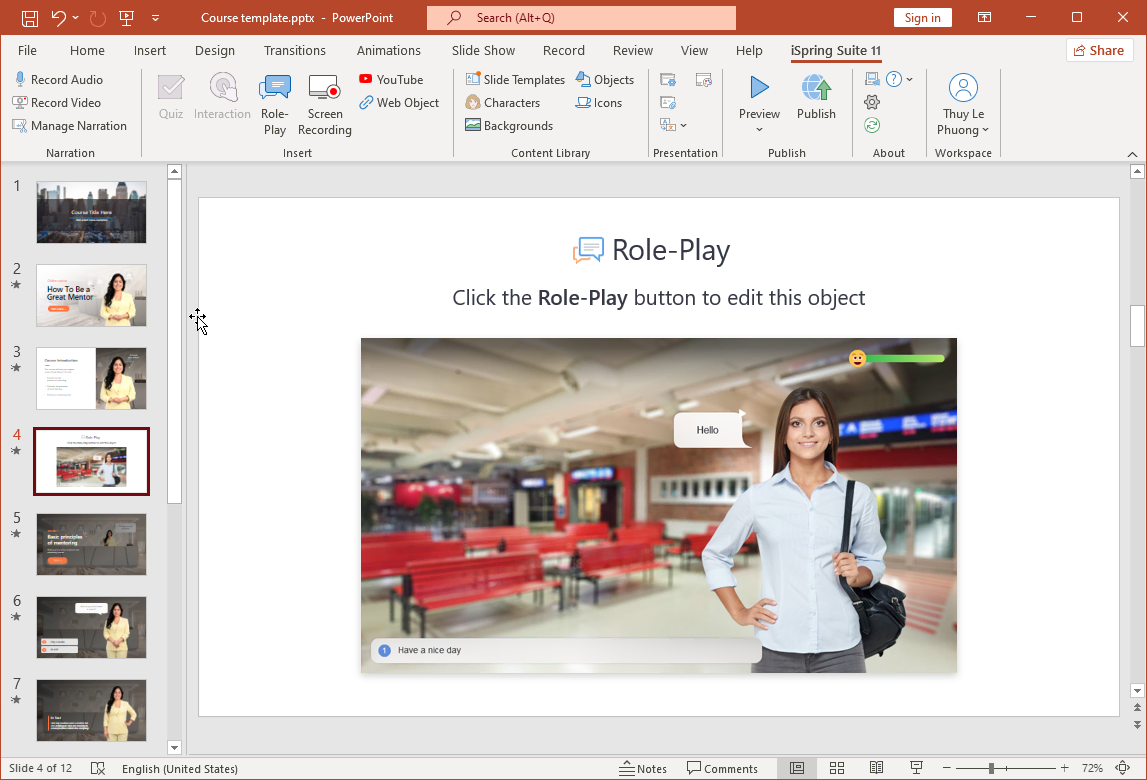
Best for: Instructional designers who live in PowerPoint and want minimal workflow disruption.
Limitations as a “free” option: No permanent free tier — after 14 days, pricing starts at ~$770/year. Strong choice, but not truly free long-term.
SCORM/xAPI: ✅ | Screen Recording: ✅ (iSpring Cam) | macOS: ❌
3. H5P (Open Source) — Best for Web-Embedded Interactivity
H5P is a browser-based, open-source framework for creating interactive HTML5 content. It integrates natively with Moodle, Canvas, and WordPress, making it ideal for educators already on those platforms.
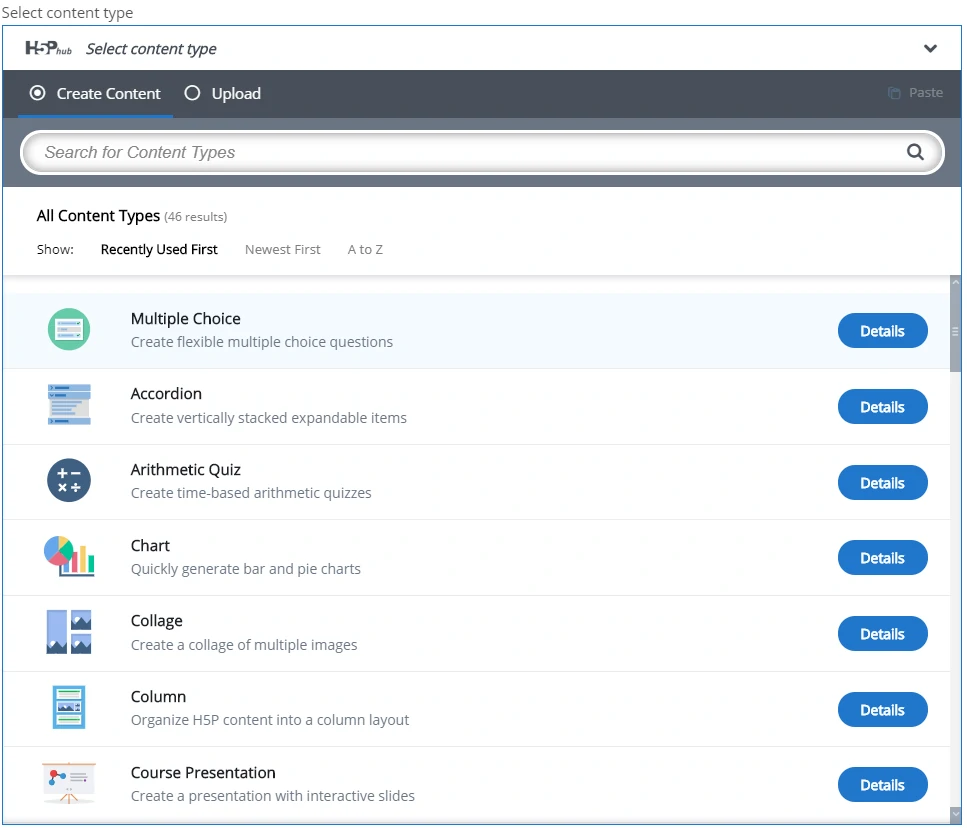
Best for: LMS administrators and educators who need interactive elements embedded directly in their LMS without a standalone authoring tool.
Limitations: No traditional slide-based authoring, no standalone SCORM packaging (requires plugins), limited to content types rather than full course design.
SCORM/xAPI: ✅ (with plugins) | Screen Recording: ❌ | macOS: ✅ (browser-based)
4. Lectora (Free Trial) — Best for Compliance & Accessibility
Lectora by Trivantis has been in the eLearning space for decades and is particularly strong in Section 508 / WCAG accessibility compliance — critical for government and healthcare training.
Best for: Organizations with strict accessibility requirements.
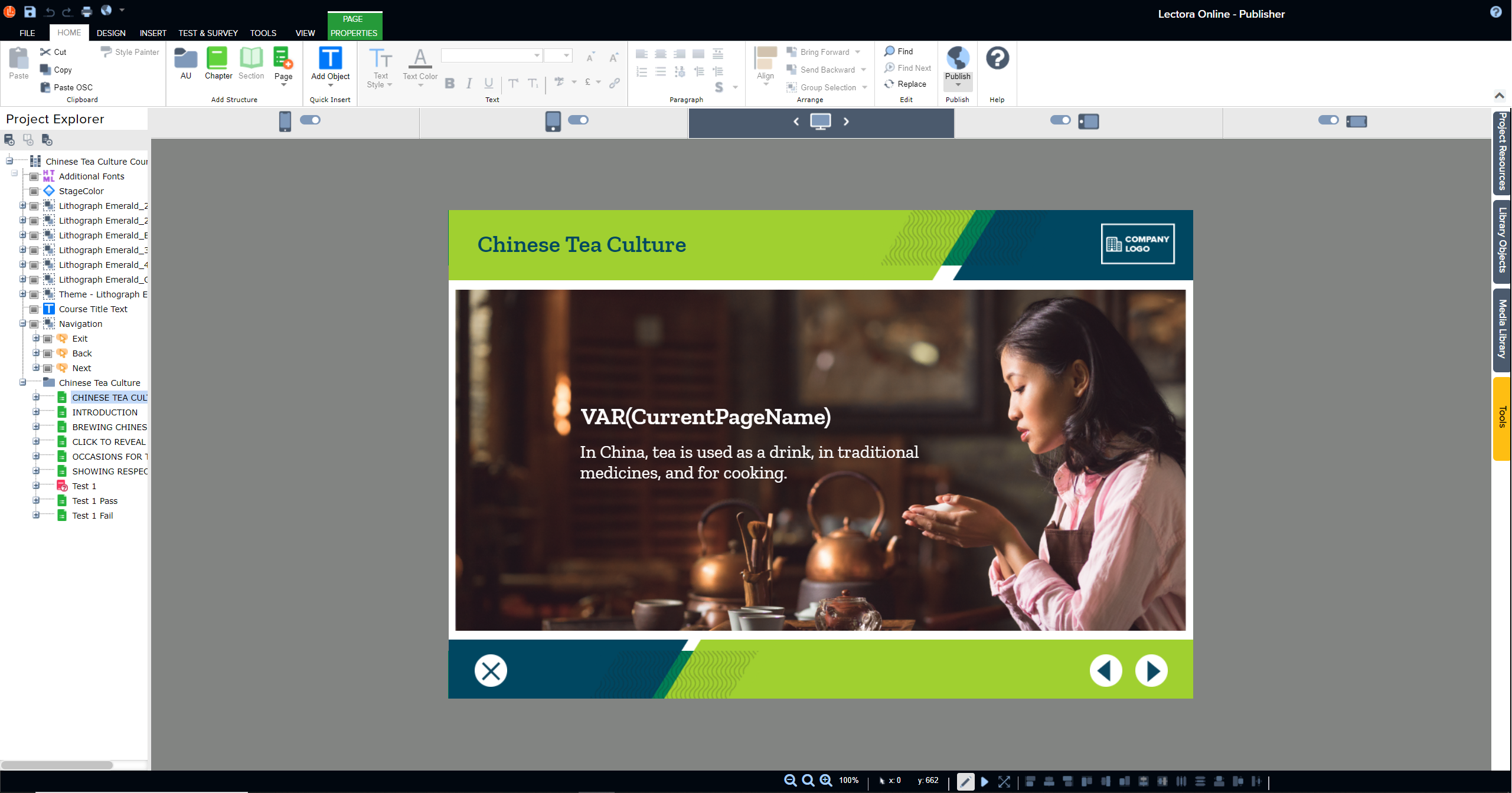
Limitations as a “free” option: Trial only; full pricing starts at ~$1,099/year. Steeper learning curve than Storyline.
SCORM/xAPI: ✅ | Screen Recording: ❌ | macOS: ✅ (Lectora Online, cloud-based)
5. Adapt Learning (Open Source) — Best for Developers
Adapt is a free, open-source, responsive HTML5 eLearning framework. Courses are built using a web-based authoring tool and exported as fully responsive HTML5.
Best for: Developer-led L&D teams comfortable with Git and web technologies.
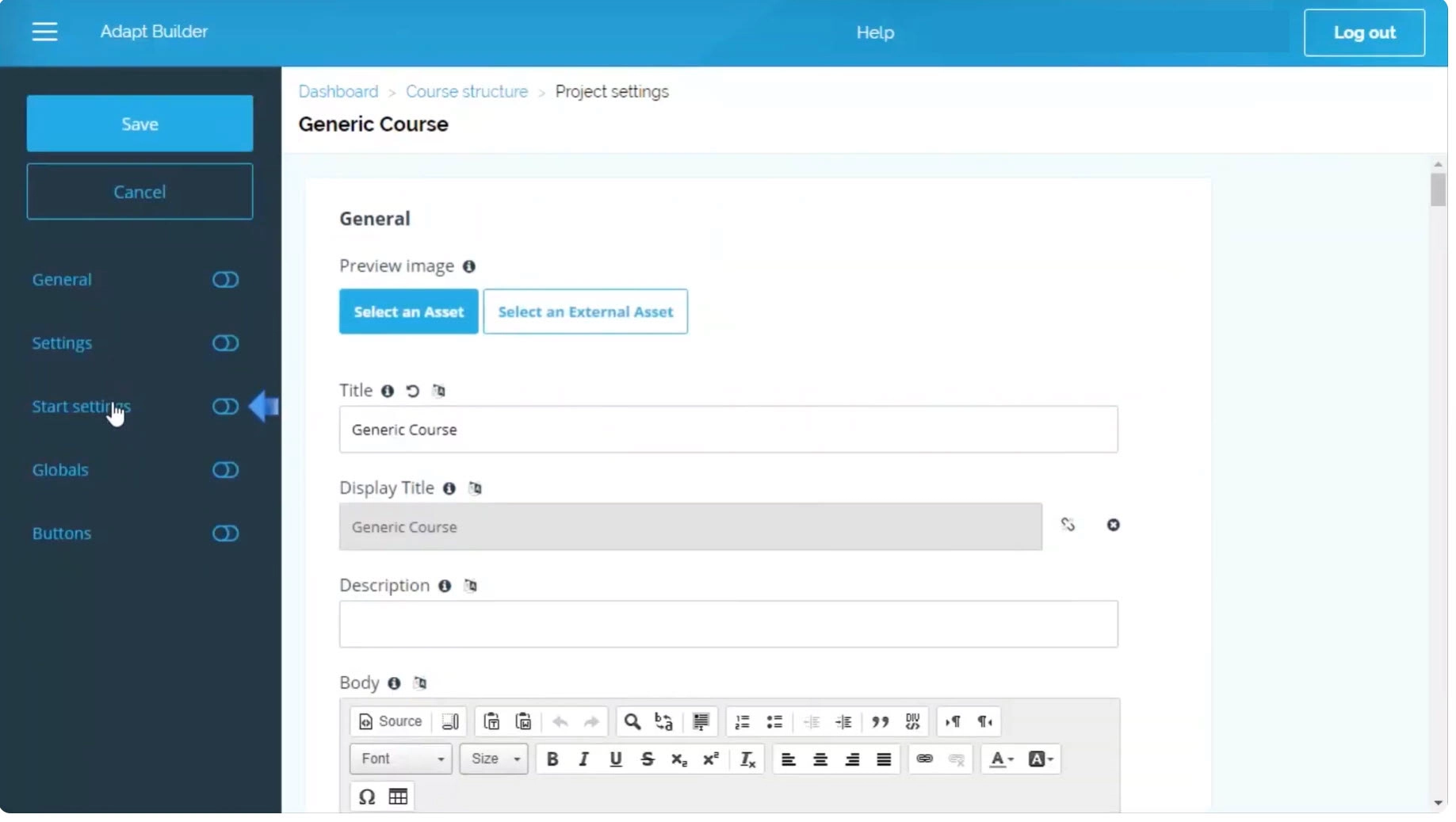
Limitations: Requires technical setup; no WYSIWYG timeline editor; significant learning curve for non-developers.
SCORM/xAPI: ✅ | Screen Recording: ❌ | macOS: ✅ (browser-based)
Quick Comparison: All 5 Alternatives at a Glance
| Tool | Truly Free? | SCORM/xAPI | Screen Recording | macOS | Best For |
| ActivePresenter | ✅ (watermark) | ✅ | ✅ Built-in | ✅ | All-round Storyline replacement |
| iSpring Suite | ⚠️ 14-day trial | ✅ | ✅ | ❌ | PowerPoint-based workflows |
| H5P | ✅ Open source | ✅ (plugins) | ❌ | ✅ | LMS-embedded interactivity |
| Lectora | ⚠️ Trial only | ✅ | ❌ | ✅ (cloud) | Accessibility-compliant training |
| Adapt Learning | ✅ Open source | ✅ | ❌ | ✅ | Developer-led teams |
Which Free Storyline Alternative Should You Choose?
Here’s the honest, experience-based recommendation:
- If you want the closest functional replacement for Articulate Storyline — free, cross-platform, with SCORM/xAPI, screen recording, and a powerful trigger system — ActivePresenter is the clear answer. The free version alone covers 90% of what most instructional designers need day-to-day.
- If you’re deeply embedded in PowerPoint and just need a fast conversion pipeline, iSpring Suite’s 14-day trial is worth evaluating — but budget for the annual cost if you’re going long-term.
- If you’re an LMS administrator on Moodle or Canvas and need interactive elements without a standalone tool, H5P is the most frictionless choice.
- If accessibility compliance is non-negotiable (government, healthcare, higher ed), Lectora is worth the investment — trial it first to confirm fit.
- If you have a developer-led team comfortable with web tech and Git, Adapt Learning offers maximum control and zero licensing cost.
Frequently Asked Questions
Is there a truly free alternative to Articulate Storyline?
Yes — ActivePresenter offers a genuinely free version with full authoring features, SCORM/xAPI export, and screen recording. The only limitation is a watermark on exported outputs. H5P and Adapt Learning are also fully free as open-source tools, though they serve more specialized workflows. Unlike many “free” tools that cripple core features or impose hard time limits, ActivePresenter’s free tier is functional for real instructional design work.
Can I export SCORM courses without Articulate Storyline?
Absolutely. ActivePresenter, iSpring Suite, H5P (with plugins), Lectora, and Adapt Learning all support SCORM 1.2 and/or SCORM 2004 export. ActivePresenter additionally supports xAPI (Tin Can), making it compatible with modern LRS platforms like SCORM Cloud, uPresenter, and most enterprise LMS solutions.
Does ActivePresenter work on Mac?
Yes. Unlike Articulate Storyline 360, which is Windows-only, ActivePresenter runs natively on both Windows and macOS. This is one of its most significant practical advantages for teams using mixed-OS environments or Apple hardware.
How does ActivePresenter compare to Articulate Storyline for interactive simulations?
For software simulations specifically, ActivePresenter’s automatic recording engine is arguably more efficient than Storyline. When you record a screen workflow, ActivePresenter automatically converts every click and keypress into an editable slide with captions, click zones, and interaction hints — no manual trigger setup required. Storyline requires you to build simulations more manually. For general branching scenarios and complex variables, Storyline’s trigger system is mature and polished, but ActivePresenter’s Event-Action system covers the same ground with a shorter setup time for most use cases.
Is the ActivePresenter free version good enough for professional use?
For internal training, academic use, and prototyping, yes — the free version is entirely sufficient. For client-facing deliverables or commercially distributed courses, the watermark on exported HTML5/SCORM outputs is a professional liability. The Pro upgrade (one-time license, not a subscription) removes the watermark and is a worthwhile investment that pays for itself compared to a single year of Storyline.
Final Verdict: The Best Free Alternative to Articulate Storyline in 2026
Articulate Storyline is a great tool — no one is arguing otherwise. But “great” and “necessary” are two different things, and for a growing segment of instructional designers, the $1,299/year price tag no longer reflects the value they’re getting when comparable alternatives exist at a fraction of the cost or for free.
Here’s the bottom line:
If you’re looking for one tool that replicates the core Storyline experience — SCORM export, interactive question types, trigger-based logic, screen recording, and HTML5 output — without the annual subscription, ActivePresenter is the most complete free alternative available in 2026.
It won’t win every feature comparison point-by-point. But for the majority of real-world eLearning projects — software training, compliance courses, onboarding modules, and skills assessments — it delivers professional results without a professional price tag.
👉 Download ActivePresenter for free and build your first SCORM course today. No credit card, no time limit, no compromises on core features.
About the Author
Thuannd is a content specialist at Atomi Systems, the company behind ActivePresenter, Saola Animate, and uPresenter. With a focus on instructional design tools and eLearning workflows, Thuan writes practical guides for designers navigating the rapidly evolving landscape of digital learning technology.