
You’ve probably heard that iSpring Suite is “the easiest way to turn PowerPoint into eLearning.” And honestly? That’s not wrong — but it’s not the whole story either.
After spending years working with dozens of SCORM creation software tools across corporate training departments, educational institutions, and freelance instructional design projects, I’ve seen iSpring Suite shine in specific scenarios and fall completely flat in others.
If you’re a beginner trying to create your first eLearning course in SCORM format and you’re wondering whether iSpring is the right tool to invest in, this review will save you time, money, and a lot of frustration.
Let’s break it all down.
Table of contents
- What Is iSpring Suite? A Quick Overview
- How We Evaluated iSpring Suite
- iSpring Suite’s Core Features: What You Actually Get
- Practical Use Cases: 3 Real Scenarios Where iSpring Works (and Doesn’t)
- iSpring Suite Pros & Cons: The Honest Assessment
- iSpring Suite vs. Other SCORM Creation Software
- Pro Tips: Getting the Most Out of iSpring Suite
- Who Is iSpring Suite Actually For?
- Best Alternative to iSpring Suite in 2026
- Final Verdict: Solid in Its Lane, Limited Beyond It
- 🚀 Ready to Explore Your Options?
What Is iSpring Suite? A Quick Overview
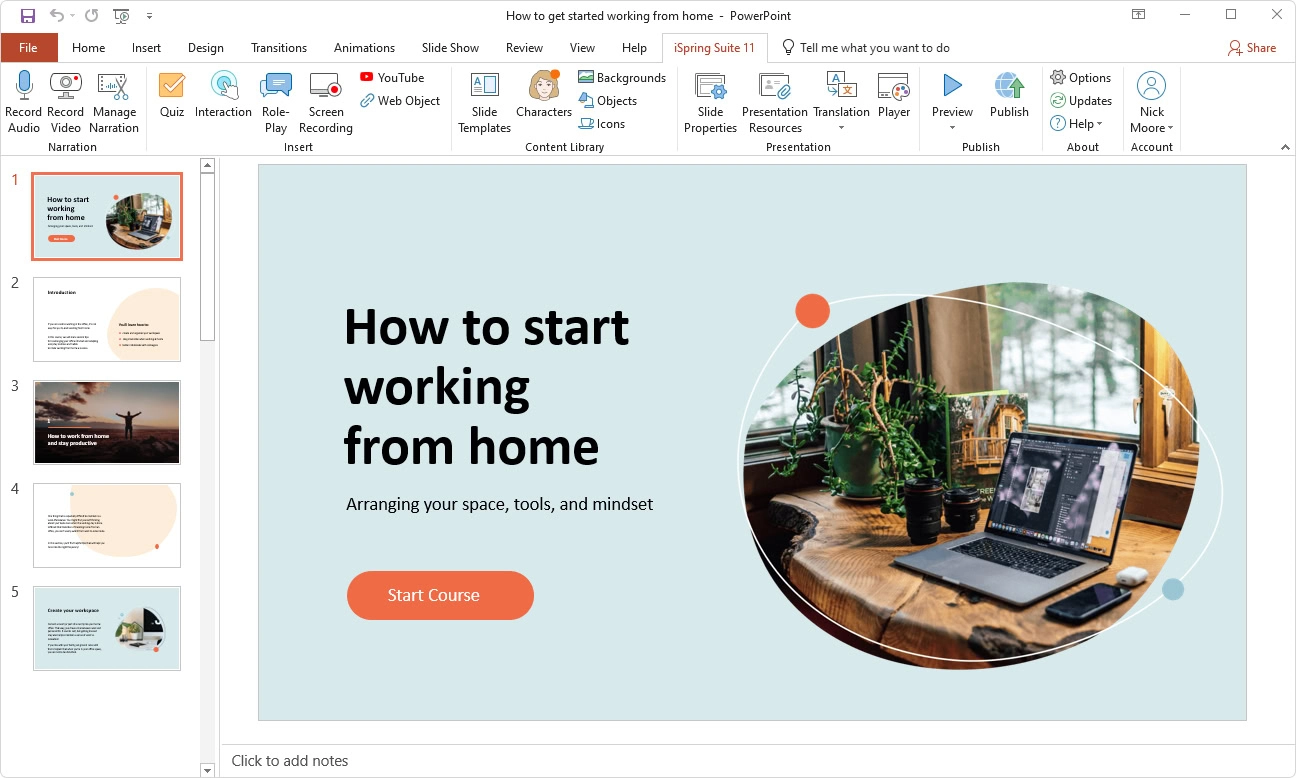
iSpring Suite is a PowerPoint-based SCORM authoring tool developed by iSpring Solutions. It works as a plugin (an additional tab) that installs directly inside Microsoft PowerPoint on Windows, allowing you to add interactive elements, quizzes, and simulations — then export your presentation as a SCORM-compliant package for your LMS.
Key specs at a glance (2026):
| Feature | Details |
| Platform | Windows only (PowerPoint desktop required) |
| SCORM Support | SCORM 1.2, SCORM 2004, xAPI, cmi5 |
| Pricing | ~$790/year (per author) without AI and ~1070/ year per author with AI assistant. |
| Free Trial | 14 days |
| Best For | HR teams, Office professionals converting PPT to eLearning |
| Weak At | Complex branching, software simulations, video editing |
How We Evaluated iSpring Suite
As someone who has tested SCORM creation software extensively, I use a consistent 5-criteria evaluation framework before recommending any tool:
- Ease of Use – How quickly can a beginner produce a publishable course?
- Interactivity Depth – Can you build meaningful learner experiences beyond click-next slides?
- SCORM/LMS Compatibility – Does it output clean, reliable packages that don’t break on major LMS platforms?
- Multimedia Capabilities – Can you record, edit, and embed video/audio natively?
- Value for Money – Does the pricing make sense relative to what you get?
Let’s walk through each one.
iSpring Suite’s Core Features: What You Actually Get
1. PowerPoint Integration (The Main Selling Point)
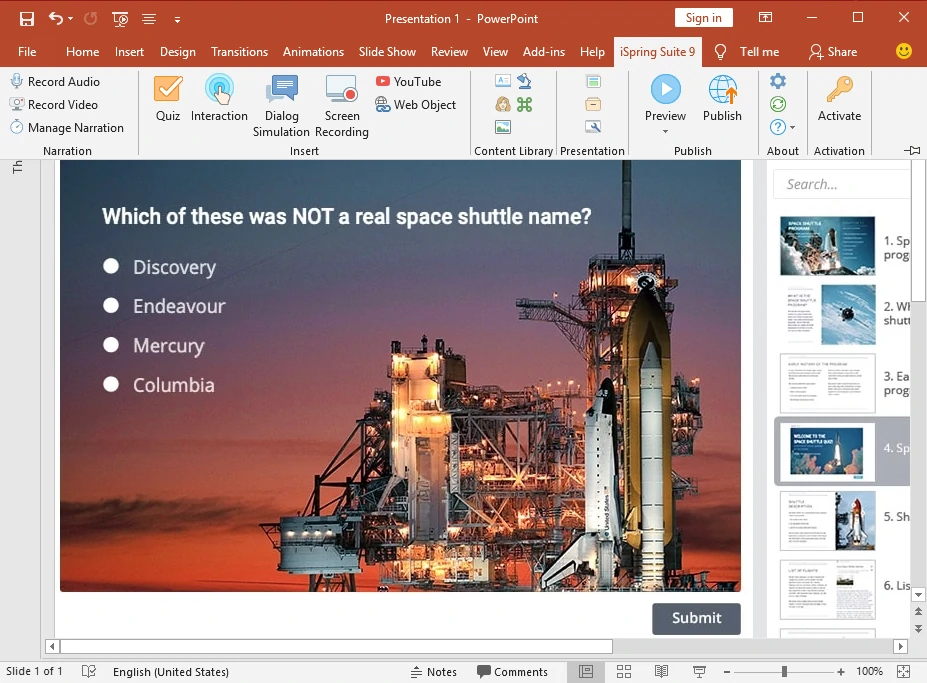
iSpring Suite’s biggest advantage is also its most defining limitation. If your team already lives inside PowerPoint, this tool genuinely accelerates content production. iSpring Suite is built to be an add-in of PowerPoint itself.
You can:
- Apply slide animations and transitions that export properly to HTML5
- Insert iSpring-powered quiz slides directly into your deck
- Add narration with auto-sync to slide objects
Pro Tip from experience: If you’re inheriting a library of existing PowerPoint training decks and need to publish them to an LMS fast, iSpring is arguably the most frictionless path. I’ve seen HR teams go from zero to a 20-module SCORM course in under a week using this workflow.
2. Quiz & Assessment Builder
This is genuinely one of iSpring’s strongest features. The quiz builder supports 10+ question types including:
- Multiple choice, True/False
- Drag-and-drop matching
- Hotspot questions
- Fill-in-the-blank
- Likert scale surveys
The interface is clean, and SCORM score tracking (pass/fail thresholds, attempt limits, feedback messages) is well-implemented. For beginners, this is accessible without any technical background.
3. Role-Play Simulations (Dialog Simulations)
iSpring Suite includes a dialogue simulation builder — a branching conversation tool where learners practice workplace scenarios (think: customer service training, compliance conversations, sales calls).
Real-World Scenario 1: A bank’s customer service team uses iSpring’s role-play feature to simulate difficult client conversations. Trainees select responses from a dialogue tree, and the simulation tracks whether they followed the correct compliance script. This requires zero coding and produces results that would have taken months in traditional training.
4. Screen Recording (iSpring Cam Pro)
The Max bundle includes iSpring Cam Pro for screen recording. It’s functional — you can record your screen with a webcam overlay and basic annotations. However, in practice, this is where the tool starts showing its limits.
From my experience testing various SCORM creation software tools, iSpring’s screen recording is more of a basic utility than a professional tool. You won’t find non-destructive editing, advanced timeline control, or the kind of software simulation features you’d need for IT training.
Real-World Scenario 2: An IT department wants to create an interactive software simulation where learners must click through the correct steps in a CRM interface — and get feedback when they click the wrong button. iSpring Cam Pro cannot do this. For that use case, you’d need purpose-built simulation tools.
5. SCORM Export & LMS Compatibility
To iSpring’s credit, its SCORM output is clean and reliable. It supports:
- SCORM 1.2 and SCORM 2004
- xAPI (Tin Can)
- cmi5
- AICC
Most major LMS platforms (Moodle, Blackboard, TalentLMS, Cornerstone) handle iSpring packages without issues. This is a non-trivial advantage — poorly-coded SCORM packages are a genuine pain point in this industry.
Practical Use Cases: 3 Real Scenarios Where iSpring Works (and Doesn’t)
✅ Scenario 1: HR Onboarding at a Mid-Size Company
A company has 200 new hires per quarter. Their HR team has onboarding content locked inside 40 PowerPoint decks. They need it on their LMS by next month.
iSpring Suite is perfect here. Minimal learning curve, fast conversion, reliable SCORM output. Done.
✅ Scenario 2: Compliance Training With Simple Branching
A financial services firm needs annual compliance training with knowledge checks and pass/fail certification tracking. The content is mostly policy-based with quiz assessments.
iSpring handles this well. The quiz builder and SCORM tracking cover this use case completely.
❌ Scenario 3: Software Simulation for a New ERP System
A manufacturing company rolls out new ERP software and needs employees to practice navigating it in a simulated environment where wrong clicks give corrective feedback.
iSpring falls short here. It cannot replicate software interfaces with interactive click-through simulations. You’d need a dedicated tool with proper software simulation capabilities for this scenario.
iSpring Suite Pros & Cons: The Honest Assessment
✅ Pros
- Zero learning curve for PowerPoint users — if you can build a deck, you can build a course
- Solid quiz and assessment builder with 14+ question types
- Clean, reliable SCORM output compatible with most major LMS platforms
- Dialogue simulation feature covers basic branching scenarios effectively
- Fast content production for teams with existing PowerPoint assets
- Good customer support and active documentation
❌ Cons
- Windows-only — Mac users are completely excluded
- Requires Microsoft PowerPoint desktop (Microsoft 365 subscription needed separately)
- No real software simulation capability — a significant gap for IT and technical training
- Limited video editing — screen recording is basic, no non-destructive editing
- Complex branching scenarios are difficult to build and maintain
- High price point (~$970/year) for what is ultimately a PowerPoint plugin
- Design flexibility is constrained by PowerPoint’s layout system
iSpring Suite vs. Other SCORM Creation Software
Here’s how iSpring compares to other tools in the market:
| Criteria | iSpring Suite | ActivePresenter | Articulate Storyline | Adobe Captivate |
| Ease of Use (Beginners) | ⭐⭐⭐⭐⭐ | ⭐⭐⭐⭐ | ⭐⭐⭐ | ⭐⭐ |
| Software Simulation | ❌ | ✅ Full | ✅ Partial | ✅ Full |
| Video Editing | Basic | Advanced | Basic | Advanced |
| Mac Support | ❌ | ✅ | ✅ | ✅ |
| SCORM Output Quality | ✅ Excellent | ✅ Excellent | ✅ Excellent | ✅ Good |
| Pricing (Annual) | ~$970 | Free + Paid tiers | ~$1,499 | Subscription |
| Best For | PPT conversion | All-round eLearning | Custom interactions | Adobe ecosystem |
In my experience, if you’re just starting out and want a SCORM creation software that grows with you — rather than one that locks you into PowerPoint’s limitations — ActivePresenter by Atomi Systems offers a more versatile foundation. It includes genuine software simulation, non-destructive video editing, and a free tier that lets beginners explore without financial commitment.
Pro Tips: Getting the Most Out of iSpring Suite
If you do decide to use iSpring, here are insider tips from years of working with the platform:
- Use Master Slides aggressively. Build your branding and layout in PowerPoint’s Slide Master before adding iSpring elements. Retroactively fixing design across 60 slides is a nightmare.
- Pre-compress your images before import. iSpring’s HTML5 export can produce bloated file sizes if your source PPT has high-resolution images. Compress to 96 DPI before building.
- Test your SCORM package on your actual LMS before full deployment. Even “clean” SCORM packages behave differently across LMS platforms. Always do a 2-slide test upload first.
- Leverage the Quiz Branching. The quiz result slides allow branching to different learning paths — most beginners don’t realize this and miss a powerful feature that’s already built in.
- Use iSpring Space for review cycles. If you’re working with stakeholders who need to review content, iSpring Space (cloud sharing) saves significant back-and-forth compared to sending SCORM files via email.
Who Is iSpring Suite Actually For?
After this full breakdown, here’s my straightforward take:
iSpring Suite is a strong choice if you:
- Already work in PowerPoint daily and want the fastest path to SCORM output
- Work in HR, compliance, or general corporate training
- Need to digitize existing slide-based content quickly
- Don’t need software simulations or advanced interactivity
- Are on Windows and have a Microsoft 365 subscription
iSpring Suite is NOT the right tool if you:
- Need to create software simulations or technical IT training
- Are on a Mac
- Want advanced video editing built into your authoring tool
- Need complex, custom branching logic
- Are cost-sensitive (at $970/year, it’s a significant investment)
- Are a beginner building your skills across multiple use cases and want flexibility
Best Alternative to iSpring Suite in 2026
If iSpring Suite’s limitations are deal-breakers for your project, here are the top alternatives worth considering:
1. ActivePresenter (Best Overall Alternative)
Developed by Atomi Systems, ActivePresenter is the strongest all-round alternative to iSpring Suite — especially for beginners who want room to grow. Unlike iSpring, it doesn’t require PowerPoint or a Windows-only environment. By operating as a fully standalone, cross-platform powerhouse, it liberates creators from the constraints of slide-based plugins. It transforms the authoring process from simple deck-conversion into a high-end multimedia experience, offering sophisticated screen recording, responsive design, and deep interactivity that outclasses iSpring’s rigid structure.
Why it stands out:
- Full software simulation with click-path tracking and corrective feedback
- Non-destructive video editing with a professional timeline interface
- Screen recording built natively into the authoring workflow
- SCORM 1.2, SCORM 2004, and xAPI export — all included
- Free version available with no time limit on core features
- Works on both Windows and Mac
Best for: Beginners and intermediate authors who want a capable, flexible SCORM creation software without being locked into the PowerPoint ecosystem. Also ideal for IT training, software onboarding, and any project requiring real interactivity.
Pricing: Free tier available; paid plans at a fraction of iSpring’s cost.
2. Articulate Storyline 360 (Best for Custom Interactions)
Articulate Storyline is the industry standard for custom, highly interactive eLearning. It offers powerful branching logic, a flexible slide-based interface, and a massive user community.
Best for: Professional instructional designers building complex, custom learning experiences.
Pricing: ~$1,499/year — even more expensive than iSpring.
Caveat: Steep learning curve for beginners; overkill if you just need basic SCORM output.
3. Adobe Captivate (Best for Technical & VR Training)
Adobe Captivate is purpose-built for advanced simulations, VR projects, and deep integration with the Adobe Creative Cloud ecosystem.
Best for: Expert-level instructional designers creating immersive or highly technical training.
Caveat: Not beginner-friendly, and frequent product changes can disrupt ongoing projects.
Quick Comparison: iSpring Suite vs. Top Alternatives
| Tool | Beginner-Friendly | Software Simulation | Mac Support | Free Option | Annual Cost |
| iSpring Suite | ✅ Yes | ❌ No | ❌ No | ❌ No | ~$970 |
| ActivePresenter | ✅ Yes | ✅ Yes | ✅ Yes | ✅ Yes | Free + Paid |
| Articulate Storyline | ⚠️ Moderate | ✅ Partial | ✅ Yes | ❌ No | ~$1,499 |
| Adobe Captivate | ❌ No | ✅ Yes | ✅ Yes | ❌ No | Subscription |
Bottom line: For most beginners exploring SCORM creation software in 2026, ActivePresenter offers the best combination of power, flexibility, and affordability — making it the top alternative to iSpring Suite.
Final Verdict: Solid in Its Lane, Limited Beyond It
iSpring Suite is a well-built, reliable tool for a specific use case: converting PowerPoint content into SCORM-compliant eLearning quickly. Within that lane, it genuinely delivers.
But if you’re a beginner building your eLearning career in 2026, I’d encourage you to think carefully about which tool you invest your learning time in. A platform with broader capabilities — like software simulation, advanced video editing, and cross-platform support — may serve you better as your skills and projects grow.
🚀 Ready to Explore Your Options?
If you’re evaluating SCORM creation software and want a tool that handles everything from simple quizzes to full software simulations without locking you into one ecosystem, ActivePresenter by Atomi Systems is worth exploring.
- ✅ Free version available — no time limit on core features
- ✅ Windows & Mac support
- ✅ SCORM 1.2, SCORM 2004, xAPI export
- ✅ Built-in software simulation, screen recording & non-destructive video editing
- ✅ Active community forum and documentation
👉 Download ActivePresenter Free and build your first interactive SCORM course today — no credit card required.

Have questions about choosing the right SCORM creation software for your specific project? Drop them in the comments below — I read every one.