
Here’s a number that should keep every L&D manager up at night: companies that invest in comprehensive training programs see 218% higher income per employee than those that don’t (Association for Talent Development). Yet most organizations still rely on outdated methods — live sessions that drain budgets, static PDFs nobody reads, and one-size-fits-all programs that ignore how people actually learn.
After spending over a decade building eLearning content and reviewing dozens of authoring platforms, I can tell you the single biggest lever for transforming corporate training isn’t a bigger budget or more trainers. It’s the right eLearning authoring tool.

In this guide, I’ll break down exactly why your business needs one, what to look for, and how a tool like ActivePresenter can help you build training that’s interactive, scalable, and surprisingly cost-effective. ActivePresenter has a fully featured free version for you to try. Click the link below to download it.

Table of contents
- What Is an eLearning Authoring Tool — and Why Should You Care?
- 5 Reasons Every Business Needs an eLearning Authoring Tool for Corporate Training
- 3 Real-World Scenarios: How Businesses Use eLearning Authoring Tools
- How to Evaluate an eLearning Authoring Tool: 7 Criteria That Matter
- ActivePresenter: An Honest Look (Pros & Cons)
- 5 Expert Tips for Getting the Most Out of Your Authoring Tool
- Ready to Build Smarter Corporate Training?
What Is an eLearning Authoring Tool — and Why Should You Care?
An eLearning authoring tool is software that lets you create digital training content — interactive courses, quizzes, software simulations, instructional videos — without needing a programming degree. The best tools support industry standards like SCORM, xAPI, and HTML5, so your content plugs seamlessly into any Learning Management System (LMS).
Think of it as the difference between hiring a film crew every time you need a training video versus owning a professional studio in-house. You gain speed, control, and the ability to iterate on the fly.
But not all authoring tools are created equal. Let me walk you through the criteria that actually matter — and then show you why every business, from a 20-person startup to a multinational enterprise, needs one in their toolkit.
5 Reasons Every Business Needs an eLearning Authoring Tool for Corporate Training
1. Slash Training Costs Without Sacrificing Quality
Traditional corporate training is expensive. Venue rentals, printed materials, instructor fees, travel costs — it adds up fast. According to Training Magazine’s annual industry report, the average cost per learner for instructor-led training can run into hundreds of dollars per session.
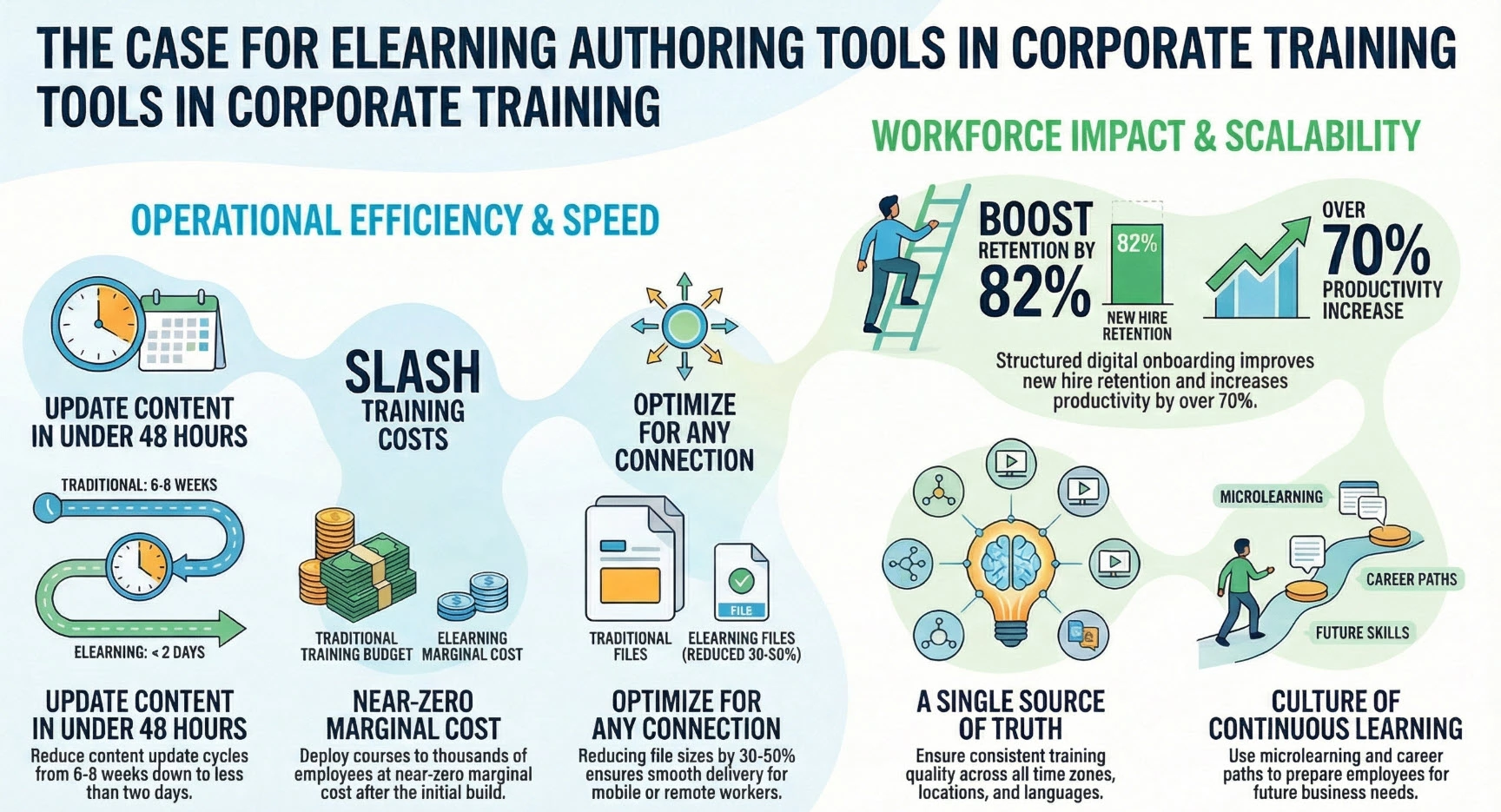
An eLearning authoring tool shifts the economics entirely. You create a course once and deploy it to thousands of employees at near-zero marginal cost. Need to train a new cohort of hires? The course is already built. Need to update a compliance module after a regulation change? Edit the slide, republish, done — no reprinting, no rescheduling.
Pro Tip: When exporting HTML5 courses in ActivePresenter, use the “Compress Images” and “Optimize Audio” options in the export settings. In my experience, this can reduce file sizes by 30-50% without any visible quality loss — a huge deal when you’re deploying to employees on slower connections or mobile devices.
2. Scale Training Across Locations, Time Zones, and Languages
If your company operates in multiple offices — or has a remote workforce — consistency becomes a nightmare with live training. Different trainers deliver different qualities. Scheduling across time zones is a logistical puzzle.
eLearning authoring tools solve this by creating a single source of truth. Every employee, whether they’re in New York, Nairobi, or New Delhi, gets the exact same training experience. And because the content is digital, employees can learn at their own pace, on their own schedule.
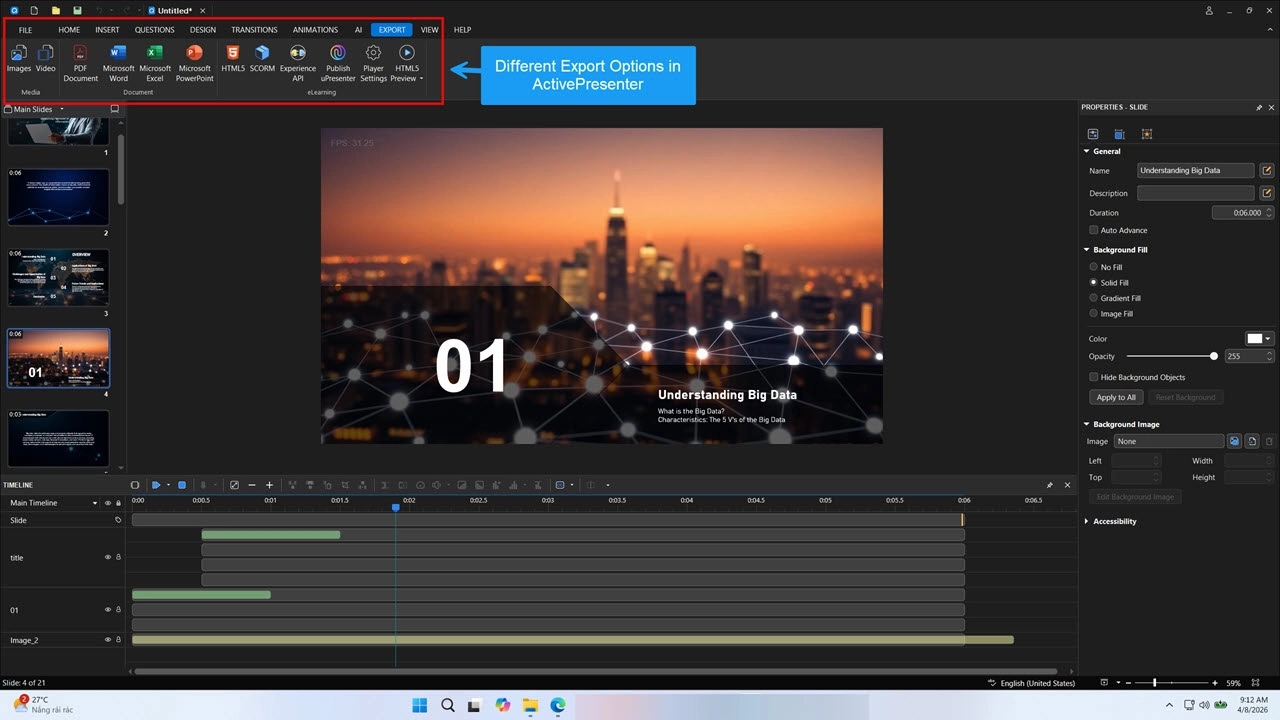
Tools like ActivePresenter make this even easier by supporting export to multiple formats:
- HTML5 for browser-based learning on any device
- SCORM/xAPI for LMS integration and progress tracking
- MP4/WebM video for quick sharing via internal platforms or even YouTube
- PDF/Word/PowerPoint for supplementary reference materials
This multi-format flexibility means you create content once and distribute it everywhere — maximizing the value of every hour your team spends on course development.
3. Transform Onboarding from a Chore into a Competitive Advantage
First impressions matter. A structured, engaging onboarding program can improve new hire retention by 82% and boost productivity by over 70% (Brandon Hall Group). Yet many companies are still onboard with a stack of documents and a “shadow someone for a week” approach.
With an authoring tool, you can build onboarding programs that include:
- Interactive company overviews with clickable org charts and culture videos
- Policy walkthroughs with built-in comprehension checks
- Role-specific software simulations so new hires practice in a safe environment
- Assessments and feedback loops to identify knowledge gaps early
This isn’t just about saving HR time (though it absolutely does that). It’s about making new employees feel confident and competent from day one.
4. Update Content in Minutes, Not Months
Business environments move fast. A new product launches. A compliance regulation changes. A security protocol gets updated. With traditional training, each of these triggers a costly, time-consuming cycle of content revision, scheduling, and redelivery.
With an eLearning authoring tool, updates happen in real time. Edit the relevant slides or modules, republish to your LMS, and every employee immediately has access to the latest version. No delays, no version confusion, no wasted print runs.
In my experience working with corporate training teams, this agility alone justifies the investment. I’ve seen organizations reduce their content update cycle from 6-8 weeks down to under 48 hours simply by switching to a capable authoring platform.
5. Build a Culture of Continuous Learning
The companies winning in 2026 aren’t just training employees to do their current jobs — they’re investing in upskilling and reskilling to prepare for what’s next. eLearning authoring tools make continuous learning practical by enabling:
- Microlearning modules (5-10 minute lessons for quick skill updates)
- Refresher courses that reinforce critical knowledge over time
- Learning paths that map to career development and promotion tracks
When employees see that their company invests in their growth, engagement and retention go up. It’s not just good training — it’s good business strategy.
3 Real-World Scenarios: How Businesses Use eLearning Authoring Tools
Theory is great, but let me show you what this looks like in practice.
Scenario 1: Software Simulation Training for Banking Employees
A regional bank needs to train 500+ tellers on a new core banking system. Instead of pulling employees off the floor for multi-day workshops, the training team uses ActivePresenter’s software simulation mode to record the exact workflows — account opening, transaction processing, loan applications — and turn them into interactive “try-it-yourself” modules.
Employees practice clicking through the real interface in a sandboxed environment. Mistakes trigger instant feedback. The result? Faster proficiency, fewer errors in production, and zero downtime during the rollout.
Scenario 2: IT Help Desk Video Tutorials
An IT department is drowning in repetitive support tickets: “How do I reset my VPN?” “How do I set up two-factor authentication?” They use ActivePresenter’s screen recording and annotation tools to create a library of short, polished video tutorials. Each video is exported as MP4 for the company intranet and as an HTML5 interactive module (with knowledge checks) for the LMS.
Support ticket volume drops by 40% within the first quarter. The IT team gets their time back.
Scenario 3: Compliance Training for a Global Healthcare Company
A healthcare organization with offices in 12 countries needs to deliver annual HIPAA and data privacy training. Using an authoring tool, they build a single interactive course with branching scenarios — employees make decisions in realistic situations and see the consequences of compliant vs. non-compliant choices.
The course is exported in SCORM format so completions and scores are automatically tracked in the LMS, generating audit-ready compliance reports. When regulations change mid-year, the team updates the affected modules and republishes — all 8,000 employees have access to the current version within 24 hours.
How to Evaluate an eLearning Authoring Tool: 7 Criteria That Matter
Not every tool is right for every organization. Here’s the framework I use after a decade of evaluating these platforms:
| Criteria | What to Look For |
| 1. Ease of Use | Can non-technical staff create content? Look for intuitive interfaces, drag-and-drop design, and built-in templates. |
| 2. Interactivity Options | Does it support quizzes, branching scenarios, drag-and-drop activities, and software simulations — not just static slides? |
| 3. Screen Recording Quality | For software training, you need high-resolution capture with the ability to add annotations, zoom effects, and cursor highlights. |
| 4. Export Format Support | At minimum: HTML5, SCORM, xAPI, and video (MP4). Bonus: PDF, Word, PowerPoint for supplementary materials. |
| 5. Non-Destructive Editing | Can you make changes without losing your original content? This is critical for iterative course development. |
| 6. Pricing & Licensing | Is there a free edition to test? Are licenses perpetual or subscription-based? What’s the total cost of ownership? |
| 7. LMS Compatibility | Does the exported content play nicely with your LMS? SCORM 1.2, SCORM 2004, and xAPI support are table stakes. |
ActivePresenter: An Honest Look (Pros & Cons)
I believe in giving you the full picture, not just a sales pitch. Here’s my candid assessment of ActivePresenter as a corporate training authoring tool. For more information about the tool, watch below video:
✅ Pros
- All-in-one platform: Screen recording, video editing, interactive course design, and eLearning publishing in a single application. You don’t need to juggle three different tools.
- Non-destructive editing: Make changes to your video and course content without losing the original — a lifesaver when stakeholders request revisions (and they always do).
- Comprehensive export options: HTML5, SCORM, xAPI, MP4, WebM, PDF, Word, PowerPoint. This is one of the most versatile export suites I’ve seen in any authoring tool.
- Free edition with no time limit: Unlike most competitors that offer 14- or 30-day trials, ActivePresenter’s free edition gives you full access to core features indefinitely. This is genuinely rare.
- Advanced interactivity: Branching scenarios, drag-and-drop questions, fill-in-the-blank, hotspot interactions, and conditional logic — everything you need for engaging, assessment-rich courses.
- Responsive design support: Content adapts to different screen sizes, which is essential as more employees learn on tablets and smartphones.
⚠️ Cons
- Learning curve for advanced features: While basic course creation is straightforward, mastering features like advanced actions, variables, and conditional logic takes time and practice.
- Desktop-only application: ActivePresenter runs on Windows and macOS but doesn’t offer a cloud-based editor. For teams that need real-time collaborative editing in the browser, this could be a limitation.
- Free edition watermark on some exports: The free version adds a watermark to certain output formats, which means you’ll need a paid license for production-quality deliverables.
Bottom line: For the vast majority of corporate training needs — from onboarding and compliance to software simulation and skills development — ActivePresenter delivers professional-grade capabilities at a price point that’s hard to beat. The free edition alone lets you fully evaluate the tool before committing a dollar.
5 Expert Tips for Getting the Most Out of Your Authoring Tool
These are lessons I’ve learned the hard way over 10+ years. Save yourself the trial and error:
- Start with a storyboard, not the tool. Before you open any software, map out your learning objectives, content flow, and assessment strategy on paper. The tool should serve your design — not the other way around.
- Use keyboard shortcuts religiously. In ActivePresenter, shortcuts like Ctrl+Shift+R for recording and Ctrl+D for duplicating objects can cut your production time significantly. Learn 10 shortcuts and you’ll feel like a different creator.
- Optimize before you export. Compress images, trim unused audio, and remove hidden layers before publishing. A lean HTML5 package loads faster and performs better on mobile devices — your learners will thank you.
- Build modularly. Create reusable templates for intros, outros, quiz slides, and feedback screens. When you need to build the next course, you’re assembling components instead of starting from scratch.
- Test on real devices. Always preview your exported course on the actual devices your employees use — including that older Android tablet in the warehouse and the locked-down browser on the call center desktop. What looks perfect on your development machine might break elsewhere.
Ready to Build Smarter Corporate Training?
If you’ve read this far, you already understand that the question isn’t whether you need an eLearning authoring tool — it’s how quickly you can get started.
ActivePresenter makes that answer easy. As an all-in-one eLearning authoring tool for corporate training, it gives you screen recording, interactive course design, video editing, and multi-format publishing in a single platform. It supports SCORM and xAPI for seamless LMS integration. And it offers a free edition with no time limit — so you can explore every feature, build your first course, and see the results before spending a cent.
Whether you’re a one-person training department at a growing startup or part of an enterprise L&D team serving thousands of employees worldwide, ActivePresenter scales with you.
👉 Download ActivePresenter Free and start building corporate training that actually works — today.
Have questions or want to connect with other training professionals using ActivePresenter?Join the Atomi Systems community for tutorials, tips, and direct support from the team.
What’s your biggest challenge with corporate training right now? Drop a comment below — I’d love to share what’s worked for teams I’ve consulted with over the years.