
If you’ve ever sat through an audit and watched your compliance officer ask, “Can you prove this employee actually completed the HIPAA module?” — you know exactly why choosing the right SCORM authoring tool matters more than most software decisions you’ll make this year. A poorly tracked course, a broken SCORM package, or a training video that doesn’t actually simulate real workflows can turn a routine audit into a legal headache. This guide breaks down what to look for and why ActivePresenter has become a go-to choice for teams building serious, trackable HIPAA compliance training.
Why HIPAA Compliance Training Needs Specialized SCORM Tools
What makes HIPAA training content different from generic eLearning
Generic product training can afford a few loose ends. HIPAA training can’t. You’re dealing with legally mandated content covering PHI (Protected Health Information) handling, breach notification procedures, and role-specific access rules. That means your authoring tool needs to support branching scenarios (so a nurse and a billing clerk see different consequences for the same mistake), realistic software simulations (so staff practice correctly logging into EHR systems), and airtight completion tracking.
The role of SCORM tracking in audit trails and legal protection
This is where SCORM compliance software earns its keep. SCORM 1.2 and SCORM 2004 packages record completion status, quiz scores, and time spent — data your LMS can pull up instantly when an auditor (or a lawyer, in a worst-case scenario) asks for proof. Without accurate SCORM packaging, you’re just hoping people clicked “Next” enough times.
Key Features to Look for in a SCORM Authoring Tool for Compliance Training
Accurate SCORM 1.2/2004 tracking
Not every tool packages SCORM data the same way. Some cloud platforms compress tracking into simplified pass/fail states, which won’t satisfy stricter compliance departments that need granular score and time data.
Interactive simulations for realistic scenario-based training
Reading a PDF about “how to properly log off a shared workstation” doesn’t stick. Practicing it in a simulated environment does.
Non-destructive video editing for policy walkthroughs
Compliance policies update constantly. You need a tool where editing a video doesn’t mean re-recording from scratch every time a regulation changes.
Data security and deployment flexibility
Healthcare and finance organizations often need offline or on-premise authoring — not everything can (or should) live in the cloud.
Best SCORM Authoring Tool for HIPAA Compliance Training: Why ActivePresenter Stands Out
After testing and comparing dozens of authoring platforms over the years, I keep coming back to the same conclusion: for compliance-heavy training, you need a tool that does more than “add text to a slide.” ActivePresenter checks the boxes that matter most for regulated industries.
Record Software Simulation — training staff on real EHR/software workflows
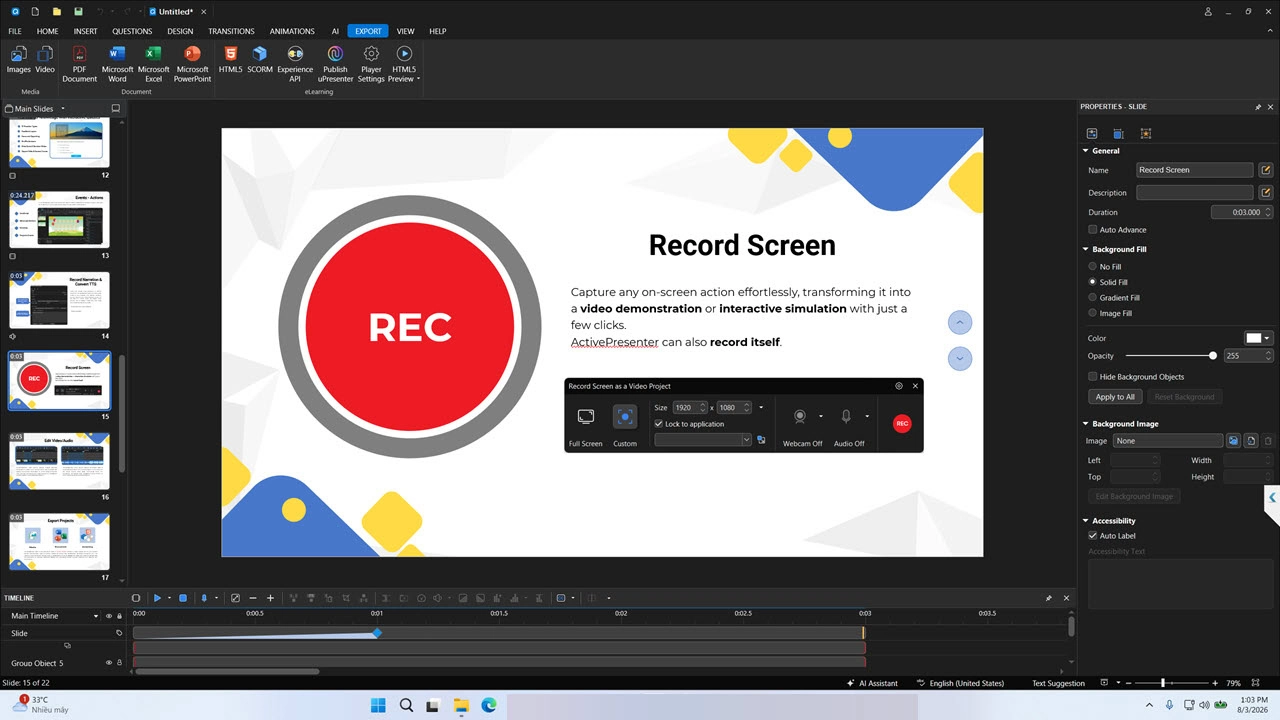
Instead of just narrating over a screen recording, ActivePresenter’s Record Software Simulation feature captures your actual clicks, keystrokes, and navigation, then automatically converts them into an interactive simulation. For HIPAA training, this means you can build a realistic “practice mode” where employees interact with a mock EHR interface — clicking, typing, navigating — before they ever touch the real system.
Advanced eLearning authoring tools
Beyond simulations, ActivePresenter includes quizzes, branching scenarios, variables, and triggers — everything you need to build a course where wrong answers lead to remediation paths instead of just a red “X.”
SCORM/xAPI publishing for LMS tracking and reporting
This is the core requirement for compliance training, and ActivePresenter handles it natively — packaging your course into SCORM 1.2, SCORM 2004, or xAPI formats that report cleanly to your LMS dashboard.
AI Agent integration via MCP Connect
One feature I didn’t expect to lean on so heavily: MCP Connect lets you hook ActivePresenter into AI agents to speed up repetitive tasks — like generating quiz variations or updating text across dozens of slides when a policy changes. For teams that update HIPAA content annually (which is basically everyone), this cuts hours off the revision cycle.
Perpetual license vs. subscription
Compliance departments tend to operate on tight, predictable budgets. ActivePresenter’s perpetual license model means you pay once and own it — no recurring subscription fees eating into next year’s training budget, and a genuinely capable free version if you’re just starting out.
Pro Tips From an eLearning Veteran
In over a decade of building training content, here are two things I wish someone had told me earlier:
Use Record Software Simulation instead of manually annotating screen recordings. A lot of people default to recording a plain screen capture and then adding click-here annotations afterward. It’s slower and less accurate. Record Software Simulation captures the actual interaction data as you go, so you get clickable hotspots and realistic feedback automatically — saving you the manual cleanup work later.
Take advantage of shared AI credits across your license. If your team has multiple machines activated under the same ActivePresenter license key, the AI credits pool together rather than resetting per device. This matters a lot for compliance teams distributing content creation across several instructional designers — plan your AI-assisted tasks (like auto-generating quiz questions or translating content) around the shared pool instead of assuming each machine gets its own separate allowance.
How ActivePresenter Compares to Other SCORM Tools on the Market
| Tool | Pricing Model | Best For | Compliance Strength |
| ActivePresenter | Perpetual / Subscription | Software simulations & non-destructive video editing | Strong SCORM/xAPI tracking, offline deployment |
| Articulate 360 | Subscription | Large enterprise teams with big budgets | Solid tracking, cloud-dependent |
| iSpring Suite | Subscription (PowerPoint add-in) | Fast PowerPoint-to-SCORM conversion | Good for quick deployment, less simulation depth |
| Adobe Captivate | Subscription | Advanced branching & VR training | Strong for experienced designers, steeper learning curve |
For compliance-specific training where simulation accuracy and long-term cost control matter, ActivePresenter’s combination of perpetual licensing and native SCORM/xAPI support gives it a clear edge over subscription-locked competitors.
Final Verdict — Choosing the Right SCORM Tool for Compliance Training
If your organization needs HIPAA compliance training that’s both engaging and audit-proof, you need more than a slide-to-SCORM converter. You need realistic simulations, dependable tracking, and a tool that doesn’t lock you into endless subscription fees just to keep your training library up to date. That’s exactly the gap ActivePresenter fills.
Ready to see it in action? Download the free trial of ActivePresenter and build your first HIPAA training simulation this week — no credit card required. If you run into questions along the way, the Atomi Systems community forum is full of instructional designers and IT trainers happy to share templates, workflows, and troubleshooting tips.
