
Create interactive quizzes are one of the most effective ways to increase learner engagement & reinforce knowledge. Whether you’re creating training materials for employees, educational content for students, or self-paced online courses, ActivePresenter SCORM authoring tool provides multiple ways to build quizzes efficiently.
In this article, we’ll explore three different methods for creating quizzes in ActivePresenter
- Creating quiz questions manually
- Importing questions from a CSV/GIFT file
- Generating quizzes automatically using AI Assistant or MCP integration
Each method serves different needs, depending on your project size, available time, and workflow preferences.
Method 1: Create Interactive Quiz Questions Manually
The traditional way to create quizzes in ActivePresenter is by manually inserting question slides and entering content yourself.
How It Works
To create a quiz manually:
- Open your ActivePresenter project.
- Go to the Question tab.
- Choose the desired question type, such as: Multiple choice, multiple response, true/false, fill in text entry, matching, sequence, essay, etc.
- Enter the question content.
- Add answer options.
- Define the correct answer & other feedbacks
- Set scoring and reporting settings.
ActivePresenter offers a wide range of question types, allowing instructional designers to create highly interactive assessments tailored to different learning objectives.
Pros
- Full control over every detail. You write the question your way, pick the answer choices, set the scoring, and craft feedback that actually makes sense for your learners. Nothing gets auto-generated or lost in translation.
- Add other types of media: You’re not stuck with plain text. Drop in a screenshot, a short video clip, some audio narration, or a clickable simulation, whatever helps the learner understand. This is where manual creation really shines, especially for software tutorials or real-world scenario exercises.
- The experience flows the way you design it. Want branching paths that react to learner answers? Locked navigation? Custom feedback for each wrong choice? You have full say over how the whole thing fits together.
Cons
- It takes time, and a lot of it. If you’re staring down a 200-question bank, building each one by hand is a serious time commitment. It’s fine for smaller projects, but the hours stack up fast at scale.
- It gets repetitive pretty quickly. Compliance courses and certification exams tend to follow the same question structure over and over. After a while, it stops feeling like instructional design and starts feeling like data entry.
Best Use Cases
Manual creation is ideal when:
- You need highly customized questions.
- The quiz contains fewer questions.
- Visual design and learner experience are priorities.
- You want complete instructional control.
Method 2: Import Interactive Quizzes from a CSV/GIFT File
For larger projects, ActivePresenter provides a much faster approach: importing quiz questions from a CSV file.
Instead of creating every question individually, you can prepare questions in a spreadsheet and import them into ActivePresenter in bulk.
How It Works
The typical workflow is:
- Create a CSV file using Excel, Google Sheets, or another spreadsheet application.
- Organize your questions according to ActivePresenter’s supported CSV format.
- Import the CSV file into ActivePresenter.
- ActivePresenter automatically generates the corresponding quiz slides.
Within minutes, hundreds of questions can be transformed into a fully functional assessment. You can visit blog Import Question in CSV File

Pros
- It saves you a ton of time. Instead of clicking through each question one by one, you build your entire question set in Excel or Google Sheets and import it in a single step. For large projects, this alone makes CSV import worth considering.
- Edits are way less painful. Need to update a question? Fix a typo across 30 slides? Just make the change in the spreadsheet and re-import. You’re not hunting through individual slides one by one, which is a huge relief when your content changes regularly.
- It’s built for scale. Some organizations manage hundreds or even thousands of assessment questions. CSV import is pretty much the only sane way to handle a question bank that size, trying to do it manually just isn’t realistic.
Cons
- You need to get the format right before anything works. The CSV file has to follow a specific structure. There’s a bit of a learning curve upfront.
- Complex interactions are out of scope. For standard quiz questions, CSV import works great. But if your assessment involves custom branching logic, advanced animations, or interactive media elements, you’ll still need to handle those parts manually inside ActivePresenter.
Best Use Cases
CSV import is ideal when:
- You already have questions in Excel or Google Sheets.
- You need to create large quizzes quickly.
Method 3: Create Interactive Quizzes Automatically with AI Assistant and MCP Integration
The newest and most efficient workflow in ActivePresenter 10 combines AI-powered quiz generation with MCP (Model Context Protocol) integration.
Instead of manually writing questions or preparing spreadsheets, you can simply provide learning content and let AI generate quiz questions automatically.
What Is an AI Assistant?
AI Assistant is built directly into ActivePresenter to help users create educational content faster.
It can generate: Quiz questions, answer choices, correct answers, feedback suggestions & learning content summaries
This dramatically reduces the time required to create assessments.
What Is MCP?
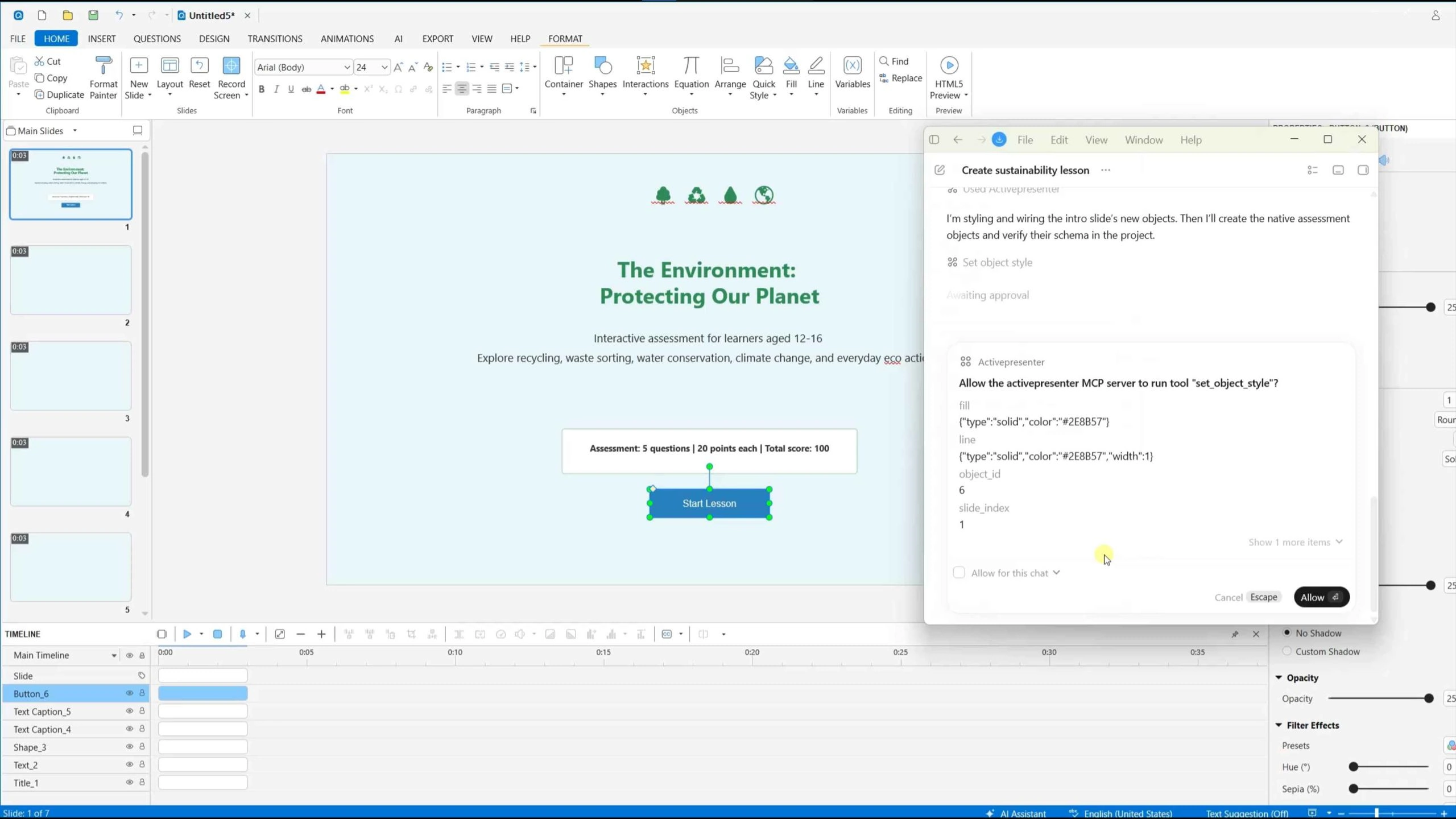
MCP (Model Context Protocol) allows AI to connect with ActivePresenter. With MCP integration, AI can generate 13 types of available quizzes in ActivePresenter including correct answers, submit buttons and feedback.
Rather than copying and pasting content manually, AI can work directly with connected resources.
How It Works
A typical workflow looks like this:
- Prepare your learning content.
- Connect ActivePresenter through MCP-supported sources (Codex OpenAI, Google Gemini CLI, Claude Code)
- Ask AI to generate quiz questions with your provided learning content
- Review and refine the generated results.
For example, after creating a lesson on workplace safety, you can ask AI Assistant to:
Create 10 multiple-choice interactive quizzes based on this lesson with information provided…Within minutes, ActivePresenter can produce a project with 10 slides ready for review
Advantages of AI Assistant and MCP
- It’s the fastest method. AI generates dozens of questions in seconds. Work that used to take hours now takes minutes hard to beat when you’re on a deadline.
- You focus on refining, not writing. Instead of drafting every question from scratch, you shift into review mode. It’s a much better use of your time as an instructional designer.
- It fits into your existing workflow. MCP Connect lets AI pull from connected content sources, so the questions are grounded in your actual materials from the start.
Disadvantages of AI Assistant and MCP
- You still need to review. AI output isn’t always accurate or well-aligned with your learning objectives. Every question needs a human check before it reaches learners.
- Quality depends on your source material. Vague or incomplete inputs lead to weak questions. The AI can only work with what you give it.
- Some questions will need editing. A quick polish pass is usually enough. You do not have to build from scratch.
Best Use Cases
AI Assistant and MCP are ideal when:
- You need to build quizzes quickly.
- You regularly create new training content.
- You want to accelerate instructional design workflows.
- You need rapid quiz generation from existing learning materials.
Which Method Should You Choose?
Each approach offers unique advantages.
| Method | Speed | Flexibility | Best For |
| Manual Creation | Slow | Highest | Custom interactive assessments |
| CSV Import | Fast | Medium | Large pre-existing question banks |
| AI Assistant + MCP | Fastest | High | Rapid quiz generation from learning content |
If you’re creating a highly customized assessment with rich interactions, manual creation remains the best option.
If your organization already maintains question banks in spreadsheets, CSV import can save substantial time.
For modern eLearning teams seeking maximum efficiency, AI Assistant combined with MCP integration provides the fastest path from content to assessment.
Final Thoughts
ActivePresenter offers a flexible range of quiz creation methods to suit different instructional design needs. From traditional manual authoring to bulk CSV imports and AI-powered generation, users can choose the workflow that best matches their project requirements.
By understanding the strengths and limitations of each method, you can select the most efficient approach and create engaging interactive quizzes that enhance learning outcomes while reducing development time.
Download ActivePresenter for free & see how the magic works
