
For L&D Managers, HR Directors, Enterprise Executives, and Instructional Designers who need to make a defensible, scalable, and cost-effective software decision

Table of contents
- Why Software Selection Is the Most Under-Analyzed Decision in Corporate L&D
- The Business Training Software Landscape: Categories, Capabilities, and What Actually Matters
- The Feature Evaluation Framework: What Separates Professional Authoring from Basic Content Production
- The Financial Equation: TCO, Licensing Models, and Building the Business Case
- Platform Comparison — ActivePresenter + uPresenter vs. Articulate 360 vs. Adobe Captivate vs. iSpring Suite
- LMS Integration and Deployment Architecture
- Implementation Considerations: Learning Curve, Team Skills, and Pilot Design
- Decision Framework: Matching Platform to Organizational Profile
- Final Assessment
Why Software Selection Is the Most Under-Analyzed Decision in Corporate L&D
Most organizations spend months optimizing their LMS configuration, curating their content libraries, and debating instructional design models — and then choose their authoring tool in two weeks based on a vendor demo and a shared spreadsheet.
This inverted prioritization is expensive. The authoring tool is the upstream constraint on everything downstream. It determines the complexity of interactions your learners can experience, the accuracy of the data your LMS receives, the speed at which your team can produce and update content, and — critically — the recurring financial exposure your organization carries year over year.
A poor authoring tool selection creates a cascade of compounding costs: slow production cycles, limited interaction fidelity, compliance gaps in SCORM/xAPI reporting, and vendor lock-in that makes switching prohibitively painful at scale.
This guide is written for the decision-maker who recognizes that selecting business training software is a strategic infrastructure decision, not a procurement task. We’ll cover every dimension that matters — feature depth, publishing standards compliance, Total Cost of Ownership (TCO), financial modeling across licensing structures, and a frank platform-by-platform comparison — so you can make a defensible recommendation to your leadership team with full confidence.
The Business Training Software Landscape: Categories, Capabilities, and What Actually Matters
The Core Categories of Business Training Software
The term “business training software” is broad enough to be nearly useless without segmentation. Before you can evaluate platforms, you need to accurately classify what you’re buying.
eLearning Authoring Tools are the production environment. This is where Instructional Designers build course content: slides, simulations, quizzes, branching scenarios, and video. Output is typically a SCORM, xAPI, or HTML5 package that gets deployed to an LMS. These tools are the primary focus of this guide.
Learning Management Systems (LMS) are the delivery and tracking environment. They host published course content, manage learner enrollment, track completion and scores, and generate compliance reports. An LMS does not produce content — it receives and manages it.
Video-Centric Training Platforms combine screen recording with lightweight engagement features (quizzes embedded in video, chapters, comments). They are appropriate for informal learning but lack the interaction fidelity and assessment rigor required for compliance training or software skills development.
Microlearning and Knowledge Management Platforms serve just-in-time performance support use cases. They are not replacements for structured eLearning courses but effective complements.
Understanding these categories prevents a fundamental evaluation error: assessing a video platform on SCORM compliance criteria it was never designed to meet, or rejecting an authoring tool because it lacks native LMS enrollment management.
The Five Dimensions of Meaningful Evaluation
Generic feature checklists fail because they treat all features as equal. The five dimensions below are weighted by actual impact on an enterprise L&D program:
- Content Production Capability — The range of interaction types, the depth of the assessment engine, and the efficiency of the authoring workflow.
- Publishing Standards Compliance — Native, tested support for SCORM 1.2, SCORM 2004, xAPI (Tin Can API), and HTML5 publishing for LMS-agnostic deployment.
- Software Simulation Fidelity — The ability to capture real software workflows and convert them into interactive, trackable training simulations. This is the single most differentiating capability between enterprise-grade tools and consumer-grade tools.
- Total Cost of Ownership (TCO) — Not just license cost, but the full multi-year financial model including renewal exposure, per-seat scaling costs, maintenance fees, and AI feature economics.
- Integration Architecture — How the output connects to your existing LMS, HR systems, and AI infrastructure.
The Feature Evaluation Framework: What Separates Professional Authoring from Basic Content Production
Content Creation Capabilities: The Foundation Layer
A professional eLearning authoring tool must support the full production spectrum without requiring external tools for common tasks. Evaluate platforms against this functional checklist:
Slide-Based Authoring:
- Multi-layer timeline with per-object show/hide control across modes
- Responsive layout design that adapts to mobile, tablet, and desktop without rebuilding
- Reusable master slides, themes, and object libraries that enforce brand consistency at scale
- Animation and transition controls beyond basic fade/appear
Video Production Integration:
- Screen recording with synchronized cursor path capture
- Audio narration recording with noise reduction and normalization
- Video editing timeline with cuts, trims, callout overlays, and captions
- Text-to-speech generation for narrator-free production at scale
Assessment Engine:
- Minimum support for: Multiple Choice, Multiple Response, True/False, Fill-in-the-Blank, Matching, Drag-and-Drop, Sequence Ordering, and Hotspot
- Configurable scoring: partial credit, attempt limits, time limits, randomized question pools
- Branching logic at the question level, not just the slide level
- Detailed results reporting passed through to LMS via SCORM/xAPI data models
The range and configurability of question types is not an academic concern. Compliance training, for example, requires assessments with specific attempt-limit behavior and detailed per-question reporting to satisfy audit requirements. A tool that only supports basic multiple-choice exports cannot pass that data to your LMS in a standards-compliant format.
Software Simulation: The Enterprise-Grade Differentiator
This is where the gap between professional and consumer-grade authoring tools is widest — and where the wrong selection does the most damage to training effectiveness.
What Software Simulation Actually Requires
Software simulation training replicates a real software environment — an ERP system, a CRM, an internal ticketing tool, a regulatory reporting interface — and requires learners to perform the correct clicks, keystrokes, and data entries to progress. Done correctly, it is the most effective method for building procedural software competency. Done with an inadequate tool, it becomes an extended screenshot slideshow with next buttons.
The capability that separates capable tools from mediocre ones is Record Software Simulation — an engine that captures your actual screen interactions automatically as you perform them in the target application, and then converts that recording into interactive, multi-mode training content. The alternative — building simulations manually, slide by slide, with individually placed click zones — is 3–5x slower and produces lower-fidelity output. To see this workflow in actions, check out this article: How to record software simulation in ActivePresenter!
The Three Simulation Modes: A Technical Breakdown
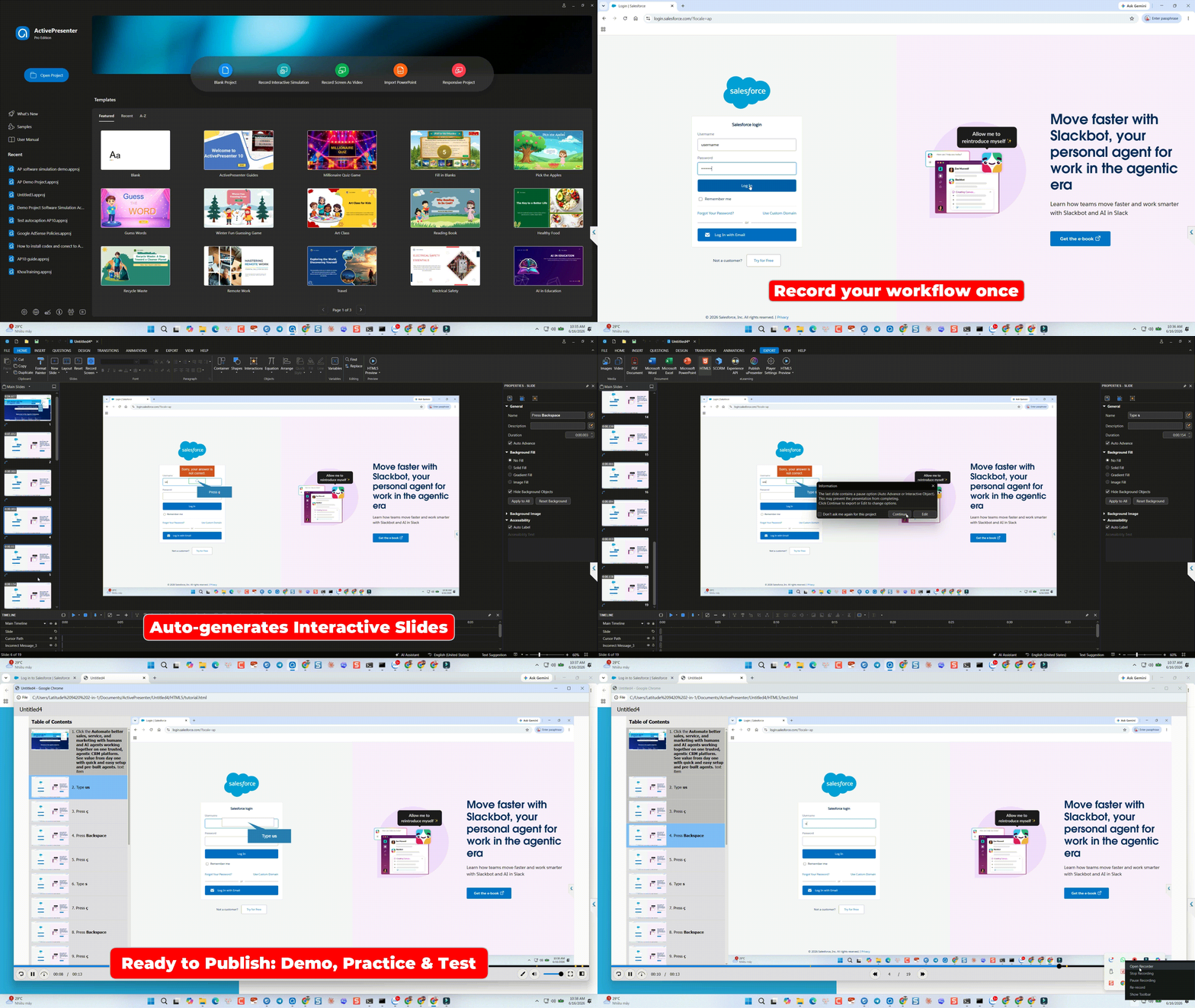
ActivePresenter’s Record Software Simulation engine captures a single workflow recording and intelligently outputs it into three functionally distinct training modes, each targeting a different stage of the learner’s skill acquisition journey:
Mode 1 — Demonstration Mode
The learner observes the software workflow as a guided, narrated walkthrough. Mouse movements, clicks, and keyboard inputs are rendered as visual cues on a static screenshot sequence. There is no interaction required from the learner. The instructional purpose is initial exposure and cognitive modeling — the learner builds a mental map of the task before being asked to perform it.
Critical technical detail: because the recording captures the actual live application, every screenshot is pixel-accurate to the real UI. There is no manual rebuild, no cropped stock images of software, and no version-drift inconsistency.
Mode 2 — Practice Mode
The learner performs the workflow themselves, within the simulated environment. The interaction engine activates recorded click zones, keystroke inputs, and drag-and-drop areas at each step. When a learner performs an action correctly, the simulation advances. When they make an error, configurable hint layers appear — cursor guides, highlight boxes, text prompts — that coach rather than block. The learner cannot “fail” Practice Mode; the design intent is deliberate, low-anxiety skill building.
From an Instructional Design standpoint, this is the “I Do, We Do, You Do” model implemented automatically from a single screen recording. No manual interaction-by-interaction construction is required once the capture is complete.
Mode 3 — Test Mode
All guidance layers are removed. The learner must perform the complete workflow from memory without hints, cursor guides, or prompts. The interaction engine records every correct action, every incorrect action, every corrected mistake, and the time elapsed at each step. This granular behavioral data is mapped to the xAPI data model and passes to your LMS or Learning Record Store (LRS) as structured, queryable evidence of task competency.
This is a technically meaningful distinction from basic click-tracking. A learner who clicks the wrong field three times before finding the correct input has a demonstrably different competency profile than a learner who completes the workflow cleanly on the first attempt. Test Mode captures that distinction; a screenshot slideshow does not.
Why This Matters for Enterprise Training Programs
For organizations deploying system adoption training — ERP rollouts, CRM onboarding, compliance portal training, internal tooling — the Demonstration → Practice → Test progression eliminates the largest single cost driver in simulation development: manual slide construction. Enterprise L&D teams report 40–60% faster production cycles when using automated capture compared to manual simulation builds, and learner performance on post-training competency assessments measurably improves when the Practice mode provides guided repetition before high-stakes testing.
Publishing Standards Compliance: SCORM, xAPI, and HTML5
Publishing compliance is not a checkbox — it is a technical specification that determines whether your content communicates accurately with your LMS, passes legally defensible completion and score data, and remains accessible as your platform evolves.
SCORM 1.2 remains the most universally supported standard. Nearly every LMS deployed in enterprise environments since 2004 supports it. Its data model tracks: completion status (completed/incomplete), success status (passed/failed), score (raw, min, max), and total time. For basic course completion tracking and compliance audit trails, SCORM 1.2 is sufficient and predictable.
SCORM 2004 extends the data model with more granular sequencing controls, the ability to report on individual objective completion within a course, and improved suspend/resume capability for multi-session content. If your compliance program requires objective-level reporting (e.g., documenting that a specific regulatory module was completed independently of the surrounding course), SCORM 2004 is the correct standard.
xAPI (Tin Can API) represents a fundamental architectural shift. Where SCORM is a two-party communication (content → LMS), xAPI is a three-party architecture (content → LRS → reporting layer). The xAPI data model supports “Statements” in the form of Actor → Verb → Object — “Sarah completed the SOX compliance training module,” “Marcus scored 87% on the credit risk assessment,” “Priya practiced the Salesforce lead entry workflow.” This freeform statement model allows capturing training activity that occurs outside a traditional LMS: mobile apps, informal simulations, embedded coaching tools, live event participation. For enterprise organizations building a unified learning data architecture, xAPI is the direction. A tool that lacks native, tested xAPI output limits your future analytics capabilities regardless of how sophisticated your LRS becomes.
HTML5 Publishing is the delivery standard for interactive content that runs natively in modern browsers without plugins. A well-implemented HTML5 publishing engine produces output that functions correctly across desktop browsers, iOS Safari, Android Chrome, and embedded LMS frame environments. The critical quality indicator is not whether a tool claims HTML5 output, but whether that output is clean, standards-compliant code that renders consistently at scale.
AI-Powered Authoring Capabilities
AI in eLearning authoring is currently bifurcated between genuine productivity features and marketing-layer additions. The genuine productivity features worth evaluating:
Text-to-Speech (TTS) Generation: Production-grade TTS narration substantially reduces dependency on voice talent for course narration updates. The quality differential between platforms is significant — evaluate actual audio output samples, not feature descriptions. Evaluators should specifically test the system with industry-specific vocabulary and multi-sentence paragraph narration, where synthetic artifacts are most pronounced.
Automatic Translation: Deploying training to multilingual workforces traditionally requires per-language narration and text review cycles that multiply production costs. AI-driven auto-translation applied at the project level — where all text elements, narration scripts, and on-screen labels are translated simultaneously — can compress international deployment timelines from weeks to days. The key technical requirement: translation must be reviewable and editable post-generation within the authoring environment before publishing.
AI Content Generation: The ability to generate quiz questions from source text, create slide outlines from topic prompts, and produce initial script drafts. These features range from minimally useful (template-based question generation) to genuinely transformative (deep-context AI agents that can read an entire technical manual and produce structured course architecture). The current frontier is MCP (Model Context Protocol) integration — an architecture that allows external AI agents to connect directly to the authoring tool’s internal control layer, enabling automation of complex multi-step design tasks that previously required manual authoring.
The Financial Equation: TCO, Licensing Models, and Building the Business Case
Understanding Total Cost of Ownership (TCO)
The purchase price of an eLearning authoring tool is the smallest component of its true multi-year cost. A rigorous TCO analysis must account for:
- License cost (initial and recurring)
- Maintenance and upgrade fees
- Per-seat scaling costs as your L&D team or author pool grows
- AI feature costs (credits, consumption tiers, add-ons)
- Integration and deployment costs (LMS compatibility, IT configuration)
- Training and ramp-up time (the Learning Curve cost is real and measurable in productive hours lost)
- Content migration cost if you ever switch platforms (this is the most underestimated cost in the entire TCO model)
Most procurement processes evaluate only the first item. The result is that organizations routinely sign contracts that look affordable at Year 1 and become financially punitive by Year 3.
Per-User Subscription vs. Perpetual License: A Multi-Year Financial Model
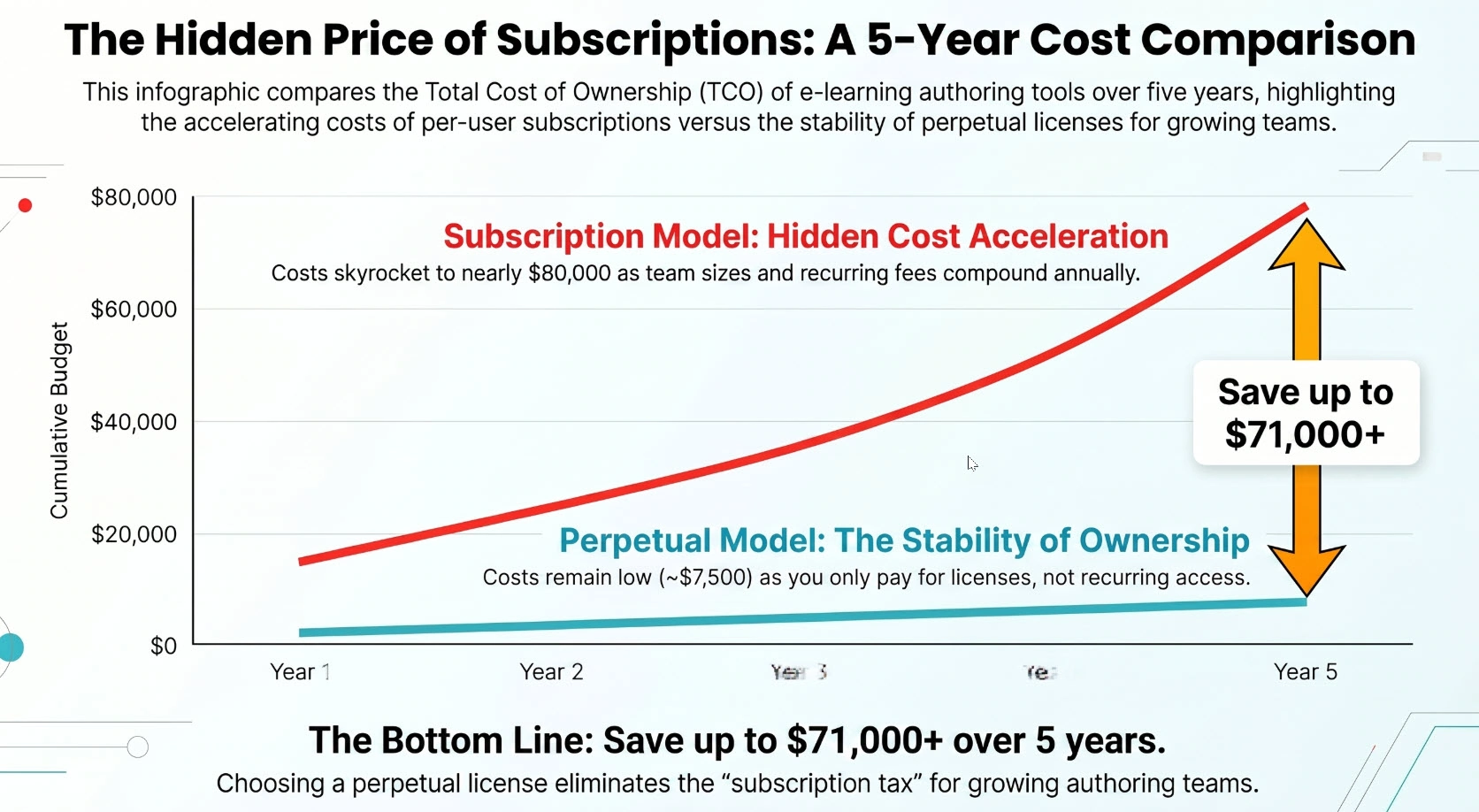
This is the single most important financial dimension of your authoring tool selection. The two dominant licensing models have structurally different economic profiles, and the gap between them widens every year.
The Per-User Subscription Model: Hidden Cost Acceleration
Subscription-based authoring tools (Articulate 360, iSpring Suite, Adobe Captivate on subscription) price per author seat per year. At small team sizes, the annual fee is manageable. As your team scales — which it inevitably does in growing organizations — the cost structure becomes punitive.
Consider a team that starts with 5 instructional designers and grows to 20 over five years at a subscription rate of $1,299/author/year (a representative Articulate 360 figure at individual pricing):
| Year | Authors | Annual Cost | Cumulative Spend |
| 1 | 5 | $6,495 | $6,495 |
| 2 | 8 | $10,392 | $16,887 |
| 3 | 12 | $15,588 | $32,475 |
| 4 | 16 | $20,784 | $53,259 |
| 5 | 20 | $25,980 | $79,239 |
By Year 5, the organization has spent nearly $80,000 on a tool they do not own. If they cancel the subscription, they lose access to all authoring capability immediately. There is no equity accumulated.
Furthermore, subscription pricing creates a structural incentive against expanding the author pool. Organizations frequently operate with undersized ID teams because adding seats triggers immediate cost increases. This is a hidden tax on scaling your program.
The Perpetual License Model: Front-Loaded Investment, Long-Term Control
A perpetual license is a single payment that grants permanent ownership of the software at that version. Optional annual maintenance plans cover upgrades; the base license does not expire.
Using ActivePresenter Pro as a concrete example at $499/license (perpetual):
| Year | Authors | License Investment | Maintenance (Optional) | Cumulative Spend |
| 1 | 5 | $1,995 | $0 | $1,995 |
| 2 | +3 new | $1,197 | $0 | $3,192 |
| 3 | +4 new | $1,596 | $0 | $4,788 |
| 4 | +4 new | $1,596 | $0 | $6,384 |
| 5 | +3 new | $1,197 | $0 | $7,581 |
Total at Year 5 with 19 authors: approximately $7,581 — compared to $79,239 on the subscription model with 20 authors.
That is a $71,000+ difference over five years for a comparable author count. Reframed for your CFO: the perpetual license model funds approximately 18 additional perpetual licenses for the same five-year budget as a single subscription plan’s per-seat fees.
The economic advantage is not marginal. It is decisive for any organization that expects its L&D team to grow, or that needs to onboard subject matter expert (SME) authors alongside dedicated IDs.
The Lock-In Ratchet Effect
Subscription tools create an additional financial dynamic that rarely appears in initial procurement analysis: switching cost amplification. As your team builds an extensive content library in a proprietary authoring format, the perceived cost of migrating to a different platform grows every year. Vendors understand this and price accordingly — renewal rates increase, and the cost to maintain access to your own content library becomes an implicit ongoing obligation.
Perpetual license tools, particularly those that publish to open standards (SCORM, xAPI, HTML5), do not create this dependency. Your published SCORM packages remain operational regardless of your authoring tool relationship. The content you’ve produced retains its value independently.
AI Resource Economics: The Shared Credit Pool Advantage
As AI features become core to authoring workflows — not optional add-ons — the economics of AI consumption matter as much as the base license cost. Two architectures exist:
Per-Seat AI Consumption: Each user account has its own AI credit allocation. A team of 10 authors, each with 500 monthly credits, has 5,000 total credits but cannot pool or redistribute them. An author working on a high-volume translation project exhausts their allocation while colleagues working on static slide content have unused credits that expire.
Pooled/Shared AI Credits Across a License: The more efficient model. Under ActivePresenter’s AI credit architecture, when multiple devices are activated under a single license key, the AI credits allocated to that license are shared across all activated devices. An L&D team working under an organizational license can direct the full credit pool toward the highest-priority production tasks, regardless of which team member is executing them.
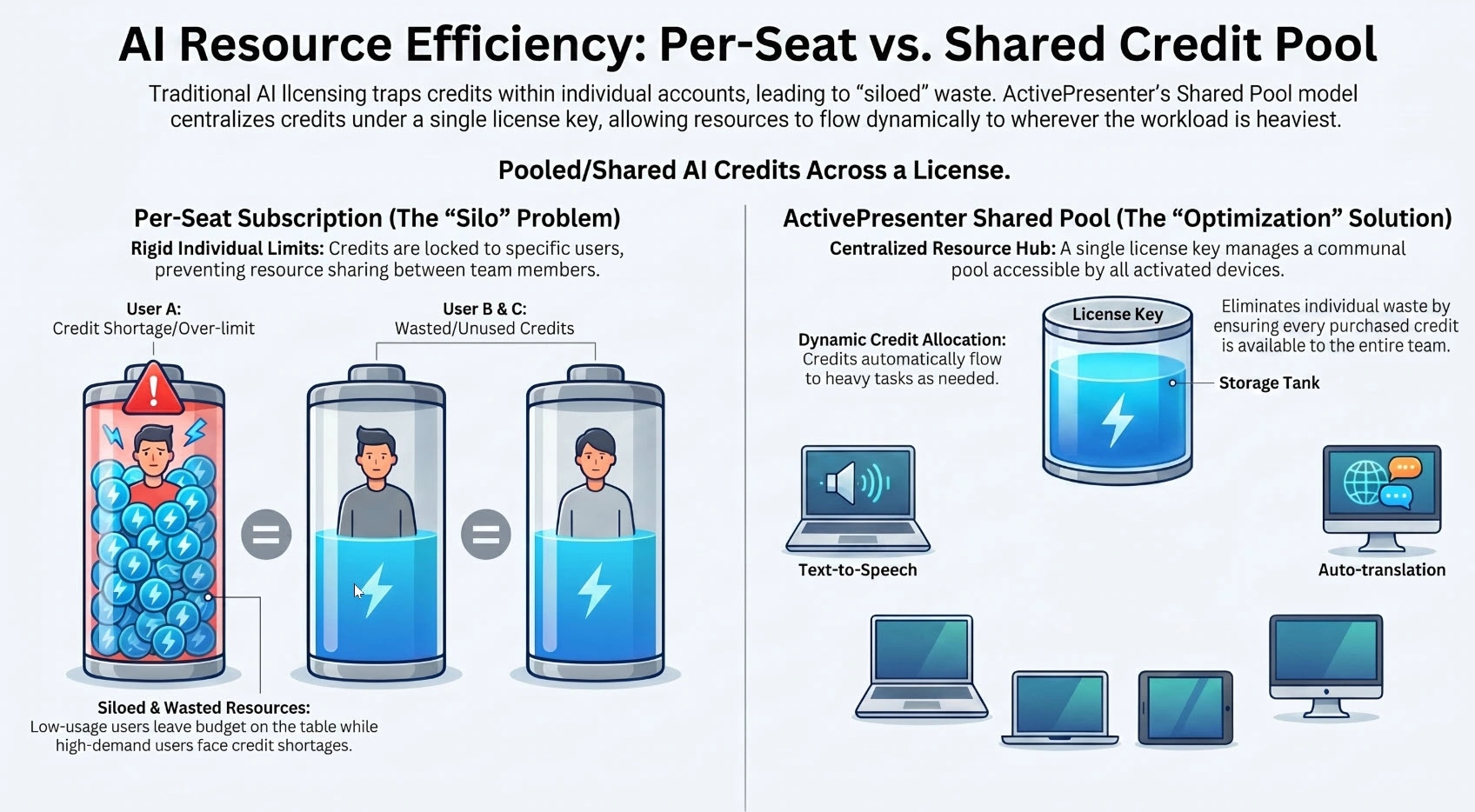
This is a meaningful operational advantage. Consider a sprint cycle where two authors are simultaneously producing a multilingual compliance course: one author running bulk auto-translation across 600 slides, another generating Text-to-Speech narration for a 45-minute module. Under a pooled model, the full organizational credit balance is available to both tasks concurrently. Under a per-seat model, each author is constrained by their individual allocation and must wait for credit resets or purchase individual top-ups.
The pooled credit model also simplifies financial governance. L&D managers can purchase AI credit blocks against project budgets rather than managing per-author allocations, which reduces administrative overhead and provides cleaner cost attribution per project.
Additional Credit Tier Options
For organizations with intensive AI production requirements — large-scale Text-to-Speech narration, bulk project translation, or high-volume image generation — additional AI credit packs are available for purchase above the base allocation included with the license. This gives budget owners predictable, project-level cost control rather than open-ended monthly billing tied to consumption spikes.
Building a Business Case Your CFO Will Accept
The financial argument for a perpetual license eLearning authoring tool is straightforward when modeled correctly. The business case has three components:
Component 1: Direct License Cost Savings. Model Year 1–5 TCO for your projected author headcount under each licensing model. The gap compounds quickly; present it as a cumulative savings figure, not an annual comparison.
Component 2: Production Efficiency Gains. Quantify the time reduction from automated software simulation capture versus manual build. If a 30-minute simulation requires 40 hours to build manually and 15 hours with automated capture, and your organization produces 20 simulations per year, that is 500 hours of L&D labor recovered annually. At a loaded staff cost of $60/hour, that is $30,000/year in productive capacity recovered — which either reduces contractor spend or enables your existing team to produce significantly more content.
Component 3: Training Effectiveness ROI. This is harder to quantify but valuable to include directionally. If your software simulation training reduces post-training error rates by 25% in the processes being trained, and those errors previously required IT support tickets, rework, or audit findings, the cost avoidance is a real financial benefit attributable to training quality.
The combined argument — license cost savings + efficiency recovery + error cost avoidance — is rarely contested by finance teams when modeled with specific organizational numbers.
Platform Comparison — ActivePresenter + uPresenter vs. Articulate 360 vs. Adobe Captivate vs. iSpring Suite
Evaluation Methodology
This comparison uses five dimensions assessed at a professional level, not a feature-parity tier list. The dimensions are: Simulation Fidelity, Publishing Standards Depth, Assessment Engine, Pricing Model & TCO, and AI Capabilities. Each platform is assessed against enterprise L&D requirements.
🥇 ActivePresenter + uPresenter (Atomi Systems) — Best for Long-Term ROI and Advanced Technical Interactivity
Overview
ActivePresenter is a desktop eLearning authoring tool (Windows and macOS) built around three core production capabilities: advanced software simulation via Record Software Simulation, full-featured interactive course authoring with a comprehensive assessment engine, and AI-powered production tools including Text-to-Speech, auto-translation, and MCP Connect AI agent integration. uPresenter is Atomi Systems’ complementary cloud-based LMS and online classroom platform, which ActivePresenter can publish to directly.
Together, they form a closed-loop authoring-to-delivery ecosystem with no per-seat penalties and no subscription dependency.
Simulation Fidelity: ★★★★★
The Record Software Simulation engine is the most technically complete automated capture system available in this market segment. One recording session produces three functionally distinct, independently deployable modes: Demonstration (guided observation), Practice (interactive with hint layers), and Test (blind assessment with granular behavioral tracking). No competing tool in the sub-$500 perpetual license tier replicates this three-mode output from a single capture.
For enterprise teams building software adoption training at scale — ERP implementations, CRM onboarding, regulatory portal training — this capability directly translates to faster production cycles and higher learner performance outcomes.
Publishing Standards: ★★★★★
Native export to SCORM 1.2, SCORM 2004, xAPI (Tin Can API), and HTML5. LMS compatibility is broad and consistently tested. For organizations requiring objective-level tracking and advanced xAPI statement generation, the publishing engine produces standards-compliant packages that work reliably with major enterprise LMS platforms (Moodle, Cornerstone, SAP SuccessFactors, TalentLMS, SCORM Cloud).
Assessment Engine: ★★★★★
Supports the full range of interaction types required for enterprise compliance and skills training, including click simulation interactions (Mouse Click, Key Stroke, Drop Area) captured natively from the software simulation workflow. Configurable partial scoring, attempt limits, randomized question pools, and pass/fail threshold configuration all map correctly to SCORM/xAPI data models.
AI Capabilities: ★★★★★
Production-quality Text-to-Speech across multiple voices and languages, AI-powered auto-translation at the project level (translating all text and narration in a single operation), AI image generation, background removal, and — unique in this category — MCP Connect, an MCP-based AI agent integration layer available on the Pro license. MCP Connect allows users to connect external AI agents (such as Claude or other MCP-compatible models) directly to ActivePresenter’s internal application control layer. This enables AI-driven automation of complex authoring tasks: generating entire course architectures from a source document, populating slide content from technical manuals, or running batch operations across large course libraries. For enterprise teams managing high-volume content production, this represents a qualitatively different capability level than chat-based AI assistants that suggest content but cannot act on it.
AI credits are allocated per license and shared across all devices activated under that key — the pooled credit model discussed in Section 4.3.
Pricing Model & TCO: ★★★★★
- ActivePresenter Free Edition: Full authoring environment with no time limit. Suitable for personal use and program evaluation. No credit card required.
- ActivePresenter Standard: $249/license (perpetual). Covers screen recording, basic video editing, and eLearning authoring core features.
- ActivePresenter Pro: $499/ license (perpetual). Upper tier perpetual license. Adds advanced eLearning features, software simulation depth, and MCP Connect AI agent support.
- uPresenter Free Plan: 250 AI credits, 200 MB storage, Text-to-Speech (up to 1,000 characters), unlimited collaborative editing, in-depth analytics — at no cost.
- uPresenter Pro: $5/user/month. Includes 5,000 MB storage, 1,000 monthly AI credits, advanced analytics, PDF and xAPI export, and priority support.
The five-year TCO advantage of the perpetual license model over competing subscription tools is substantial — see the financial model in Section 4.2.
Identified Limitations:
- Desktop application (Windows and macOS). Teams with Linux-primary environments will need to assess compatibility.
- The interface is feature-dense; initial onboarding for authors without prior eLearning tool experience requires investment. The learning curve pays back quickly given production efficiency gains, but it is real.
Ideal Organizational Profile: Mid-market to enterprise organizations building software simulation training, compliance courses, or multilingual content programs at scale. Organizations seeking to eliminate recurring per-seat subscription costs. Teams that want an authoring-to-LMS pipeline they own and control.
Articulate 360 (Storyline + Rise) — Powerful, but Structurally Expensive at Scale
Overview
Articulate 360 is the market incumbent in enterprise eLearning authoring — specifically Storyline 360 for fully custom, timeline-based slide authoring and Rise 360 for responsive, block-based web course production. The combination is genuinely capable. Storyline’s interaction engine is deep, the asset library is extensive, and the user community is large enough that most production questions have documented answers.
Simulation Fidelity: ★★★☆☆
Storyline supports software simulation capture, but lacks native three-mode output from a single recording. The practice-to-test simulation workflow requires more manual construction and offers less granular behavioral data in Test output compared to ActivePresenter’s capture engine.
Publishing Standards: ★★★★☆
Full SCORM 1.2, SCORM 2004, xAPI, and HTML5 output. Storyline’s output is widely tested and reliable across major LMS platforms.
Assessment Engine: ★★★★☆
Comprehensive question type support and solid branching logic. The Storyline interaction engine is flexible for custom scenario design.
AI Capabilities: ★★★☆☆
AI features exist but are concentrated in Rise 360 for content generation (outline and text suggestions) and are not yet deeply integrated into Storyline’s simulation or interaction workflow. No MCP Connect equivalent.
Pricing Model & TCO: ★★☆☆☆
This is where Articulate 360 diverges from enterprise scalability requirements. The subscription pricing model — approximately $1,299/author/year at individual rates, with volume discounts available at enterprise — creates escalating annual costs that compound with team growth. Organizations frequently report that Articulate 360 is their single largest L&D software line item by Year 3, and that cancellation is practically impossible due to deep content library lock-in in the .story proprietary format.
There is no perpetual license option. You do not own what you pay for — you rent access.
Identified Limitations:
- Storyline is Windows-only. MacOS authors require Parallels or Boot Camp, which adds infrastructure cost and complexity.
- Per-seat subscription model creates structural cost escalation.
- Large content libraries in .story format create significant switching costs.
Ideal Organizational Profile: Large enterprises with dedicated, stable L&D teams, existing Articulate relationships, and the budget to sustain per-seat subscription costs indefinitely. Not recommended for organizations projecting team growth, budget discipline requirements, or a desire to own their authoring infrastructure.
Adobe Captivate — Technically Deep but Demanding
Overview
Adobe Captivate has the longest history in software simulation training of any tool in this comparison. It pioneered automated screen capture for eLearning simulation and remains technically capable in experienced hands.
Simulation Fidelity: ★★★★☆
Captivate’s simulation capture is technically competent, with Demonstration, Practice, and Assessment mode outputs from recorded content. The interaction engine is sophisticated.
Publishing Standards: ★★★★☆
Full support for SCORM, xAPI, and HTML5/Responsive Design Project output. The HTML5 output quality has improved significantly in recent versions.
Assessment Engine: ★★★★☆
Comprehensive, with strong branching capability and detailed quiz reporting.
AI Capabilities: ★★★☆☆
Adobe has integrated AI features (Auto-Closed Captions, Smart Shapes, and limited AI-powered slide generation), but the integration depth for enterprise automation workflows does not match ActivePresenter’s MCP Connect architecture.
Pricing Model & TCO: ★★☆☆☆
Adobe Captivate moved from perpetual to a subscription model in recent versions. This eliminates the historical cost advantage that made Captivate the default enterprise choice for budget-conscious buyers. Additionally, the interface has not kept pace with modern UX expectations, creating a steeper learning curve that directly increases ramp-up time — an underappreciated TCO factor.
Identified Limitations:
- Steeper learning curve than competing tools; requires dedicated training investment.
- Subscription pricing removes the perpetual license advantage that historically differentiated it.
- UI complexity creates onboarding friction, particularly for SME authors.
Ideal Organizational Profile: Organizations with existing Captivate implementations and experienced users who have amortized the learning curve. Less compelling for new implementations given the subscription model and UX complexity.
iSpring Suite — Fast to Deploy, Constrained by PowerPoint Dependency
Overview
iSpring Suite operates as a PowerPoint plugin and cloud platform. For organizations whose L&D team already lives in PowerPoint, the deployment speed is genuine. The familiar interface reduces the learning curve significantly.
Simulation Fidelity: ★★★☆☆
iSpring’s simulation capability (via iSpring TalkMaster and basic interaction tools) is less robust than dedicated simulation engines. Click-path tracking and multi-mode output from a single recording are not core strengths.
Publishing Standards: ★★★★☆
SCORM 1.2, SCORM 2004, xAPI output is well-tested and broadly compatible. This is a genuine strength — iSpring’s packaging reliability is widely recognized in the practitioner community.
Assessment Engine: ★★★★☆
14+ question types, solid quiz configuration, and good LMS score passing. The assessment engine is one of iSpring’s genuine strengths.
AI Capabilities: ★★★☆☆
AI features are present but primarily focused on content suggestions within the PowerPoint workflow rather than deep automation.
Pricing Model & TCO: ★★★☆☆
iSpring Suite uses a subscription model (~$770–$970/author/year for Suite). This creates the same compounding cost dynamic as Articulate 360, though at a lower starting price point. The PowerPoint dependency also means the tool cannot be used independently — it requires a Microsoft 365 subscription in parallel.
Identified Limitations:
- Hard dependency on Microsoft PowerPoint. MacOS users and organizations moving off Office 365 are structurally excluded.
- Limited responsive/mobile-first design capability compared to standalone authoring tools.
- Subscription pricing model creates year-over-year cost escalation.
Ideal Organizational Profile: PowerPoint-centric organizations with limited dedicated ID team resources needing rapid deployment of slide-converted content. Not optimal for organizations building complex simulations, responsive mobile-first courses, or programs requiring budget predictability at scale.
Platform Comparison Matrix
| Dimension | ActivePresenter + uPresenter | Articulate 360 | Adobe Captivate | iSpring Suite |
| Software Simulation | ★★★★★ Three-mode automated capture | ★★★☆☆ Manual construction intensive | ★★★★☆ Capable, UI complexity | ★★★☆☆ Limited depth |
| SCORM/xAPI Output | ★★★★★ Fully native | ★★★★☆ Reliable | ★★★★☆ Good | ★★★★☆ Reliable |
| HTML5 Publishing | ★★★★★ Clean, standards-compliant | ★★★★☆ Strong | ★★★★☆ Improved | ★★★★☆ Good |
| Assessment Engine | ★★★★★ Full range + simulation scoring | ★★★★☆ Comprehensive | ★★★★☆ Comprehensive | ★★★★☆ Strong |
| AI Features | ★★★★★ TTS, Translation, MCP Connect | ★★★☆☆ Limited depth | ★★★☆☆ Basic | ★★★☆☆ Basic |
| Pricing Model | ★★★★★ Perpetual, no per-seat | ★★☆☆☆ High-cost subscription | ★★☆☆☆ Subscription | ★★★☆☆ Subscription |
| 5-Year TCO (20 authors) | ~$8,000–$12,000 | ~$80,000–$120,000 | ~$60,000–$90,000 | ~$45,000–$65,000 |
| macOS Support | ✅ Native | ❌ Windows only (Storyline) | ✅ Supported | ❌ Requires PowerPoint |
| Free Evaluation | ✅ No time limit | ✅ 30-day trial | ✅ 30-day trial | ✅ 30-day trial |
5-Year TCO estimates are illustrative projections based on publicly available pricing tiers and a 5→20 author growth model. Actual enterprise pricing will vary based on negotiated volume discounts.
LMS Integration and Deployment Architecture
Understanding the Authoring Tool–LMS Relationship
The authoring tool produces the course package; the LMS receives, delivers, and tracks it. The quality of that communication depends entirely on:
- Whether the authoring tool produces valid, tested SCORM or xAPI packages
- Whether the LMS correctly implements the SCORM or xAPI specification it claims to support
- Whether both sides agree on critical behavioral parameters: completion threshold, scoring model, suspend/resume behavior, and communication timing
The majority of SCORM integration issues originate in one of two places: malformed packages from the authoring tool, or non-standard LMS implementations that deviate from the spec. When evaluating an authoring tool, always test actual published packages in your target LMS during the evaluation period — do not rely on vendor compatibility claims without verification.
SCORM vs. xAPI: Choosing the Right Standard for Your Architecture
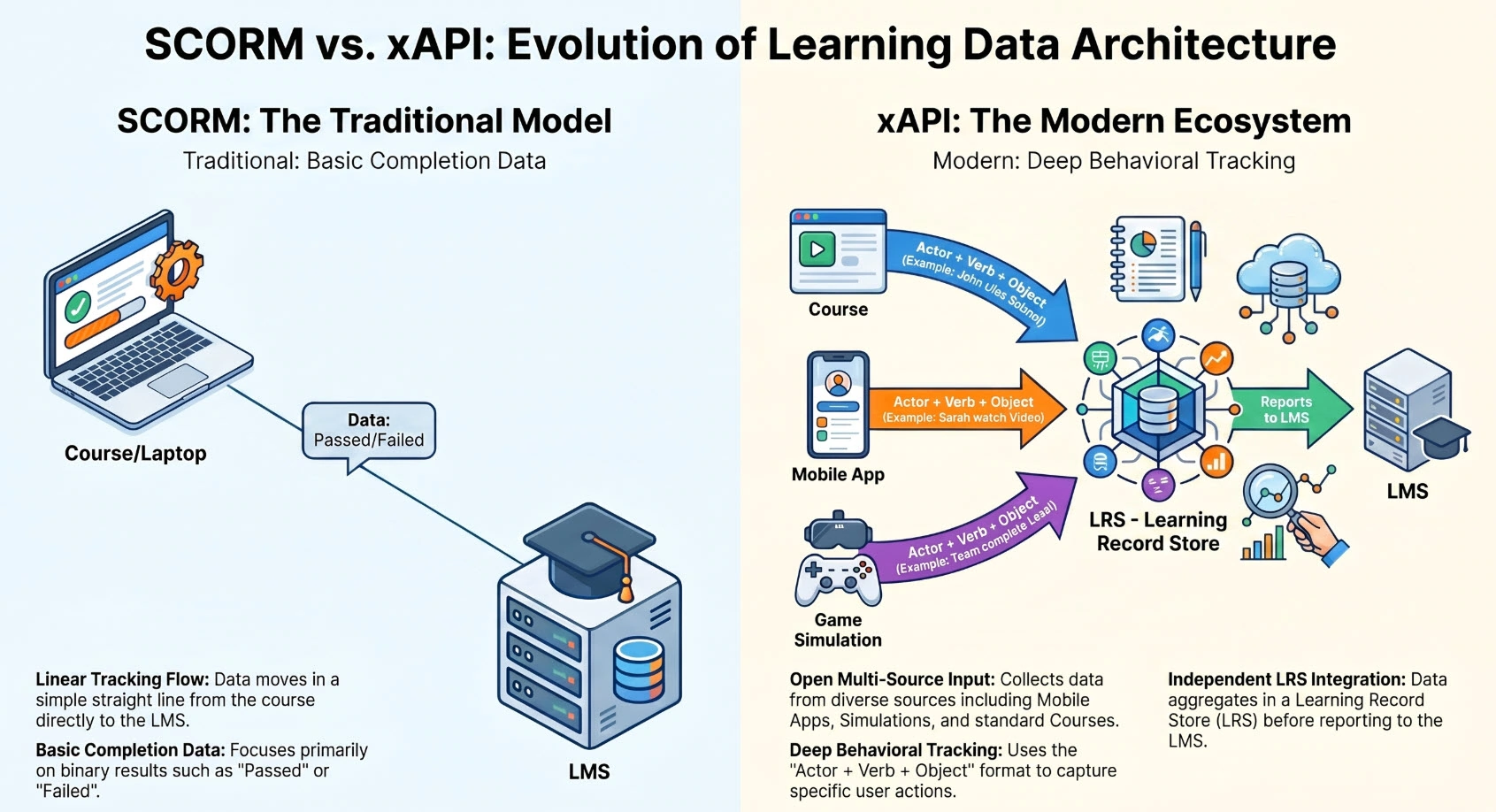
Choose SCORM 1.2 when: Your LMS has been in production for several years on a stable SCORM 1.2 implementation, you primarily need completion and score data, and LMS compatibility reliability is the top priority. SCORM 1.2 is the safest choice.
Choose SCORM 2004 when: You require objective-level tracking within courses, you’re using sequencing and branching that needs to communicate state back to the LMS, and your LMS vendor has confirmed tested SCORM 2004 support. Verify this — some LMS platforms have incomplete SCORM 2004 implementations.
Choose xAPI when: You’re building a learning data architecture that will need to track activity outside the LMS, you have (or plan to have) an LRS such as SCORM Cloud, you need to capture behavioral data from software simulations at the individual interaction level, or your compliance reporting requirements demand evidence of specific task performance rather than just course completion.
Practical Deployment Note: ActivePresenter supports all three standards natively and additionally supports direct publish-to-uPresenter for organizations using Atomi Systems’ own LMS. This publish-direct workflow eliminates the SCORM package upload step entirely for teams using the integrated ecosystem — course updates push directly from the authoring environment to the delivery platform.
LMS Selection Considerations for L&D Leaders
While selecting an LMS is outside the primary scope of this guide, the authoring tool selection constrains LMS options in meaningful ways:
- An authoring tool that only produces SCORM 1.2 output limits you to SCORM 1.2-capable LMS platforms and forecloses xAPI-based analytics architecture
- An authoring tool with a proprietary publish-to-cloud model (some vendor ecosystems lock you into their own LMS) removes LMS portability
- An authoring tool that produces clean, standards-compliant HTML5 output preserves maximum LMS choice
The practical recommendation: select your authoring tool for its production capabilities first, confirm it produces standards-compliant SCORM/xAPI output, and then evaluate LMS platforms against that output. Reversing this order — selecting an LMS and then choosing an authoring tool based on the LMS vendor’s preferred partner — typically results in authoring capability compromises.
Implementation Considerations: Learning Curve, Team Skills, and Pilot Design
Assessing the True Learning Curve Cost
Every authoring tool has an adoption timeline, and that timeline has a real cost in L&D productive capacity. A tool that takes three months before authors reach professional production speed is not equivalent to a tool that achieves the same speed in four weeks, even if their feature sets are identical.
Learning curve variables to assess honestly:
Interface Architecture: Is the production environment tab-based and discoverable, or does it require extensive training to navigate? Tools built on familiar paradigms (timeline-based editors for video-experienced authors, slide-deck paradigms for PowerPoint-familiar authors) accelerate onboarding.
Documentation and Tutorial Quality: Official documentation, video tutorials, and active community forums directly reduce time-to-competency. When evaluating platforms during a free trial, deliberately attempt to solve a specific, non-trivial production challenge using only available documentation. The experience reveals documentation quality accurately.
Community and Peer Support: Large, active user communities (forums, Discord channels, YouTube practitioner content) substantially reduce the “stuck” time that characterizes early platform adoption. A smaller but highly active and responsive technical community can be more valuable than a large but low-engagement one.
SME Author Onboarding: Enterprise programs frequently rely on subject matter experts — technical trainers, compliance officers, department managers — as authors for specialized modules. These individuals do not have instructional design backgrounds and require an authoring environment that is accessible without a full ID workflow. Assess the platform specifically from the perspective of a non-specialist author, not just from your most experienced ID’s perspective.
Designing an Effective Pilot Program
A pilot program that accurately predicts full-team adoption has three components that generic software trials lack:
Pilot with representative content, not showcase content. Most authoring tool demos use carefully designed, uncomplicated examples optimized to showcase strengths. Your pilot should include your hardest production challenge — typically a multi-mode software simulation, a complex branching compliance scenario, or a highly formatted technical document conversion — to stress-test the tool against real requirements.
Pilot with representative authors. Include at least one author who is not technically sophisticated alongside your most experienced ID. The non-specialist author’s experience predicts your SME author adoption curve.
Measure production time, not just output quality. Time how long it takes to produce a representative 15-minute course module from content receipt to published SCORM package, including one revision cycle. This production time benchmark, multiplied by your annual content volume, directly predicts your L&D team’s capacity requirements.
Validate LMS integration in the pilot. Publish a SCORM package from the trial version to your actual LMS (or an LMS staging environment). Confirm that completion data, scores, and any objective-level tracking you require are received correctly before committing to a platform.
Change Management for L&D Tool Transitions
If you are replacing an incumbent authoring tool, the technical migration is typically the simpler part of the transition. SCORM packages published from the previous tool will continue to function in your LMS — they do not need to be rebuilt unless they require content updates. New content and updated content shifts to the new tool.
The more significant transition challenge is workflow disruption. Authors who are proficient in the incumbent tool will initially be slower in the new environment. Plan for a 6–8 week production slowdown during the active adoption period, and protect L&D team capacity accordingly. Attempting a platform transition during a high-output production quarter (typically Q3/Q4 for compliance recertification cycles) amplifies both the transition cost and the team stress involved.
Decision Framework: Matching Platform to Organizational Profile
Decision Matrix by Organizational Profile
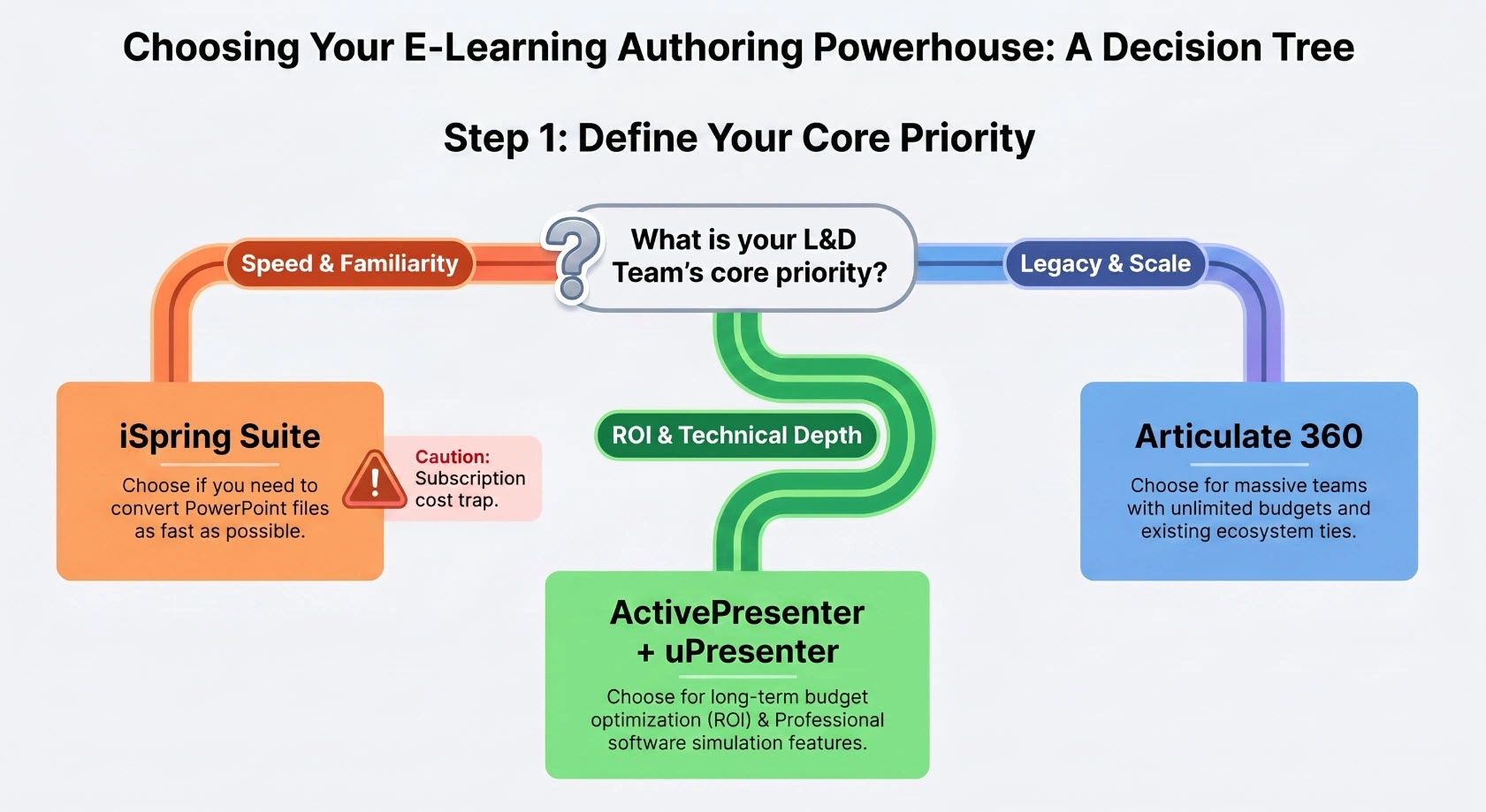
Profile 1: Mid-Market Organization, Growing L&D Team, Software Training Primary Use Case
Recommended: ActivePresenter Pro (perpetual) + uPresenter
The combination of automated software simulation capture, perpetual licensing economics, and a direct publish-to-LMS pipeline addresses every core requirement. The 5-year TCO advantage compared to subscription alternatives is substantial at any projected team growth rate. Prioritize ActivePresenter Pro for the simulation depth, MCP Connect capability, and AI credit pooling architecture.
Profile 2: Large Enterprise, Existing Articulate Investment, Stable Large ID Team
Recommended: Evaluate ActivePresenter Pro as a strategic migration over a 12–18 month transition
The per-seat cost is defensible only at very large teams with negotiated enterprise discounts and a production pattern that does not require team expansion. If your ID team size is fixed and your Articulate-format content library is extensive, calculate your specific Year 1–5 TCO with actual negotiated pricing before any migration decision. If the content library is large and actively maintained, migration cost is real. If content is becoming stale and due for rebuild, a rebuild cycle is a logical migration trigger.
Profile 3: Small Organization or Independent Instructional Designer
Recommended: ActivePresenter Free Edition to evaluate, then Standard or Pro based on simulation requirement
The Free Edition has no time limit and no production restrictions for personal use. Build and test a complete pilot course before purchasing. If software simulation training is not a primary requirement, Standard ($249 perpetual) covers all core eLearning authoring needs. If simulation is central, the Pro investment pays back in production efficiency at even moderate output volumes.
Profile 4: Educational Institution or Non-Profit with Budget Constraints
Recommended: ActivePresenter Standard (Education License) + uPresenter Free Tier
The combination of educational license pricing, the uPresenter free classroom platform, and perpetual licensing creates the lowest total cost pathway to a full-featured authoring-and-delivery program. No recurring subscription exposure.
Profile 5: PowerPoint-Centric Team Needing Rapid Deployment
Recommended: Pilot iSpring for near-term, plan migration to ActivePresenter for long-term
iSpring Suite’s PowerPoint integration minimizes initial adoption friction. However, the subscription cost model creates a 3–5 year financial trap, and the PowerPoint dependency limits responsive design capability. Use iSpring to deploy quickly if the timeline requires it, but plan a parallel evaluation of ActivePresenter to establish a migration pathway before the subscription renewal cycle creates lock-in pressure.
Red Flags in Software Vendor Presentations
Enterprise L&D buyers are routinely presented with demonstrations optimized to obscure weaknesses. These red flags warrant explicit follow-up during evaluations:
“Our SCORM output is compatible with all major LMS platforms” — Require tested evidence with your specific LMS, not a compatibility list. Ask for documentation of known issues and their resolutions.
“Our AI features will reduce your production time by X%” — Require a live demonstration using a realistic production scenario, not a pre-built example. AI content generation quality varies dramatically between platforms when applied to technical subject matter.
“Subscription pricing is more flexible than perpetual licensing” — Ask them to model the 5-year TCO with your projected team size. The answer will be instructive.
“Our per-seat pricing scales affordably with your team” — Model it explicitly. “Affordably” is a relative term. At 20 authors and $1,299/user/year, “affordable” becomes $26,000/year, every year, indefinitely.
“Most customers don’t need to switch” — This is not a quality claim. It is a lock-in claim. Proprietary formats and deep content libraries create switching costs that keep customers subscribed regardless of product quality.
Recommended Next Steps
- Download and evaluate under free tier. ActivePresenter’s free edition has no time limit and no significant feature restrictions for evaluation. Build a representative 15–20 minute course module that reflects your actual content type before any purchase decision.
- Model your 5-year TCO with your specific numbers. Use the framework in Section 4.2 with your actual projected author count and growth rate. The perpetual vs. subscription comparison will produce a specific dollar figure relevant to your organization, not an abstract principle.
- Test your LMS integration in the pilot. Publish to your actual LMS (or a staging environment), confirm SCORM/xAPI data is received correctly, and document the test before committing.
- Benchmark production time on a representative module. Time your pilot author(s) from content receipt to published SCORM package with one revision cycle. Extrapolate to your annual content volume. This converts “production efficiency” from a marketing claim into a measurable operational prediction.
- Involve your procurement and IT stakeholders early. Security assessments, software deployment policies, and procurement timelines all create delays after a technical decision is made. Parallel-track the business evaluation with the procurement process to compress time-to-deployment.
Final Assessment
Selecting business training software is a decision with a 5–10 year operational and financial footprint. The platforms that look cheapest in Year 1 under subscription models look most expensive by Year 3. The platforms that require the most upfront investment in learning curve pay back in production efficiency and content quality at every point after the adoption plateau.
The technical analysis in this guide leads to a clear conclusion: for organizations that need advanced software simulation training, standards-compliant SCORM/xAPI publishing, AI-powered production tools, and financial sustainability as their L&D program scales — the ActivePresenter + uPresenter ecosystem delivers a combination of technical depth and economic structure that no subscription-based competitor matches.
Start with the free edition. Build something real. The evidence will be self-evident.

Last updated: June 2026 | Written from a Senior Instructional Design and B2B SaaS content strategy perspective with 10+ years of enterprise eLearning implementation experience.